


Inspiring
November 7, 2023
Question

Robohelp 2022: Bottom of TOC is not clickable

  • November 7, 2023
  • 5 replies
  • 529 views

My Table of Contents is long enough that it has a scrollbar.  When I output my topics using a frameless template, the last visible entry is not clickable.  It’s there, and I can move the mouse cursor over it, but the cursor does not turn into a hand, and the entry cannot be selected.


The problem appears to be with the location and not the entry.  For example, as shown below, when Rollout is at the bottom of the viewable entries, it is not clickable:



But if I scroll down so the entry is not at the very bottom, it is clickable:
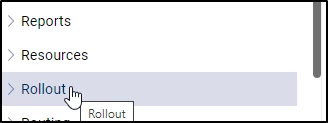


The problem is that when I get to the point where the last entry in the TOC is shown, there is no way to select it with the mouse, and I cannot scroll down any further to move it out of this dead zone.  (I am able to get to it by using Tab and the arrow keys.)


This seems like a bug, and I’m wondering if anyone else has encountered it.

This topic has been closed for replies.

5 replies

Peter Grainge
Community Expert
Community Expert
November 8, 2023

I have just generated both sample projects using 2022.3. The skins were set not to show the right hand panel.


I generated them and expanded the TOCs so that the last item had to be accessed by using the scroll bar. The last items both opened when clicked.


I would be trying again using new skins.

________________________________________________________

My site www.grainge.org includes many free Authoring and RoboHelp resources that may be of help.


Use menu (bottom right) to mark as Best Answer or to Highlight particularly useful replies. Found the answer elsewhere? Share it here.
Community Expert
November 7, 2023

I think in the past I've come across problems at the bottom of long topics/tocs with the last line being cut off. I seem to remember it was a problem somewhere in the styling of the numerous nested divs in the output - something had a max-height or overflow setting that prevented the stuff in the inner div from showing. But I can't remember the exact details and it likely depends on the specific skin used, and the nesting and css has probably changed since the problem I encountered so would need to be re-investigated. If you are a css master you can probably track it down and hack it using a user asset css file in your skin. But probably it's easier to go via Adobe for an answer and proper fix.


You can contact them via email here:
https://helpx.adobe.com/contact/enterprise-support.other.html#robohelp

Peter Grainge
Community Expert
Community Expert
November 7, 2023

Whichever template you are using, create a new second copy with a slightly different name. Try that. 

________________________________________________________
My site www.grainge.org includes many free Authoring and RoboHelp resources that may be of help.


Use menu (bottom right) to mark as Best Answer or to Highlight particularly useful replies. Found the answer elsewhere? Share it here.
Jeff_Coatsworth
Community Expert
Community Expert
November 7, 2023

Hmm, does it happen if you shorten your TOC as an experiment? If not, then it's probably a bug; if so, then check to see if the sample project is behaving; if it is, then it's something about your project.

Inspiring
November 7, 2023

I made the TOC shorter, so there is white space after the last entry, and it works correctly.  However, if I shrink the browser window so it is too short to fit the entire TOC, the problem returns.  Also, if I make the window so narrow that I have to choose between showing the TOC or showing the content, when showing only the TOC, it works fine.  But if I widen the window so both the TOC and content are displayed, the last item in the TOC is no longer clickable.  

Inspiring
November 7, 2023

As a test, if you use one of the HTML5 responsive templates, does it behave the same way?


No.  It seems fine when I use an HTML5 template.

Jeff_Coatsworth
Community Expert
Community Expert
November 7, 2023

Haven't heard that one before - what patch version of RH2022 are you on?

Inspiring
November 7, 2023

2022.3.93