


Inspiring
October 25, 2023
Answered

Robohelp - Generate Direct Link Button on HTML5 Output

  • October 25, 2023
  • 4 replies
  • 834 views

Using Robohelp 2022.3.93

I'm using HTML5 Azure Blue template for our output and I received a request to add a "Get Link" button to topics. It seems that there isn't a preset button for this built into Robohelp, but it looks like it should be possible via the Javascript OnClick fields when adding custom buttons. 
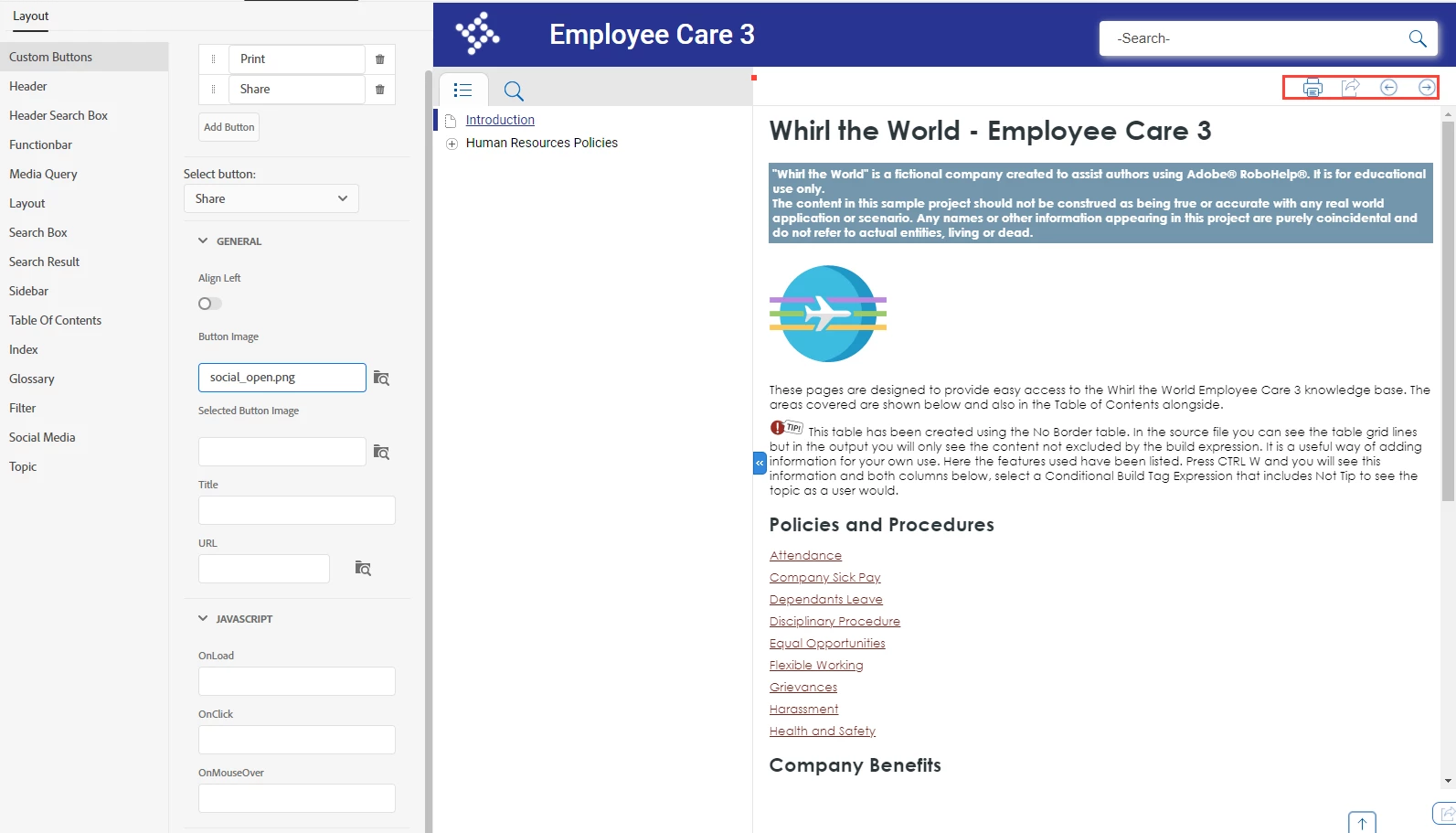
I'm not sure if there's a variation on the Print script rh.model.publish(rh.consts('EVT_PRINT_TOPIC'));return false; that I could use to copy a direct link to the current topic to a user's clipboard (or something similar), but I haven't had any success.

Is there a list of available commands that work with HTML5 output or would this be something we'd need to custom build ourselves?

Thanks!

This topic has been closed for replies.
Correct answer Amebr

I'm not sure if RH2022 has changed, but in RH 2019 New UI, the text I enter in the Title field for the button shows when I hover over a custom button. I'm not sure if this could work for you?

4 replies

Brainiac
October 27, 2023

I'm not sure it's what Adobe intended for that field, but if it works... 🙂

AmebrCorrect answer
Brainiac
October 26, 2023

I'm not sure if RH2022 has changed, but in RH 2019 New UI, the text I enter in the Title field for the button shows when I hover over a custom button. I'm not sure if this could work for you?

Inspiring
October 27, 2023

Thank you, Amebr! I completely overlooked the "Title" field on the custom buttons. Now that I actually have text in those fields, I can show descriptions on hover for each button. 

Peter Grainge
Adobe Expert
October 25, 2023

I'm not sure these methods will work with the new UI but take a look at this. https://www.grainge.org/pages/snippets/snippets.htm#email


It's not exactly what you want but maybe it will help.

________________________________________________________

My site www.grainge.org includes many free Authoring and RoboHelp resources that may be of help.


Help others by clicking Correct Answer if the question is answered. Found the answer elsewhere? Share it here. "Upvote" is for useful posts.
Inspiring
October 26, 2023

Thanks, Peter! I sort of combined some bits from what you sent and some info I found on relative paths.


Here's what I've placed in the OnClick field: window.location.href = "./" + rh._.hashParam('t');


When I click the Share button, it opens the page in just that topic, so the URL is as direct as possible (window that displays with "Click to see this page in full context" option in the header. 

Obviously, this isn't good as copying the link directly to the clipboard, but it's pretty close. 


Inspiring
October 26, 2023

On a related note, I can't find any direct answers on displaying hover text over these buttons (using OnMouseOver). I feel like that should be simpler than my initial request and it would alleviate my concerns with doing it this way instead of copying to clipboard. That way, when a user hovers over the button, I can display a description like "Click to display direct URL to Topic" or something similar.

Jeff_Coatsworth
Adobe Expert
October 25, 2023

I suspect it's a "roll your own" type of thing.