Hi,
Well Adobe support sent me many of the suggestions that were in the articles posted above.
I have a deadline to validate someone else's doc for today, so, I concentrated on that validating from their output instead of carrying out the changes directly in RoboHelp... i.e.,, I didn't press on with finding the solution before getting that done. Was planinng on looking deeper into it this afternoon. Was still working on it this morning, on the offchance, without doing anything, I tried to log into RoboHelp and it's now working again....
I, therefore, do not know if it was on their side or my network was just being weird (nothing else stopped working yesterday) or what. Total mystery. I wish I knew what had happened but the essential is I have it back 😄
However, this is the info I got from Adobe. I had already done the top list and the hosts file check mentioned in the second list to no avail...yesterday:
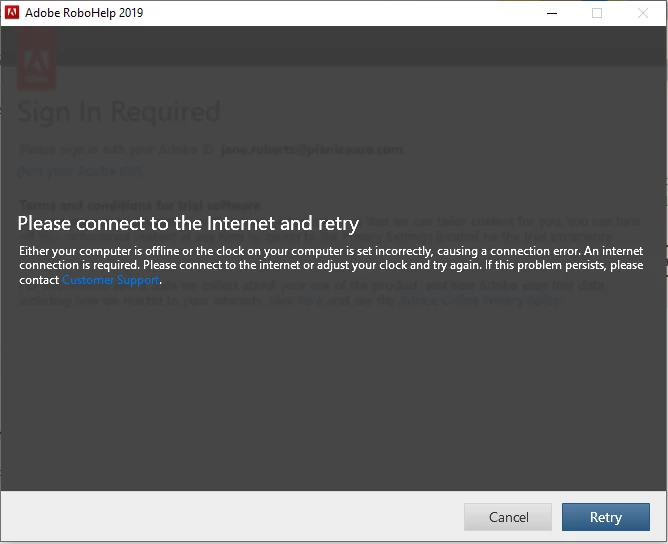
"The issue that you are facing occurs due to network and domain security, hence I would suggest you to please follow the below steps one by one and see if it works.
- Turn off the Antivirus
- Turn off the proxy or firewall
- Close the Captivate Sign in Window.
- Sign out from the creative cloud and close it.
- Check the date and time on the machine, it should be correct as your time zone.
- Verify if you are connected to VPN, if yes, please disconnect it and try to sign in.
If you still get the error message, follow the below steps.
- Close the Captivate Sign in Window.
- Sign out from the creative cloud and close it.
- Go to the location:- C:\Program Files (x86)\Common Files\Adobe\SLCache
- Delete all the files inside the SLCache Folder.
- Navigate to this location:- C:\ProgramData\Adobe\SLStore
- Delete all the files inside the SLStore folder
- Go the location C:\Windows\System32\drivers\etc
- Open the Hosts file and see if there is an entry like adobe.com
- If yes move the file to desktop and remove the entries related to adobe or adobe URL and save the file move back to the same location.
- Try to sign in.
If the issue still persist, try to login in Local Admin Account with the help of your IT team and see if it works there. If you still get the same issue whitelist the ports/URL given below.
- activate.adobe.com
- adobe.com
- adobeid-na1.services.adobe.com
- ccmdl.adobe.com
- ccmdls.adobe.com
- cmdl.adobe.com
- ims-na1.adobelogin.com
- ims-prod06.adobelogin.com
- interaction.adobe.com
- lm.licenses.adobe.com
- na1r.services.adobe.com
- oobe.adobe.com
- p.typekit.net
- prod-rel-ffc.oobesaas.adobe.com
- prod-rel-ffc-ccm.oobesaas.adobe.com
- sstats.adobe.com
- swupdl.adobe.com
- swupmf.adobe.com
- use.typekit.net
- www.adobe.com
- prod.acp.adobeoobe.com
- All port 80 and 443"



 AdChoices