


mitrefincha77665767
Participating Frequently
October 25, 2016
Question

Search Result Widget is not Allowed in Topic Screen Layout Page

  • October 25, 2016
  • 3 replies
  • 3790 views

Hi,

I am trying to output a HTML5 help file and am receiving the following error message:

It is also adding this search option to the help file, which didn't exist before:
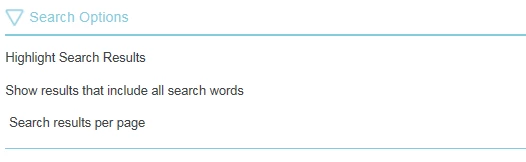
This help file has been generated numerous times in the past, with no problems. However, i am new to the company and am working on a different computer to the previous technical author, could this be the problem? No settings concerning the layout/output have been changed or interacted with in any way.

I am using Robohelp11, on a Windows 7 (64-bit) operating system.

All i can think is that the issue is due to me being a new user (permission based), or it's because the help file is being generated from a new computer?

Many thanks in advance for any help you are able to provide with this.

This topic has been closed for replies.

3 replies

Participating Frequently
May 16, 2017

My apologies for bumping/hijacking an old topic, but I am having the same error with a newly created RoboHelp 11.0.0.179 Responsive HTML5 projected. Fortunately, I have two output files to compare, and will call them "old" and "new."

  • Both use Theme 1 Standard
  • Old doesn't have this issue.
  • Precious little difference in the SSL properties (one uses the default.css, the other uses a master page instead.)

Key differences:

NEW

  • Output/Search as mentioned by @mitrefincha77665767.
  • Search box at the bottom of every page,
  • Back button/icon on every page, even the first/start page.
  • Changing the theme from Theme 1 Standard to Theme 2 Government removes both the errors and the search option.
  • On line 243 of the code, a Search Results Widget begins. Part of the code copied below.

OLD

  • Search box in the header, not at the bottom of every page.
  • Search icon in sidebar.
  • No widget in the code.
  • No back button/icon.

<!-- Search results widget -->

<!-- Search field widget -->

<div class="searchholder secondary_search_box">

<div class="wSearchField">

<input id="searchBoxSearchPage" class="wSearchField" type="search" data-placeholder="-Search-" onkeydown="searchHelp(event, 'searchBoxSearchPage')" data-search="true" /><a class="wSearchLink" onclick="searchHelp(null, 'searchBoxSearchPage')" href="#"><img src="template/Theme1_Standard/Search.png" alt="" id="xmlEditwSearchLink_Secondary" class="wSearchLink" border="0" style="width:100%; max-width:24px" /></a>

</div>

</div>

Participating Frequently
May 16, 2017

FYI, updating to 11.0.4.291 solved this issue for me.

Inspiring
July 24, 2018

You just made my day! I had the very same problems, but after updating to 11.0.4.291, everything is working fine again. So: thanks a lot!! :-)

mitrefincha77665767
Participating Frequently
October 31, 2016

After looking through the Windows registries on both computers, there is no major difference from the Robohelp files, certainly nothing that should be causing this issue.

So, i am still lost as to how to solve this issue, and it's getting to the point where the requested help files are not going to be generated before the deadline.

If anyone has any other suggestions (short of just getting madcap flare) then they would be very much appreciated.

Thanks,

Tom

Willam van Weelden
Inspiring
October 31, 2016

In the output, can you check the whxdata folder? Do you have a lot of package**_xml.js files? If not, there seems to be an issue with MSXML.

Does the output behave the same on all browsers? Or just some?

mitrefincha77665767
Participating Frequently
November 1, 2016

Hi Willam,

There are 48 of the files you mentioned above, in a 320 page help file (when in PDF format), i'm not sure if this is a normal amount or not?

Also, it behaves the same in all browsers unfortunately.

Jeff_Coatsworth
Community Expert
October 25, 2016

I think we might need to see how your SSL recipe is laid out. Where is the RH project located and where are you creating HTML5 output?

Captiv8r
Brainiac
October 25, 2016

Hi there

Just trying to clarify Jeff's questions in the event you are also somewhat new to RoboHelp.

When Jeff refers to SSL Recipes, he is meaning to ask about the settings of the "Single Source Layout" (SSL) found in your Single Source Layout's pod. I tend to describe each layout you see here as being a different "recipe".

When Jeff asks where the RH project is located, he is asking if the project itself is on your C drive or on a network drive. (Network drives are very slow and RoboHelp will perform sluggish as well as sometimes corrupt the CPD file as well as other files)

Likewise, when Jeff asks where you are creating the HTML5 output, he is asking if the output folder is also on your local C drive or if it's on a network drive.

Cheers... Rick

mitrefincha77665767
Participating Frequently
October 25, 2016

Hi Jeff and Rick,

Firstly, thank you for responding. I am indeed new to Robohelp, after previously doing battle with HelpStudio ('interesting' software), and so the explanations help a lot thanks

Both the output and the Robohelp file itself are stored on my local C drive.

Here are some screenshots of the SSL recipe:

Once again, thanks in advance for any help.