


Known Participant
June 11, 2018
Question

Some index entries aren't appearing in compiled Responsive HTML 5 Help

  • June 11, 2018
  • 2 replies
  • 1665 views

I'm generating a Responsive HTML5 Help project. I've got several keywords in my index that don't appear in the compiled Help's index. Can anyone suggest how I can resolve this?

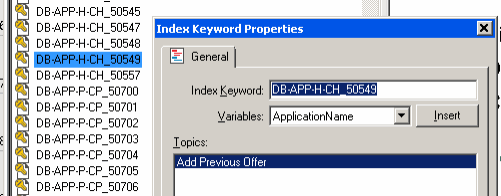
Here's a screen shot of my Index pod in RH:
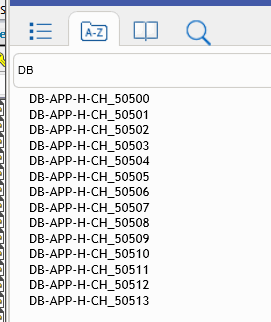
Here's a screen shot of the Index in the compiled Help. You can see that DB-APP-H-CH_50549 is not appearing.
This topic has been closed for replies.

2 replies

Participant
July 17, 2018

I have this problem as well, and it is very annoying... :-/

Peter Grainge
Community Expert
Community Expert
July 17, 2018

@mabeck Not sure who marked your post as Correct Answer but I have removed that as it is clearly not an answer.

As you can see, others have had this problem so I'm not too hopeful. First thing to check is do you have the same problem with all the same settings, or as close to, if you generate WebHelp.

Are your entries similar to those above or are they words?


See www.grainge.org for free RoboHelp and Authoring information.

@petergrainge

Help others by clicking Correct Answer if the question is answered. Found the answer elsewhere? Share it here. "Upvote" is for useful posts.
Known Participant
December 18, 2018

I think you could be onto something. I just created a three topic project and entered PolynomialProjection in the index. When I started typing that in the index filter, it worked immediately.

It would also explain why Rick hit the problem as he is a member of the Extreme Index party.

Do you have any idea of how many index entries you have? It would be worth adding that information to the existing bug report as it will help Adobe locate the cause.


See www.grainge.org for free RoboHelp and Authoring information.

@petergrainge


I am also having a big problem with Index for Responsive HTML5 output, in Robohelp 2017 with latest patch.  Not sure if it could be related to the possible causes of the initial problem here - so let me know if I should create a new thread for this (not trying to steal this thread!!).

Our main help system has an EXTREMELY big index with possibly more than 1000 keywords and many more subkeywords, and you cannot scroll down through the entire Index (though it does try to do some paging).  There is no problem with our much smaller help systems!

What happens is you cannot scroll down the Index very far.  If I add a filter keyword, it finds several matching keywords and it looks like several matching keyword groupings get put down to bottom.  But then you cannot scroll down further. We want to be able to scroll down the entire Index.

In our old WebHelp output, the Index worked OK.  But we now need to use Responsive HTML5 for our TOC working in Chrome.

Perhaps this Index behavior is to be expected with a gigantic Index, and I am misunderstanding the functionality. The filter works, I think, but it seems like some users would want to "browse" through our Index also to find what keywords are in there. So maybe we all need to be re-trained in how we use Index.

Any way to just this Index behavior?  Or adjust paging?  Or "workaround" suggestions? This is happening in both IE 11 and Chrome.  If we have to accept this Index behavior, we need to let our users know how to use it.

Thanks so much!  And, sorry if I stole this thread for a problem not exactly related.

Susan

Jeff_Coatsworth
Community Expert
Community Expert
June 11, 2018

Are any of those 50545 onward ones showing up?  

Known Participant
June 11, 2018

Thanks for answering me so quickly, Jeff. I only get a few entries after 50500. There are several more that should be there, but they're not showing up.

To add this to the index, I right-click the text (DB-....), then click Add to > Index Keyword > Topic Index Keyword.

Jeff_Coatsworth
Community Expert
Community Expert
June 11, 2018

Ok, any difference between those that show up & those that don't?