


stylesheet background picture in table not visible in word file
I have a table width a stylesheet background image (see picture)

In my compiled .chm file every picture is visible.
When I create a word-file with printed documentation, the styleseet pictures of the table are not visible.
The html Code of the table cell is:
<td class=AttentionImg
style="width: 12.5%;"
width=12.5%>
<p> </td>
The stylesheet code for the class is:
td.AttentionImg
{
background-attachment: scroll;
width: 12.5%;
padding-right: 10px;
padding-left: 10px;
border-left-style: none;
border-right-style: none;
border-bottom-style: none;
background-image: url('html/img/attention.png');
background-repeat: no-repeat;
background-position: center top;
}
The project file ist located in C:\Projekte\D0760\HtmlHelp\
The image is located in C:\Projekte\D0760\HtmlHelp\html\img\
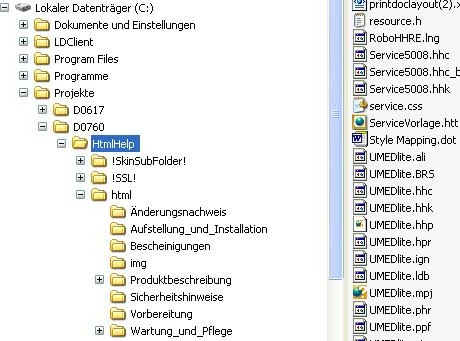
What might be the reason for my problem?
 AdChoices