


Participating Frequently
March 18, 2019
Answered

Team Foundation Server 2018.3 - connection issue

  • March 18, 2019
  • 1 reply
  • 1214 views

Hi,

Using Robohelp 2019.5 version, i got an error trying to connect my TFS server (on premise).

The collection used is not the "DefaultCollection" and has a "space" in it's name.

Visual Studio Team explorer 2017 installed on same machine and TF.exe folder added to global path variables.

Error message (in french) :

-

Impossible de trouver le fichier TF exécutable. Assurez-vous que TF est installé et que le chemin spécifié contient le nom du fichier.

-

Does anyone have any help or used to connect Robohelp to TFS ?

Thanks
This topic has been closed for replies.
Correct answer vikassingla

Hi,

I setted the path to my "TF.exe" file as you showed and checked the box above. Then restarted Robohelp.

I don't have the previous error when i "Open connection" with the connection profile i created.

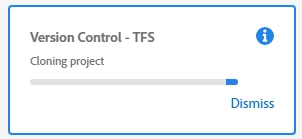
I got the cloning progress, as below.

But still no files on local folder mapped and i see the open project dialog.

I see the mapping into Visual Studio Team Explorer with the good name and folder.


Hi,

Can you please share the TFS Client and Server version with us. Please share the details in email to vsingla@adobe.com.

Regards,

Vikas Singla

1 reply

Community Manager
March 18, 2019

Hi,

I guess you have already followed this step-by-step guide?

Participating Frequently
March 18, 2019

Hi,

Yes, i followed it to add my new connection (no error when adding it).

Team project has to be filled like "$/MyProject", right ? Then we'll navigate to open ?

But when i try to "Collaborate > Open Connection" i just created, i got the error with the "TF" file not found.

Adobe Employee
March 18, 2019

Hi,

Can you please try running "TF.exe" from Command Prompt on your machine, just to verify the path to TF Exe is correct. And after adding the path of TF.exe, you restarted the RoboHelp, right?

Regards,

Vikas Singla