


Inspiring
April 12, 2022
Answered

Tree expand structure in Right side navigation bar

  • April 12, 2022
  • 5 replies
  • 487 views

Hi Team,

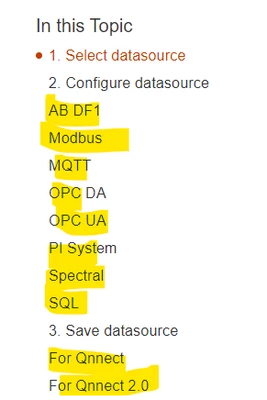
I have a small query in Framless output. I'm working on a content which has couple of subtopics, Sub-subtopics. When I used Frameless output to view my content. In Right side navigation bar, all my subtask appears as an individual headings, but it's not appearing as a tree expand structue. 

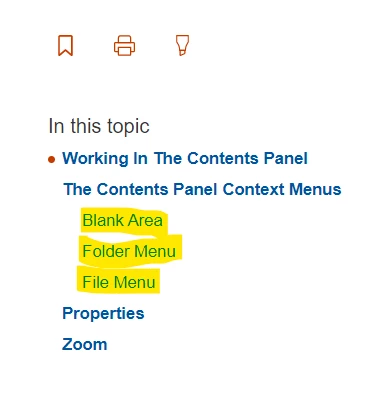
I saw in Peter Grainge's website, he used same frameless output and all the subtopics are aligned under the respective headings in an tree-expand order. I'm trying to achieve the same but I couldn't figure out how to do. 

I have attached screenshots of your site and my content for reference. Please help me in the query.

Below screenshot is an example from peter's site.
Below screenshot's from my site.
Could someone please help me with this that would be really great.


Thanks in advance,

Avinash S
This topic has been closed for replies.
Correct answer Peter Grainge

Thanks @Amebr - I now have it working by combining that and a previous post of yours where any colour setting for the mini-toc was not coming through. For that you suggested a user asset CSS.


To get the responses in one place...


Whilst the RoboHelp skin editor lets you set a colour for the minitoc fonts, it doesn't get applied. @Amebr advised creating a separate CSS with the colour definitions, then adding that to the skin as a User Asset (Layout settings).


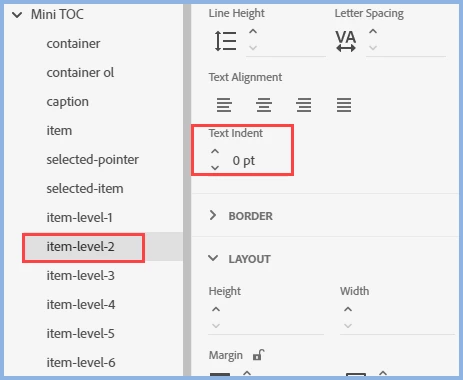
To get the block indented I set the text indent to 0pt and then applied the required padding, 12pt for level 2 and 24pt for level 3 in my case.


The result can be seen at RH2020 Lists and Autonumbering (grainge.org)


Thanks @Amebr for pointing me in the right direction.

________________________________________________________

My site www.grainge.org includes many free Authoring and RoboHelp resources that may be of help.


5 replies

Peter Grainge
Peter GraingeCorrect answer
Community Expert
April 20, 2022

Thanks @Amebr - I now have it working by combining that and a previous post of yours where any colour setting for the mini-toc was not coming through. For that you suggested a user asset CSS.


To get the responses in one place...


Whilst the RoboHelp skin editor lets you set a colour for the minitoc fonts, it doesn't get applied. @Amebr advised creating a separate CSS with the colour definitions, then adding that to the skin as a User Asset (Layout settings).


To get the block indented I set the text indent to 0pt and then applied the required padding, 12pt for level 2 and 24pt for level 3 in my case.


The result can be seen at RH2020 Lists and Autonumbering (grainge.org)


Thanks @Amebr for pointing me in the right direction.

________________________________________________________

My site www.grainge.org includes many free Authoring and RoboHelp resources that may be of help.


Help others by clicking Correct Answer if the question is answered. Found the answer elsewhere? Share it here. "Upvote" is for useful posts.
Peter Grainge
Community Expert
May 23, 2022

I have added this to my site including how to work around the bug that stops the colour settings getting applied. Thanks to @Amebr for that.


See this Snippet

________________________________________________________

My site www.grainge.org includes many free Authoring and RoboHelp resources that may be of help.


Help others by clicking Correct Answer if the question is answered. Found the answer elsewhere? Share it here. "Upvote" is for useful posts.
Peter Grainge
Community Expert
April 20, 2022

RH-10618 | Tracker (adobe.com) covers the wrapping. 

________________________________________________________

My site www.grainge.org includes many free Authoring and RoboHelp resources that may be of help.


Help others by clicking Correct Answer if the question is answered. Found the answer elsewhere? Share it here. "Upvote" is for useful posts.
Community Expert
April 20, 2022

The indentation is correct for text-indent (indents only the first line of a block of text).


https://www.w3schools.com/cssref/pr_text_text-indent.asp


So the solution is to remove the value in text-indent, and instead apply it as either margin-left or padding-left instead.

Community Expert
April 20, 2022

Probably the mini-toc styles have text-indent set, instead of padding-left or margin-left.

Peter Grainge
Community Expert
April 19, 2022

Has @Amebr's response resolved this for you? 

________________________________________________________

My site www.grainge.org includes many free Authoring and RoboHelp resources that may be of help.


Help others by clicking Correct Answer if the question is answered. Found the answer elsewhere? Share it here. "Upvote" is for useful posts.
Inspiring
April 20, 2022

Hi Amebr,
Thanks for the help. I figured it out. But, Unfortunately there's an another issue with the Mini TOC. All the <h2> headings are text wrapped but all <h3,h4,h5> headings are not text wrapped. 


In the above attached image, You can see heading highlighted in Yellow is text wrapped properly, but heading highlighted in green is not text wrapped properly. 

Any suggestions on this?


~ Avinash S

Community Expert
April 12, 2022

That should be configurable in the skin under Topic Page > Mini TOC > item-level-1 to 6. 


I would recommend setting a padding-left value (click the little lock symbol to see the individual padding fields).