Inspiring
September 4, 2013
Answered

Unable to delete baggage file named "none"

  • September 4, 2013
  • 1 reply
  • 1551 views

Hi there,

I'm using Adobe Robohelp HTML 8.0.2.208

I opened my WebHelp project today and noticed I have a missing baggage file, simply titled "none".

When I right-click on it, the delete option is not there.

When I click Properties, all it tells me is that it is named "none", and Location, Size, Created, and Modified are all (Unknown). Clicking the "Open Folder" button simply takes me to my source folder.
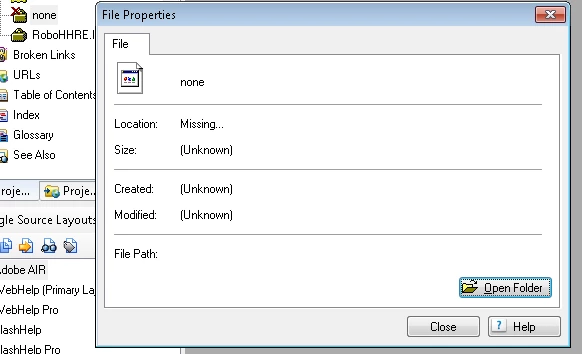
My project has no broken links of any sort. I checked my index, TOC, references, everywhere. The project (to the best of my knowledge) is flawless. I even went overkill and made sure all my pages are W3C validated.

I searched the forums and web trying to find someone with the same or at least similar problem, and I found tips on add/remove baggage files by editing the rhbag.apj file in notepad or similar editing program.

So I opened the file and I see a basic xml tree with only two references; one to my RoboHHRE.lng file, and one to this mysterious "none" file.
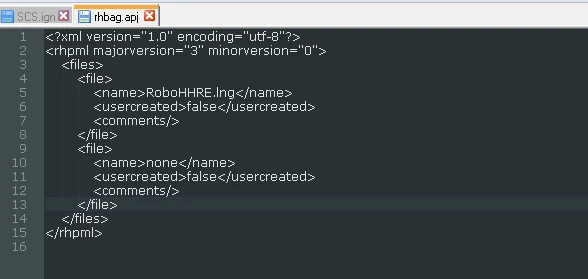
So I removed lines 9 through 13 and save the file...

And the problem seems to be fixed (temporarily). My Project Manager refreshes immediately and the file which supposedly never existed is gone:
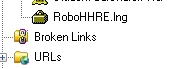
However, it only stays gone until I close my project. The next time I open the project (either by launching it from the recent projects list within RoboHelp or executing the .xpj file from the source folder) the missing baggage file is back in my Project Manager, and when I re-open the

rhbag.apj file, the code is back for the "none" file:

<file>

<name>none</name>

<usercreated>false</usercreated>

<comments/>

</file>

So whatever file writes the rhbag.apj file is telling it to list this baggage file, so ideally I need to go to the source of the problem and find what file is responsible for writing the rhbag.apj file and remove the reference there.

Problem being, RoboHelp generates ALOT of files, many with proprietary or obscure file extensions. Opening each one, one at a time, in notepad and trying to find a reference to baggage files (which I've spent the last several hours doing) seems to be hopeless.


Any help that anyone could offer would be greatly appreciated! As functional as the project seems, I don't know what (if any) problems/crashes this conflict could produce in the future, and I'd rather get rid of it now before the webhelp project expands much greater.


Thanks in advance


This topic has been closed for replies.
Correct answer Craig_MacKinnon

Hi again Rick,

I'm starting to warm up to the idea of running with it, since I've already spent way too much time trying to fix what seems to be an inconsequential bug. I hesitate however for two reasons; 1.) I've seen funny stuff like this too many times with RH, going back to RH5, and they always seem to come back and haunt me in the future if I don't fix them when I have the chance and 2.) I'm a tad OCD

I opened every file in my source folder that would read in notepad++ and tried to perform find and replace but, unfortunately, not a single file contained "none".

I did however stumble upon a potential clue.

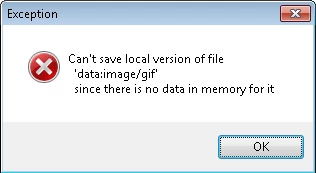
While editing one of my topics, I got a popup error when I hit save:

My jaw dropped! I thought I hand stumbled upon the very evil surrounding this mystery. I immediately jumped from design view to html view to find where my topic was trying to call "data:image/gif" thinking I had made a typo a put a slash in lieu of a period for a img tag.

Now the mystery just got even worse! There are no images in that particular topic. I ran find for "image", "img", and "gif" and came up empty. I also then checked all my images and I don't have any images linked to that topic.

Now I'm really confused

Regards,

Craig


UPDATE

Well I managed to find where the above 'data:image/gif' erorr was coming from. I forgot my css was using Data URLs for list styles for IE10 (if you're curious, check out this article).

It seems RH8 doesn't like Data URLs as it seems to mistake the mime type for an actual image file and location and doesn't read the base64 representation of the binary image.

It's purely there for IE10 support and since I'm developing for intranet it's not critical, so I surrounded the reference with comment brackets in my css file, resaved my topic, closed RH, and just for kicks deleted the CPD file again, and voila! No more popup error and no more mysterious "none" baggage file!!!

I need a coffee now 

Thanks for the continued support on this problem Rick, you kept me motivated to find a solution, cheers!

Craig

1 reply

Jeff_Coatsworth
Community Expert
Community Expert
September 4, 2013

Try deleting or renaming the .cpd file – it gets rebuilt each time if it’s missing

Inspiring
September 4, 2013

Deleted the .cpd file, it's still there

Craig_MacKinnonAuthorCorrect answer
Inspiring
September 5, 2013

Hi again Rick,

I'm starting to warm up to the idea of running with it, since I've already spent way too much time trying to fix what seems to be an inconsequential bug. I hesitate however for two reasons; 1.) I've seen funny stuff like this too many times with RH, going back to RH5, and they always seem to come back and haunt me in the future if I don't fix them when I have the chance and 2.) I'm a tad OCD

I opened every file in my source folder that would read in notepad++ and tried to perform find and replace but, unfortunately, not a single file contained "none".

I did however stumble upon a potential clue.

While editing one of my topics, I got a popup error when I hit save:

My jaw dropped! I thought I hand stumbled upon the very evil surrounding this mystery. I immediately jumped from design view to html view to find where my topic was trying to call "data:image/gif" thinking I had made a typo a put a slash in lieu of a period for a img tag.

Now the mystery just got even worse! There are no images in that particular topic. I ran find for "image", "img", and "gif" and came up empty. I also then checked all my images and I don't have any images linked to that topic.

Now I'm really confused

Regards,

Craig


UPDATE

Well I managed to find where the above 'data:image/gif' erorr was coming from. I forgot my css was using Data URLs for list styles for IE10 (if you're curious, check out this article).

It seems RH8 doesn't like Data URLs as it seems to mistake the mime type for an actual image file and location and doesn't read the base64 representation of the binary image.

It's purely there for IE10 support and since I'm developing for intranet it's not critical, so I surrounded the reference with comment brackets in my css file, resaved my topic, closed RH, and just for kicks deleted the CPD file again, and voila! No more popup error and no more mysterious "none" baggage file!!!

I need a coffee now 

Thanks for the continued support on this problem Rick, you kept me motivated to find a solution, cheers!

Craig