


Participant
September 20, 2011
Question

Visual C++ runtime library error when generating printed documentation from RH9

  • September 20, 2011
  • 2 replies
  • 1734 views

I just upgraded a project from RH 7 to RH 9. I tried generating printed documentation in Word from it, but as soon as the Printed Documentation dialog opened, a Visual C++ Runtime Library error displayed. RoboHelp stopped working and I had to restart.

I tried using one of the sample projects -- same thing happened.

I then created a brand-new project. This time, opening the Printed Documentation dialog worked. I selected "Generate Word Doc" and the .docx extension, since I have Word 2010,  and tried to generate printed documentation. However, the following message then displayed: Cannot find Microsoft Word installed on your system.

So I have two questions:

- How can I avoid crashing RoboHelp when generating printed documentation?

- How can I ensure that RoboHelp finds the Word 2010 installation on my system?

Thanks for any help!
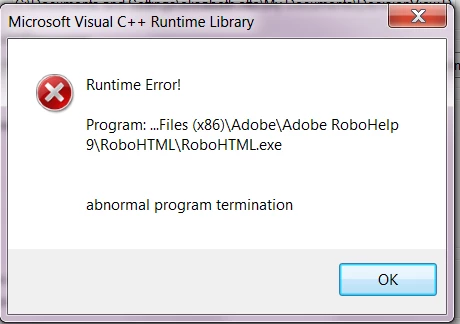
OK, just played around a bit more and I was able to help myself on the first question:

- I created a new Printed Documentation Layout in the Single Source Layouts pane, and from there I was able to generate .pdf files, without encountering the Visual C++ runtime error.

- But the "Cannot find Microsoft Word installed on your system." msg still pops up when I try to generate .docx files. (When I generate .doc files, they have no content.)

Message was edited by: mizotto

This topic has been closed for replies.

2 replies

mizottoAuthor
Participant
September 21, 2011

Thanks for the response. Yes, I do have the RH 901 patch and I'm running Word 2010 64 bit.

However, after rebooting my machine and restarting RoboHelp, I was then able to generate the .doc file successfully, but in Word 2003 format. I still can't generate a .docx file (same msg continues to display), but as long as I can generate it in Word, I don't care whether it's 2003 or 2010.

Peter Grainge
Community Expert
Community Expert
September 22, 2011

You should report that as a bug though. Somewhere along the line you may not have access to Word 2003.

Please follow this link.

http://www.Adobe.com/cfusion/mmform/index.cfm?name=wishform&product=38


See www.grainge.org for RoboHelp and Authoring tips

@petergrainge

Use menu (bottom right) to mark as Best Answer or to Highlight particularly useful replies. Found the answer elsewhere? Share it here.
mizottoAuthor
Participant
September 22, 2011

Yes, that's true. Thanks for the link -- just logged the bug. Will post any info I receive re. this.

Peter Grainge
Community Expert
Community Expert
September 21, 2011

First the fact that the problem is with old layouts suggest they were using an old template.

The PDF creation relies on a Word document being created in the background. The fact that you cannot generate a good doc or docx makes it odd that you get a PDF. The PDF is OK I take it?

I'm wondering if you have not applied the 901 patch and are running Word 2010 64 bit?


See www.grainge.org for RoboHelp and Authoring tips

@petergrainge

Use menu (bottom right) to mark as Best Answer or to Highlight particularly useful replies. Found the answer elsewhere? Share it here.