



Den DiMarco
Inspiring
July 10, 2020
Question

Web help: TOC, Index and Search are not showing in Chrome or Edge

  • July 10, 2020
  • 16 replies
  • 743 views

One of our help projects, built with RoboHelp 2015, uses the output of web help. When using Internet Explorer 11, the help pages, table of contents, index and search are all displayed properly. But with Chrome or Edge, the pane for TOC, index and search contains no infomation. (See attachment.)
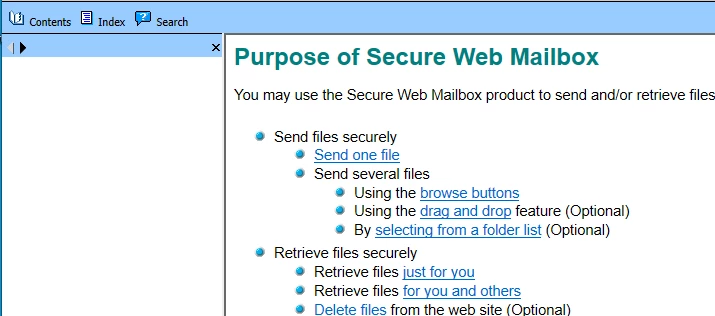


We upgraded to Robohelp 2019, but find the new RoboHelp is different enough, that for occasional users like us, it's not clear what I need to do to fix this problem. I have not been successful in finding solutions though web searches at Adobe or in general.


Can someone offer step-by-step guidance on how to display the contents for the TOC, Index and Search tabs? 


Thanks!

    This topic has been closed for replies.

    16 replies

    Den DiMarco
    Inspiring
    July 11, 2020

    Peter, thank you for that detailed explanation. I try your suggestions on Monday and let you know of the results.

    Peter Grainge
    Community Expert
    Community Expert
    July 11, 2020

    First the button issue. When you click the black icon the reply does appear in order. However, if someone then clicks the black reply in that post it gets nested. The end result of that is that the latest reply can then be nested halfway through the thread. Think of a printed document with no page numbers and the pages are not in order.


    Now to summarise as what Jeff as said is right but I'm not sure you followed.


    1. When you upgrade from one classic version to another classic version, the old project is upgraded and you are not left with a copy valid in the old version.
    2. Thus if you upgrade from 2015 Classic to 2019 Classic you can't go back. Hence you must always make a backup in case that step goes wrong.
    3. When you upgrade from any Classic version to 2019 New UI, the Classic version is left untouched and can still be opened in whichever version of Classic it was in.
    4. You can upgrade from any Classic version to the New UI version but if there are problems, it is recommended you go from whatever Classic version you were using to Classic 2019 first.
    5. Then upgrade from Classic 2019 to the New UI by opening 2019 New UI and upgrading.


    That's what you need to try. However, in this case I'm not sure it is the upgrade that is behind your problem. The skin you are showing is webhelp so it is from Classic. I'm not clear whether you are wanting to work in the New UI where the skin you would use would not have that problem or you want to stay with Classic.


    I seem to recall the TOC was a problem and that there are posts about that. If you changed to a responsive skin, the problem would, I think, go away. What is responsive? On a PC full window it is much the same as webhelp but the layout changes as you shrink the window or view on a mobile device. In the New UI version you can turn that off so that it behaves like webhelp.


    Hope that helps.


    Help others by clicking Correct Answer if the question is answered. Found the answer elsewhere? Share it here. "Upvote" is for useful posts.
    Den DiMarco
    Inspiring
    July 10, 2020

    Thanks, Jeff.


    I'll have to give that some thought as to how to proceed. (On Monday. 🙂 )


    Thanks for your reply.

    Jeff_Coatsworth
    Community Expert
    Community Expert
    July 10, 2020

    There's no such thing as the old WebHelp in RH2019 - it's just Responsive HTML5 with the responsiveness turned off in the skin.

    Den DiMarco
    Inspiring
    July 10, 2020

    Jeff and Peter,

    Although I have not tried to create any output, when I selected Batch output to see what was selected, I saw that RH 2019 Classic shows Responsive HTML5. This was definitely not used in the original project. I need RH 2019 Classic to create two different help folders each with a set of web help files (with slightly different content. This is how the original help wa set up.)  But it appears RH 2019 classic does not "know" about the previous output set up.


    Do you have any suggestions as to how I might resolve this? Thanks.

    Den DiMarco
    Inspiring
    July 10, 2020

    Jeff and Peter,

    After opening the earlier project with RoboHelp 2019 Classic, I didn't see anything special being reported. The red squares are still shown. I'm happy to entertain other suggestions and thank you for them.


    Den DiMarco
    Inspiring
    July 10, 2020

    Thank, Jeff.

    I'll give that a try now.

    Jeff_Coatsworth
    Community Expert
    Community Expert
    July 10, 2020

    Yes, then have a look at the upgraded project in RH2019 Classic to see that everything looks good - if it doesn't report back & maybe Peter will have some ideas/advice about proceeding.

    Den DiMarco
    Inspiring
    July 10, 2020

    Oh. And I should perform the upgrade to my project using RoboHelp 2019 Classic, not the newer RoboHelp 2019.

    So are these the correct steps to follow?

    1. Make a copy of my project
    2. Start RoboHelp 2019 Classic
    3. To upgrade, Select File > Open Project?
    4. Then maybe follow some prompts as to upgrading? (Or maybe RH will know to upgrade, do so, and inform me that it is doing so?)
    Den DiMarco
    Inspiring
    July 10, 2020

    Yes, I see that now about the blue button. Thanks to you and Peter for the education.


    You'r eright that my earlier upgrade to the project would have been with a version of RoboHelp earlier than 14.0.14.002 which I now have. Apparenlty when I upgraded RoboHelp 2019, RoboHelp 2019 Classic was also upgraded.

    So now I can try upgrading my earlier project, but only after I make a copy of it, right?