Known Participant
March 22, 2021
Answered

Paragraph Styles Missing and Application Error after Upgrade to 2019 from Classic

  • March 22, 2021
  • 16 replies
  • 1779 views

After upgrading from RoboHelp Classic to 2019, paragraph styles are missing and an Application Error appears that reads "The application has run into an error. Please save your unsaved changes and restart from menu: Help > Restart RoboHelp"

Any tips as to what's going on or what was done incorrectly? Thanks.

    This topic has been closed for replies.
    Correct answer Peter Grainge

    Solution.


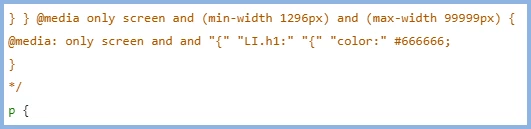
    Open the CSS in source view and locate the first @217338 only style. Prefix it as I have done with /* and the code for the rest of the CSS will change to the colour shown because that has commented it out.


    Next scroll down to where they stop just before the P tag and close that section with */.


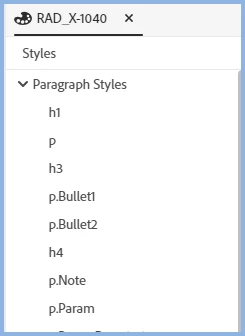
    Save that and you will be able to go back to the CSS in author view and you will see your styles.


    Open a topic and you will also see them there.


    I'm guessing those media definitions don't meet CSS3 standards. Check your outputs to ensure they still work OK.

    ________________________________________________________
    See www.grainge.org for free Authoring and RoboHelp Information

    16 replies

    Peter Grainge
    Adobe Expert
    March 23, 2021

    @sharont64060952 Can we clarify the versions as at one point you said "I started with RoboHelp Classic 2019 and upgraded into RoboHelp 2019.0.11". Then you said you were trying to apply the 02 and 03 upgrades. Why would you try to install an earlier update over a later one?


    Have you perhaps seen the 2020 02 and 03 updates? They should install as a separate app anyway.


    Please go to the Help menu and see what it says there.

    ________________________________________________________
    See www.grainge.org for free Authoring and RoboHelp Information

    Help others by clicking Correct Answer if the question is answered. Found the answer elsewhere? Share it here. "Upvote" is for useful posts.
    Known Participant
    March 23, 2021

    I've uninstalled 2019, reinstalled, and applied update 2019.0.14 and good news...I'm not getting the Application Error now. 

    Next, I'll start over and upgrade my Classic project again. Hopefully the paragraph styles will be present after the upgrade. I'll let you know 🙂

    Known Participant
    March 23, 2021

    I upgraded my Classic project and received the message that it upgrade with issues. The issues log indicates "There were total 1 issues," but how can I determine what that issue is?


    Also, if I open a topic in the authoring area and open the Properties menu on the right, there are no paragraph styles in the Properties menu. Shouldn't these have carried over from my Classic project? Thanks.

    Jeff_Coatsworth
    Adobe Expert
    March 23, 2021

    Did you run it as a local Admin? Do you have enough rights to your C:\ drive? If yes, then try uninstalling & reinstalling RH2019. If it still doesn't work, see https://helpx.adobe.com/contact/enterprise-support.other.html#robohelp for your support contact options.

    Jeff_Coatsworth
    Adobe Expert
    March 23, 2021

    You want the RH2019 version - not the 2020 right? - see https://download.adobe.com/pub/adobe/robohelp/2019.0.14/Setup.zip for the direct link

    Known Participant
    March 23, 2021

    My initial RoboHelp 2019 installation was release .01 and when I opened the app after that install, I got no error messages. However, I just downloaded and installed the 2019.0.14 update and when I launch RoboHelp now, I get the "Application Error. The application has run into an error. Please save your unsaved changes and restart from menu: Help > Restart RoboHelp."

    When I restart as recommended, I still get the same error. ???

    Jeff_Coatsworth
    Adobe Expert
    March 23, 2021
    Known Participant
    March 23, 2021

    Yes, that's the page from which I was trying to download the .03 update and I just tried again. The .02 update dowloaded and installed fine, but the .03 update gives me an error. ???

    Jeff_Coatsworth
    Adobe Expert
    March 22, 2021

    Last patch to RH2019 was 2019.0.14 - try updating and redo the conversion of the RH2019 Classic project again with the newer version. Is there any version or source control at play? If so, it's probably safer to check the Classic project out & then convert it locally, before checking back in.

    Known Participant
    March 23, 2021

    Hi Jeff. The link to the Adobe RoboHelp 2019.0.3 update seems to be broken/missing as I get a "Sorry this page is inavailable" message when I try to download it. Suggestions?

    Jeff_Coatsworth
    Adobe Expert
    March 22, 2021

    What version were you starting with and what point version of RH2019 are you using? Also RH2019 Classic or New UI?

    Known Participant
    March 22, 2021

    I started with RoboHelp Classic 2019 and upgraded into RoboHelp 2019.0.11