


Inspiring
May 19, 2014
Question

RH11 - Tabs missing in Word Index

  • May 19, 2014
  • 1 reply
  • 668 views

I have just upgraded from RH10 to RH11. Upon upgrading a project and publishing a Word document in RH11 I see that the index entries are now missing the tab between the item and the page number.

This is how the Word document looked in RH10
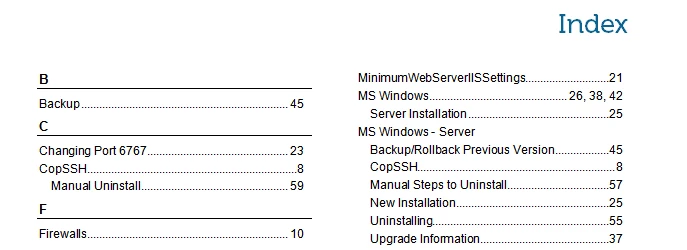
This how it now appears in RH11. No changes have been made to any of the previous RH10 settings (i.e CSS or Word Template).
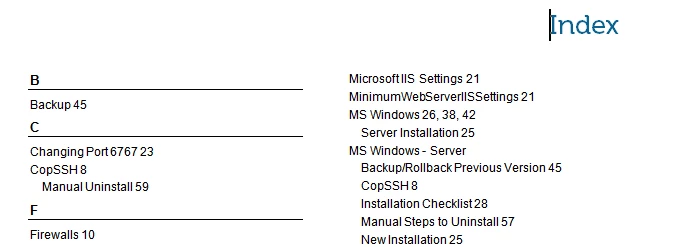
The Word template still contains the tab setting for the Index style but the actual tab is not being inserted when the document is generated. Am I missing a setting somewhere or is this a bug?

Thanks,

Chris

This topic has been closed for replies.

1 reply

Peter Grainge
Adobe Expert
May 27, 2014

I am not aware of any changes that would cause this and have not seen anyone else report it. Have you resolved the problem since reporting it?


See www.grainge.org for RoboHelp and Authoring tips

@petergrainge

Help others by clicking Correct Answer if the question is answered. Found the answer elsewhere? Share it here. "Upvote" is for useful posts.
Inspiring
May 27, 2014

Hi Peter,

No, this issue has not been resolved. I have not had time to raise a bug report as yet, but will do soon.

The issue seems to be be in the Edit Field/Index dialog box in MS Word. In RH10 when a document was generated the 'Right align page numbers' box was checked, in RH11 it is left unchecked.

Unfortunately, it is not as simple as just checking this box to fix the issue. When the box is checked the field code that adds the heading letter for each index group (e.g A, B, C etc) is removed,so this has to be manually added back in. It also upsets the section break before the Index changing it from an 'Odd' section break to a 'Continuous' break.

Cheers,

Chris

Peter Grainge
Adobe Expert
June 17, 2014

Tick the check box AND set Formats to Bulleted (and optionally Columns to 1). You may also need to reset Tab Leader.


See www.grainge.org for RoboHelp and Authoring tips

@petergrainge

Help others by clicking Correct Answer if the question is answered. Found the answer elsewhere? Share it here. "Upvote" is for useful posts.