



5AD.ink
Participant
December 14, 2023
Answered

First Upload - Not sure I understand the summary?

  • December 14, 2023
  • 5 replies
  • 1014 views

Hi! I poked around looking for clarification but I seem to not be giving the right key words for the isse. I submitted 12 images and received the following determination: 
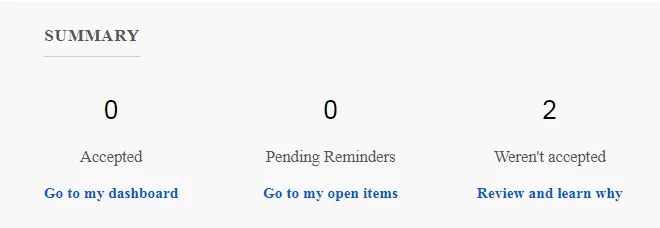
I understand why the 2 weren't accepted. The determination was clear 🙂 Panorama on an iphone was a long shot anyhow. It's the other two categories I'm not clear on: Accepted and Pending Reminders. Does that mean the other files are still under review? Or are they in a holding pattern? Many thanks!

This topic has been closed for replies.
Correct answer Jill_C

Accepted means that the asset was reviewed and approved, and you would then see it on your Portfolio, as it is available for licensing by Buyers. Pending Reminders can be viewed on the Reminders section in your Uploaded Files tab; these need property or model releases. "Weren't accepted" can be seen on the "Not accepted" tab, and if you click on the image, you'll see the rejection reason on the right side of the screen.

Other images are still in the queue awaiting review, as seen on your "In review" tab. Generally, images submitted simultaneously are reviewed as a batch.

5 replies

Abambo
Community Expert
Community Expert
December 19, 2023

If you want to know more about the refusals, post the two refused assets here, with the refusal reason (only the header, not the full text, the text is stock text and for all refusals of this type the same!). We will have a look into that.

ABAMBO | Hard- and Software Engineer | Photographer
Abambo
Community Expert
Community Expert
December 19, 2023
quote

Hi! I poked around looking for clarification but I seem to not be giving the right key words for the isse. I submitted 12 images and received the following determination: 

I understand why the 2 weren't accepted. The determination was clear 🙂 Panorama on an iphone was a long shot anyhow. It's the other two categories I'm not clear on: Accepted and Pending Reminders. Does that mean the other files are still under review? Or are they in a holding pattern? Many thanks!


By @5AD.ink

This is a summary of what happened to your currently moderated assets: 0 got accepted, 0 got moved to the reminder tab and 2 got refused. So from the 2 submitted and moderated assets, 2 got refused. The refusal reason gives yo a summary information about what is wrong.


Nobody talkes about your 10 other assets, so they stay well in the moderation queue waiting their turn.


If you are new to stock, you should consider these resources: https://helpx.adobe.com/stock/contributor/tutorials.html
Please read the contributor user manual for more information on Adobe stock contributions: https://helpx.adobe.com/stock/contributor/user-guide.html
See here for rejection reasons: https://helpx.adobe.com/stock/contributor/help/reasons-for-content-rejection.html
and especially quality and technical issues: https://helpx.adobe.com/stock/contributor/help/quality-and-technical-issues.html

ABAMBO | Hard- and Software Engineer | Photographer
Jill_C
Community Expert
Jill_CCommunity ExpertCorrect answer
Community Expert
December 14, 2023

Accepted means that the asset was reviewed and approved, and you would then see it on your Portfolio, as it is available for licensing by Buyers. Pending Reminders can be viewed on the Reminders section in your Uploaded Files tab; these need property or model releases. "Weren't accepted" can be seen on the "Not accepted" tab, and if you click on the image, you'll see the rejection reason on the right side of the screen.

Other images are still in the queue awaiting review, as seen on your "In review" tab. Generally, images submitted simultaneously are reviewed as a batch.

Jill C., Forum Volunteer
5AD.ink
5AD.inkAuthor
Participant
December 18, 2023

Thank you! My confusion stems from none of the other 10 images are in the "In review" tab. Still true today 4 days later.  But the feedback came through for the two panorama shots.


I'd assume all would be reviewed at the same time like you said. This is what the FAQ and a number of posts throughout the forum state 🙂 Just didn't occur here.


All images were appropriate and innocuous. The submissions included these shots for instance:

Abambo
Community Expert
Community Expert
December 20, 2023

I searched for Kodak in the Buyer portal and find that the majority are marked "Editorial". I assume that Property Releases were attached to the others.


quote

I searched for Kodak in the Buyer portal and find that the majority are marked "Editorial". I assume that Property Releases were attached to the others.


By @Jill_C

I doubt that you get a property release from Kodak. No serious company would do that. They would lose control over their image. 

ABAMBO | Hard- and Software Engineer | Photographer
daniellei4510
Community Expert
Community Expert
December 14, 2023

You'll receive a Pending Reminders message if or when you've neglected to provide required information, such as a model or property release. This normally means the assets would probably have otherwise been accepted or will be once the missing information is provided.

Adobe Community Expert | If you can't fix it, hide it; if you can't hide it, delete it.
Nancy OShea
Community Expert
Community Expert
December 14, 2023

Your other submissions have not been reviewed yet. 

Stock receives hundreds of submissions per day.   Be patient. Wait times vary from 1 - 3 months now.


See this help article.

https://helpx.adobe.com/stock/how-to/adobe-stock-contributor-portal.html


Hope that helps.


Nancy O'Shea— Product User & Community Expert