


Participant
June 26, 2018
Answered

How to change language in AdobeStock?

  • June 26, 2018
  • 4 replies
  • 21154 views

Hi all, I'm a contributor and Adobe Stock website started to speak to me in my local language. As the translation is clumsy and confusing, I'm trying to switch it back to English. Any ideas on where I can do this? I had no luck trying to solve this myself. Thank you!
Correct answer twaritar3263062

Michal,

  • Go to contributor.stock.adobe.com, log in with your credentials.
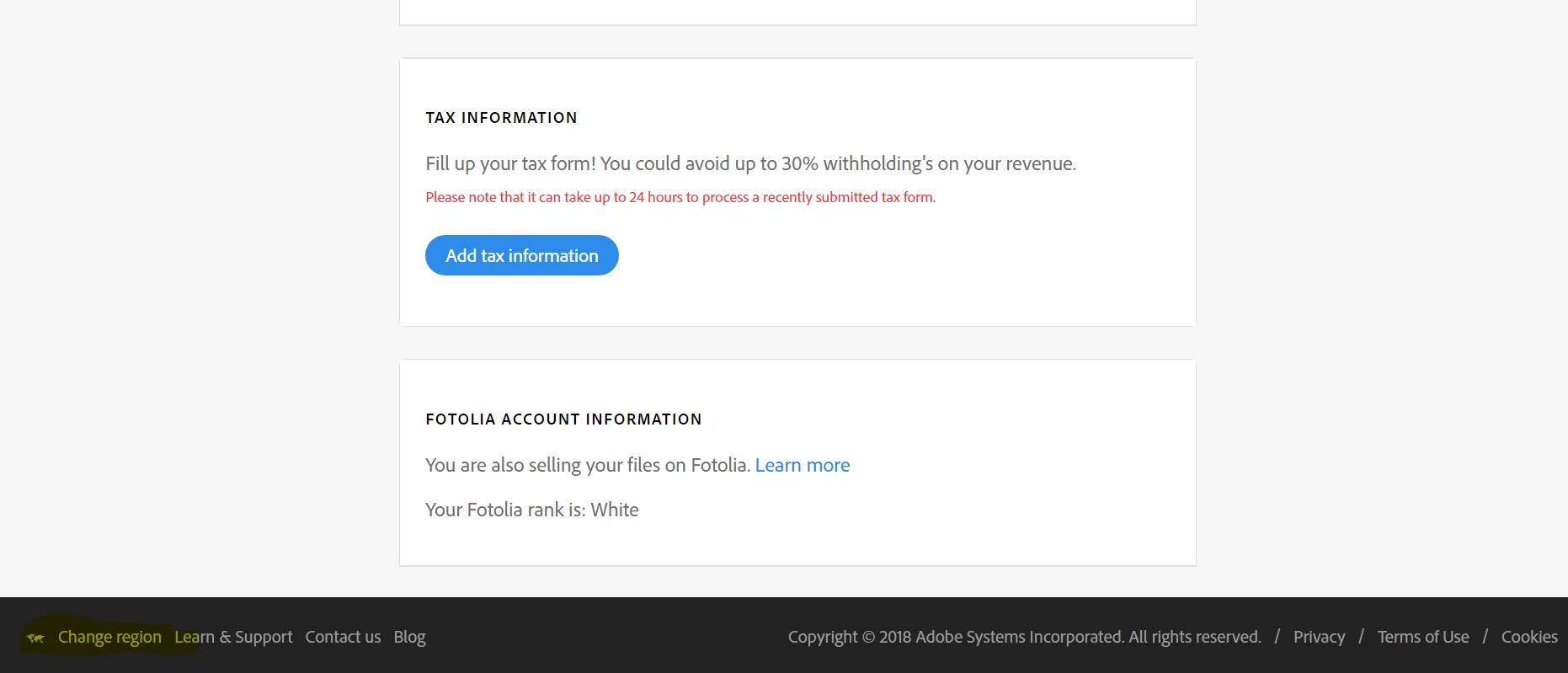
  • From your contributor account scroll down the page below and you will get the option "Change the region". Please see the screenshot shared :

Regards,

Twarita

4 replies

daniellei4510
Community Expert
Community Expert
September 10, 2024

This isn't Instagram. Do you have a question for the community?

Adobe Community Expert | If you can't fix it, hide it; if you can't hide it, delete it.
Participant
November 8, 2022

So where is it ???? I'm on stock and there's nothing like you say here. Guys, it's totally frustrating !!!

Abambo
Community Expert
Community Expert
November 10, 2022

Stock (https://stock.adobe.com) or contributor stock (https://contributor.stock.adobe.com) it's always at the footer of the page. You need to scroll down:


ABAMBO | Hard- and Software Engineer | Photographer
Abambo
Community Expert
Community Expert
November 11, 2022

BTW: In contributor stock, there are follow-up screen, that do not feature the change region link, so make sure to be on your contributor home page.


The change region is also available on other Adobe pages, I think that it works cross site. The only place where I find that it is not sticky is stock and contributor stock. I need to change it always from French (one choice for my region) to English (my preferred choice). 


I think, this behaviour is coded in stock, because you need to make purchases in your region, as some assets are not available in all regions.

ABAMBO | Hard- and Software Engineer | Photographer
nilanthar98223359
Participant
October 14, 2022

Just go to Adobestock.com home page, then scroll down to the bottom. At the footer bottom left click "CHANGE REGION". Then select your region that will change the language.


Abambo
Community Expert
Community Expert
October 14, 2022
ABAMBO | Hard- and Software Engineer | Photographer
twaritar3263062
Community Manager
Community Manager
June 26, 2018

Moving to Adobe Stock Contributors

Hi Michal,

In order to change the language in Adobe Stock website, please select the region, which changes the language and promotional content you see on the Adobe Stock website as shown in the screenshot below:

Feel free to update this thread in case of any additional questions.

Regards,

Twarita

Participant
June 26, 2018

Thank you Twarita! One last issue left for me - where do I find the region selection screen? Again, the local version is very confusing and difficult to navigate - even to find the screen you posted.

Thanks again!

twaritar3263062
Community Manager
twaritar3263062Community ManagerCorrect answer
Community Manager
June 26, 2018

Michal,

  • Go to contributor.stock.adobe.com, log in with your credentials.
  • From your contributor account scroll down the page below and you will get the option "Change the region". Please see the screenshot shared :

Regards,

Twarita