


Participating Frequently
October 25, 2025
Answered

Identify the missing quality standards in these photos?

  • October 25, 2025
  • 3 replies
  • 212 views

Hi. New to stock photo upload and recently decided to upload a whole range of landscape photos from a bikepacking trip, with every single one reviewed so far failing to meet quality requirements. Looking at the photos already available from the location (search word 'Rallarvegen') I'm struggling to understand where mine come up short. I've provided 3 of the rejected photos as examples. Would really appreciate any help identifying the issue. 
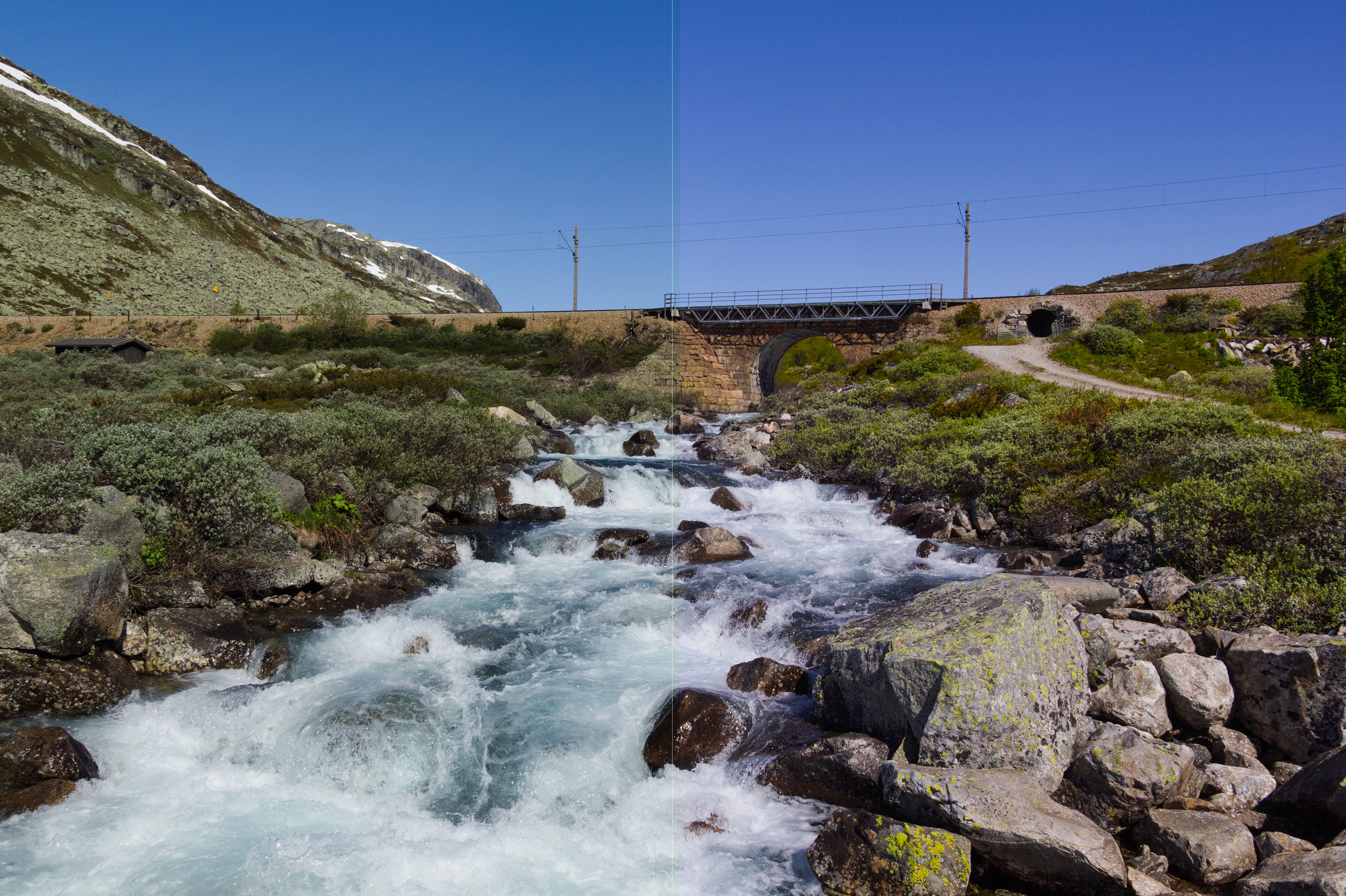
Correct answer daniellei4510

This is a rough edit, but I think all three could stand an increase in exposure and the shadows opened up. In the example below, the greens have a blueish cast and could be made greener.


3 replies

Ricky336
Community Expert
Community Expert
October 25, 2025

Hello,

In my view, I think you could make the photos 'pop' a bit more. They are rather flat and dull.

Increase the contrast and add more vibrance:


There might also be another issue. Quality is not so good when enlarged to 100%.

Did you use the kit lens that comes with your camera?

If so, the kit lens is not very good; the quality is quite poor. If you want to upload to stock, you may have to think about getting a third-party lens.


Participating Frequently
October 25, 2025

I've been cautious of making my photos "pop" because I don't know where the limit for post-processing lies. These were already pushing the limit I thought and was maybe curious if that was the problem, but then checking the photos already accepted for sale there's both images with more and less pop than mine. 


Photos are shot with a Canon 60D and Sigma 17-50mm f2.8 lens. I wouldn't know if that's good enough, but if it is and I've managed a 100% rejection rate that's quite the feat haha. 

Ricky336
Community Expert
Community Expert
October 25, 2025

That lens should be ok.

Did you shoot in CR2 (raw) format, or saved as JPEG?

If saved as JPEG, then perhaps some JPEG compression artefacts. The background is a tad 'blocky'.

Ideally, you should shoot in raw format, then use some photo editing programme such as Adobe Lightroom Classic/ Lightroom to make small adjustments (sometimes large) and then save as JPEG, and then upload to Adobe Stock. It can be quite a performance!

Jill_C
Community Expert
Community Expert
October 25, 2025

This one has chromatic aberration.

Jill C., Forum Volunteer
Participating Frequently
October 25, 2025

Thanks. I noticed some in other photos I checked as well, but only at 140+% zoom. Is there a set standard because some aberration seems inevitable with my gear if I zoom enough. 

daniellei4510
Community Expert
daniellei4510Community ExpertCorrect answer
Community Expert
October 25, 2025

This is a rough edit, but I think all three could stand an increase in exposure and the shadows opened up. In the example below, the greens have a blueish cast and could be made greener.


Adobe Community Expert | If you can't fix it, hide it; if you can't hide it, delete it.
Participating Frequently
October 25, 2025

Appreciate the feedback. I am ok to re-upload these with changes? 

daniellei4510
Community Expert
Community Expert
October 25, 2025

Of course. If assets are rejected a second time, it's usually best to move on.

Adobe Community Expert | If you can't fix it, hide it; if you can't hide it, delete it.