


New Participant
May 22, 2022
Answered

Cannot license anything even though I have a subscription

  • May 22, 2022
  • 1 reply
  • 1353 views

Hello, 


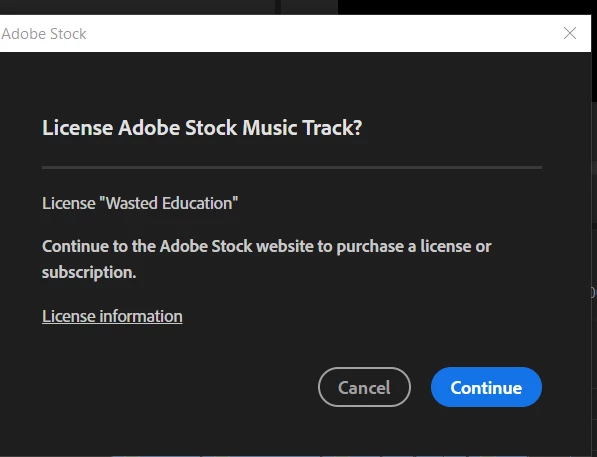
I have a trial version of adobe stock (10 assets a month). When I visit the adobe stock website and I'm signed in to my account, it says I do not have a subscription but when I go to my account the plan shows up. I was using an audio in premiere pro and clicked the cart button but it says I have to buy a subscription or credit. Any help trying to figure this out? 


Here's what shows up. 
This topic has been closed for replies.
Correct answer Abambo

Contact Adobe customer care on this issue. Adobe customer care can be contacted by beginning a secure chat session at https://helpx.adobe.com/contact.html?rghtup=autoOpen. Pop-up blockers need to be disabled! If the chat window fails to open, or is non-responsive, use a different device to start the interaction.
Support phone numbers may be found here: https://helpx.adobe.com/contact/phone.html. Please note that phone charges may apply.

(see also here: https://community.adobe.com/t5/creative-cloud-services/how-to-contact-adobe-support/td-p/11875703 or here
https://community.adobe.com/t5/account-payment-plan/how-to-contact-adobe-support/td-p/11843852)

1 reply

Abambo
Community Expert
May 22, 2022

Try to go to https://stock.adobe.com check, if you are signed in (upper-right corner: look for your avatar, left of your avatar you see the still available assets). If you are not signed-in, sign-in.


Search for your audio file:

and licence the asset from there:

I hope that works.

ABAMBO | Hard- and Software Engineer | Photographer
New Participant
May 22, 2022

No luck. I have the same issue pop up whether it's on the website or on a program and I'm signed in. It just offers me to look at different subscriptions and when I click on one, it says I already have a plan. So I'm confused? 

Abambo
AbamboCorrect answer
Community Expert
May 23, 2022

Contact Adobe customer care on this issue. Adobe customer care can be contacted by beginning a secure chat session at https://helpx.adobe.com/contact.html?rghtup=autoOpen. Pop-up blockers need to be disabled! If the chat window fails to open, or is non-responsive, use a different device to start the interaction.
Support phone numbers may be found here: https://helpx.adobe.com/contact/phone.html. Please note that phone charges may apply.

(see also here: https://community.adobe.com/t5/creative-cloud-services/how-to-contact-adobe-support/td-p/11875703 or here
https://community.adobe.com/t5/account-payment-plan/how-to-contact-adobe-support/td-p/11843852)

ABAMBO | Hard- and Software Engineer | Photographer