


Participant
April 25, 2023
Answered

How to filter out AI generated images

  • April 25, 2023
  • 3 replies
  • 8629 views

Hi all, Does anyone know how to filter all AI-generated images out? It's been a REAL nightmare lately. I can generate some images myself. Don't need an expensive stock subscription for this.AdobeStock is turning into a garbage. How is it possible AI-generated imagery is labeled as photography? Any advice? 
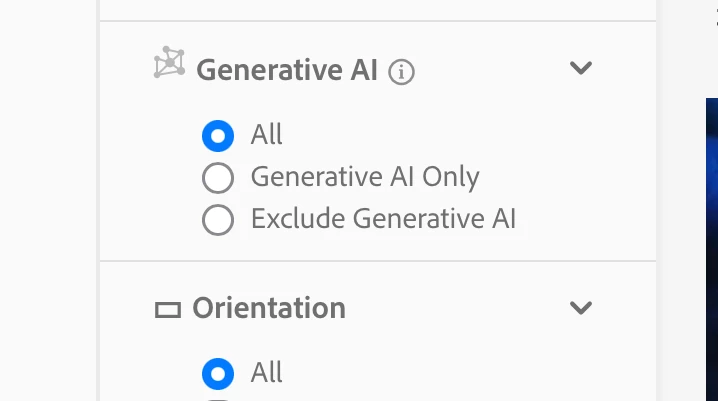


Correct answer Abambo

New filter option: 

3 replies

savagequest
Inspiring
May 30, 2025

It's very tedious and exhausting having to click "Exclude AI" every time. Can Adobe please, please remove all the AI as the default and go back to making it easier to find real, usable content for our projects?

Abambo
Community Expert
Community Expert
May 31, 2025

If you want to see that filter option being sticky, go and upvote the corresponding idea: https://community.adobe.com/t5/stock-ideas/how-can-i-permanently-disable-ai-generated-images-showing-up-in-my-searches/idi-p/13918799

ABAMBO | Hard- and Software Engineer | Photographer
Abambo
Community Expert
AbamboCommunity ExpertCorrect answer
Community Expert
April 26, 2023

New filter option: 

ABAMBO | Hard- and Software Engineer | Photographer
Jill_C
Community Expert
Community Expert
April 26, 2023

Whoo hoo !  Works great, but I was still able to find Generative AI assets in a few of my searches, presumably because they're not properly keyworded or titles.

Jill C., Forum Volunteer
Abambo
Community Expert
Community Expert
April 25, 2023

AI images should be in the illustrations section, not the photography section. And they need to be marked "generative AI" in the title. In addition, they need to have as keywords "ai", "generative" and "generative ai".


To exclude conforming generative AI from your search, use "-ai" as a search term. If you get shown non conforming AI assets, you can report them here, either by posting a link to the asset or by posting the asset id.


Adobe is working on a different solution, to exclude (or include) AI assets from your search. However, for the moment, the workaround is what you need to use.

ABAMBO | Hard- and Software Engineer | Photographer
Participant
April 25, 2023

Thank you for the answer. the problem is there are loads of images that are not only not tagged as AI but also classified as photos. These  contributors should be banned from the site. I think there should be an easy way to report these images. Is there any way to do it?


Here is one of many examples:

https://stock.adobe.com/pl/images/abstract-background-of-stone-texture-turquoise-texture/570643100 


This person upload only AI generated imagery without tagging them correctly.

Jill_C
Community Expert
Community Expert
April 25, 2023

Unfortunately, Adobe has not provided any means of reporting such flagrant disregard for their own rules. Nor do they seem to have any systematic way of identifying such non-compliant images. 

Jill C., Forum Volunteer