

New Participant
February 11, 2018
Answered

Licensed image TOO small

  • February 11, 2018
  • 2 replies
  • 2116 views

Hello,

I downloaded image id 128971834 today and found it to be too small and hence totally useless for me.  Please help, its very urgent!

    This topic has been closed for replies.
    Correct answer twaritar3263062

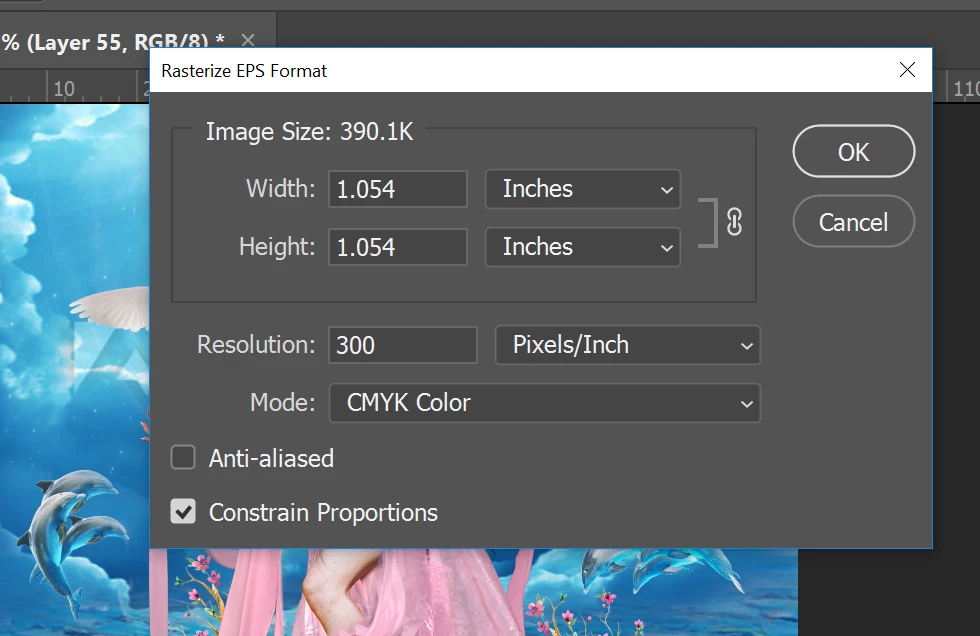
    Thank you Twarita. Now 316 pixels in not an acceptable file size for any kind of artwork. So please help me by either giving me access to high resolution file or please credit me back for one image so I can purchase another one instead. I do all my work in Photoshop and this is the first time I have come across such a small file which is practically of no use to me! Please help me with this. I appreciate your help, thank you so much!


    Artist,

    As per your request, I am adding an image license to your account as a goodwill gesture since you were not aware of the file size.

    Moving forward I would request you to download a JPEG file if you wish to work in Photoshop since we do not guarantee the quality of a vector image used in Photoshop.

    Hope this helps!

    Feel free to update this thread in case of any additional questions.

    Regards

    Twarita

    2 replies

    Community Manager
    February 12, 2018

    As the file you licensed being a vector type, you may want to use Illustrator to open the file.  I take that you tried to open using Photoshop, then you may just want to input higher width and you should be able to see the image in full.  And please refer to this post for important information. Re: Adobe Stock not working in Photoshop

    Regards

    New Participant
    February 12, 2018

    Thank you for your response! I tried to input 2000 pixels each side and opened it. Attaching the screenshots here. The image is too pixellated

    twaritar3263062
    Community Manager
    Community Manager
    February 12, 2018

    Hi Artist,

    I see that the file ID (128971834) which you have downloaded is an Ai file. I would like to let you know that if you try opening a vector image(.AI/EPS file) in Photoshop, it will be pixelated and we will not be able to guarantee the image quality.

    The vector images are best to be downloaded in Illustrator.

    So I would request to download the file in Illustrator CC to get the best results and if you do not have Illustrator, then as a workaround you may download the trial version of Illustrator(7 days trial ) and can try to use the files.

    You may use this link to download the trial version of Illustrator:

    Download a free trial or buy Adobe products | Adobe downloads

    Feel free to update this thread in case of any additional questions.

    Regards

    Twarita

    Brad Lawryk
    Brainiac
    February 11, 2018

    Since I can see the watermark on the image in your screenshot it tells me you are not opening the full resolution image. The full resolution image would not have the Adobe watermark on it.

    The image number you provided is also different than the one in your screenshot. The image is also a .ai file which needs to be opened in Illustrator and resized there.

    New Participant
    February 12, 2018

    Thank you for your response Brad! The image seen in the background is a composite image I am creating and the watermark visible is from another stock image. The one I bought yesterday and is very tiny size is a SHELL stock image. This screenshot was meant to just show its original size is just 1.054 inches each side. I changed the size to 2000 pixels each side but the image is very very pixellated, totally unusable. I am sharing the screenshots here. Thank you so much for your time and help!