


Participating Frequently
August 9, 2023

CLO 3D OBJ file not uploading to substance 3d Painter

  • August 9, 2023
  • 9 replies
  • 838 views

Hi,

I am new to using substance painter and I have an issue where my obj that I have exported from clo 3d isn't loading in substance painter. I have made sure that my patterns peices don't overlap in the UV editor, not sure if there is another issue there. I was able to open the file in blender and also 3d stager but not 3d painter.

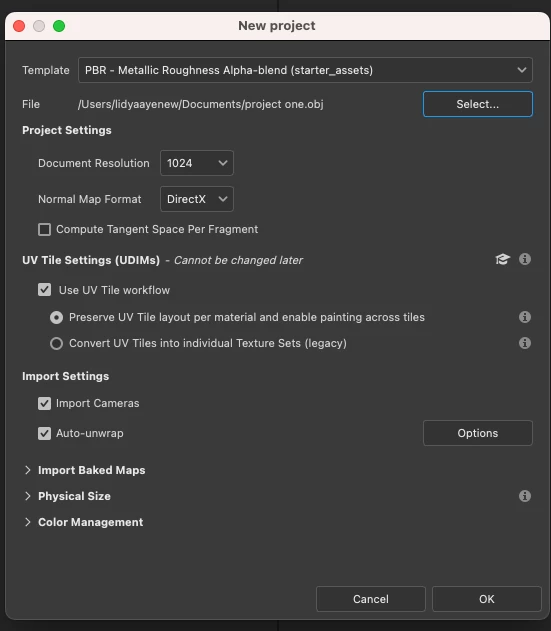
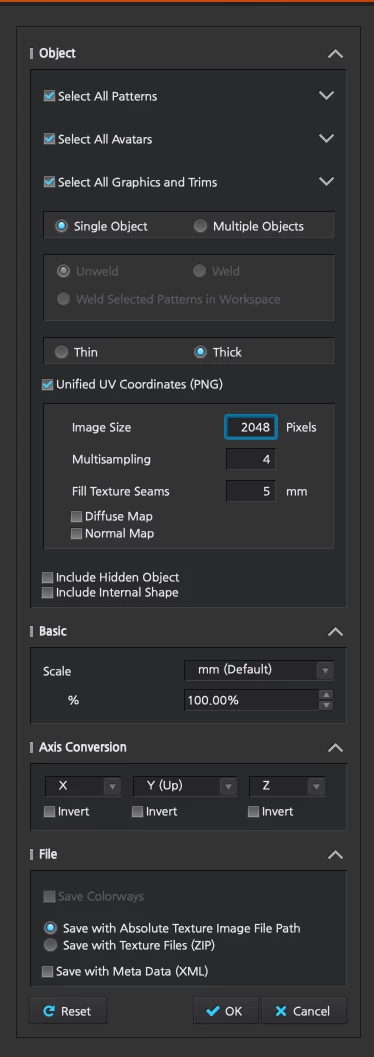
My settings are attached below: I also need to have UV Tile settings checked for my work

for painter when I am importing the obj
on Clo 3d
 

9 replies

Participant
May 29, 2025

Had the same issue. Make sure your UV maps are correct. Meanning there is no patterns outside the UV tile, even sligtly poking out.

Participating Frequently
August 14, 2023

Hi Cyril

Thanks for you assitance. I applied your suggestions and still not working. I don't think my issues are my UV maps. I tried to click recompute all in my UV maps but it is taking a while for the file to load? is that normal. I have attached my settings for the unwrap sequence. Let me know if there is anything else I can try.


Cyril Dellenbach
Community Manager
Community Manager
August 14, 2023

Hello Linda,


I probably know where the issue comes from. Your mesh has currently 31 Material IDs. Each time Substance 3D Painter finds a new Material ID, it will create a new Texture set (this is in fact what's defining a Texture set). This is probably not what you want, considering the UDIM workflow you mentioned.

In addition, some of the UVs are bigger than its UV map and are poorly unwrapped. Make sure to have clean UVs before creating a project, or check the Recompute all box under the auto-unwrap settings. 


Also, I advise you to keep a quad topology on your mesh, this could prevent a lot of problems.


Best regards,


Cyril Dellenbach (Micro) | QA Support Artist | Adobe
Participating Frequently
August 13, 2023

I am also working on a mac. I am not sure if this effects results.

Participating Frequently
August 11, 2023

Let me know if any addtional files are needed

Participating Frequently
August 10, 2023

ok, just emailed thank you

Cyril Dellenbach
Community Manager
Community Manager
August 10, 2023

Interesting... Could you share with me your .OBJ file, so I can take a deeper look? You can send it to me privately at cdellenbach@adobe.com


Let me know,


Cyril Dellenbach (Micro) | QA Support Artist | Adobe
Participating Frequently
August 10, 2023

HI Cyril,

This is the error that shows up when I am trying to import my file. 

Cyril Dellenbach
Community Manager
Community Manager
August 9, 2023

Hi Linda,


What exactly Substance 3D Painter do when you're creating the project? Do you have an error written in the bottom left of the screen?


Let me know,


Cyril Dellenbach (Micro) | QA Support Artist | Adobe