


cbthomas94
Participant
July 5, 2022

Layers are glitching - masking errors

  • July 5, 2022
  • 6 replies
  • 2026 views

So I am running into the following issue when I am trying to create some textures for a personal project:
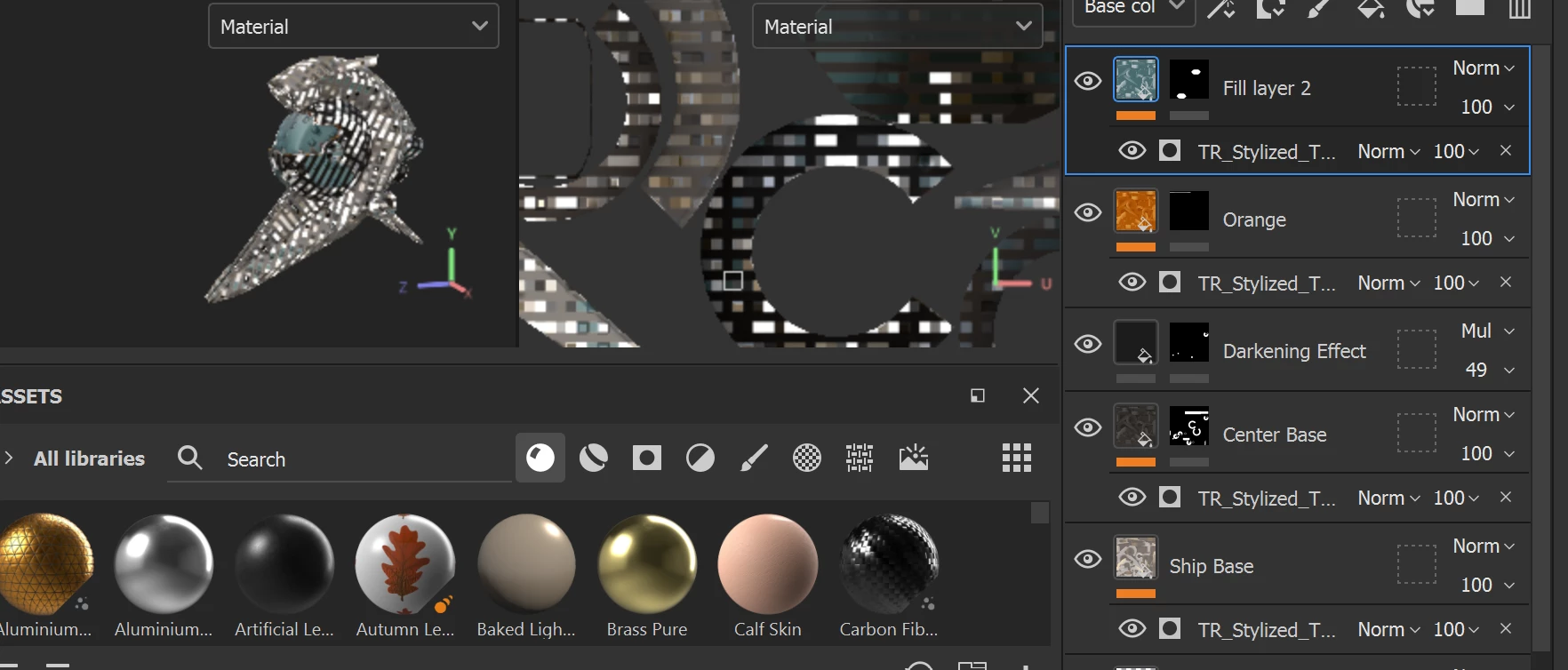


This glitch is happening on all layers and all channels, and there is only one texture set I am working with.  I have tried closing out the project and restarting, and I have also tried to remake this project, with the same results

6 replies

Participant
November 12, 2025

THANKAKAKAKAKAKAKAKK YOOYOYOYOYOYOYOYOYOYOYOUUUUUUUU

Participant
April 23, 2024

This fixed mine too, thank you for posting

Participant
January 13, 2024

Go to Edit, Settings, Scroll down until you see "Sparse Virtual Texture" and deactivate the "Hardware Support Acceleration". I have this problem just a minute ago and this fixed the issue.

GeoffroySC
Community Manager
Community Manager
July 7, 2022

Hi,


It seems that you are running on the integrated GPU, an Intel(R) HD Graphics. This device does not allow you enough dedicated Vram to run Substance Painter. We require 4 GB of VRAM to guarantee the stability of Painter.

You can find the minimum specs requirements on that page: https://docs.substance3d.com/spdoc/technical-requirements-172824034.html


If you have another GPU, can you make sure that your main display is connected to it?

You can find more information about unrecognized GPU in our official documentation: https://docs.substance3d.com/spdoc/substance-painter-doesn-t-start-on-the-right-gpu-182266570.html


If you have any questions, feel free to ask.


Regards,


Geoffroy SC


cbthomas94
Participant
July 5, 2022
GeoffroySC
Community Manager
Community Manager
July 5, 2022

Hi,

Could you share a log, please? This would help me pinpoint the origin of your issue.

Thank you,

Kind Regards,

Geoffroy SC