


New Participant
December 16, 2022
Answered

Black Material - Substance Not Loading Properly in Blender

  • December 16, 2022
  • 3 replies
  • 5609 views

I'm using Blender 3.4.0 and Windows 11. I have downloaded and installed the latest version of the Substance plugin and its Integration tools. I've also tried reinstalling several times and all I get is a black material. Even the preview of the material shows up as black. I am seeing an error in the command window but then it also says at the end that the material loaded correctly. Below is a screenshot of the error.
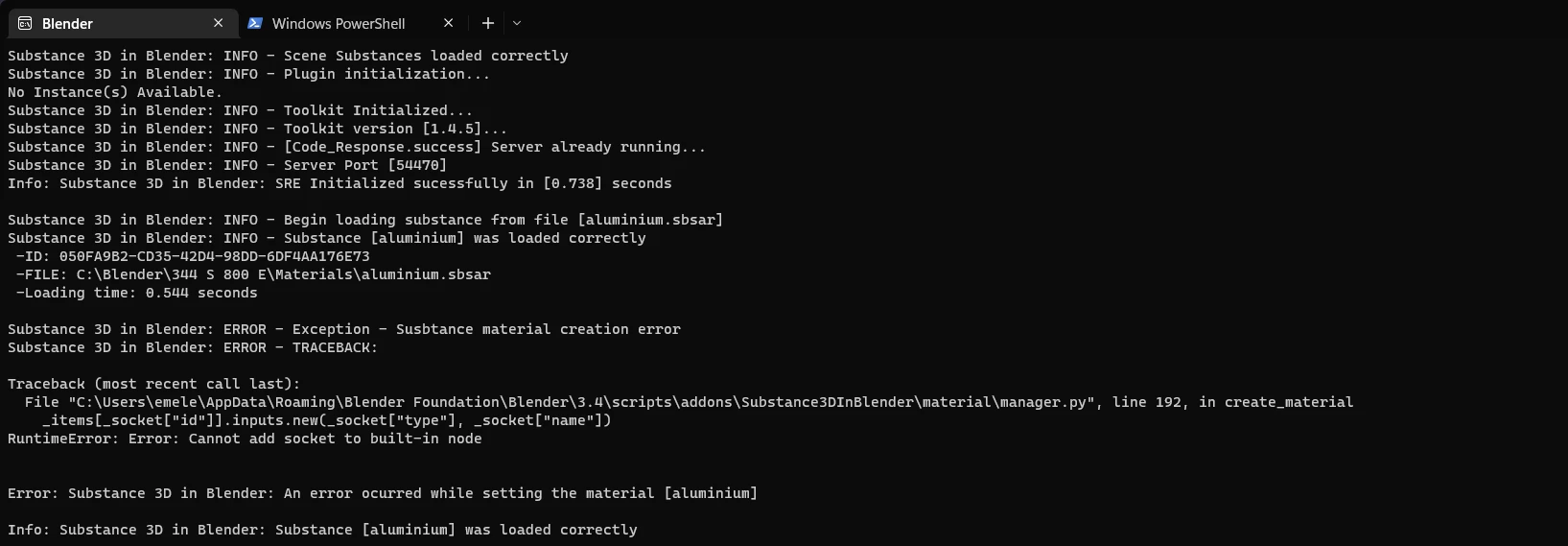


I've only found one other person with the exact same problem who posted on the Blender reddit a few days ago with no luck, but they posted a video. If you want to see their video/issue then you can see it here:


Reddit Post: Substance addon 3.0 blender, black material??? 

Thanks in advance for any help here.

This topic has been closed for replies.
Correct answer k30n1

To add to that if you're having with the duplicate material button there's another "Initialize shader sockets" function that can be fixed the same way around line 468.


I got a chance to look at the Duplicate Material code this morning and did the same fix, then confirmed I was able to duplicate an SBSAR material in Blender 3.4.1 on macOS. Here's the updated manager.py file. Thanks for pointing out the other location! 


This replaces the earlier patched manager.py with an additional 5-line change, and should fix both the loading and duplication of shader node networks for the Substance plugin in Blender >= 3.4 .

3 replies

Participating Frequently
January 13, 2023

I have the same issue however where exactly you enter the script mentioned below ? and how any help thank you

 here the bug I have reported to blender they send me back here

Issue notice on january 11 2023

happy new year


ubstance ADD on SBSAR none applying on object Black image

STEP TO REPRODUCE
1 install blender 3.4.1
2 go to Adobe substance pluging website for blender to download to substance toolkit and substance add on
https://substance3d.adobe.com/plugins/substance-in-blender/

2 download substance toolkit 0.9.2 1.4.3 and 1.4.5
Substance3DInBlender-0.9.2.zip
Substance3DIntegrationTools-1.4.3-Windows.zip
Substance3DIntegrationTools-1.4.5+default-89-x64-win.zip

3 download substance add on 1.01
Adobe_Substance_3D_for_Blender-1.0.1+default-172-any-multi.zip

4 once blender 3.4.1 is install open blender
5 go to EDIT and select preference
6 Select ADD on and install
7 install either 0.9.2 or 1.0.1

8 CLICK ON INSTALL FROM DISK toolkit install either the 1.43 or 1.4.5 substance toolkit

9 CLOSE BLENDER and RE OPEN

10 check The render engine EeVEE
11 open the side menu on the right side
12 select Substance folder and download a substance SBSAR from substance painter library
13 CLICK LOAD
14 select your SBSAR substance
15 SELECT OBJECT the cube or the sphere in center viewport of blender and SELECT RENDER sphere on the top right
16 CLICK APPLY on the substance menu
17 OPEN MATERIAL TAB on the menu
18 SELECT the proper SBSAR material

19 NOTICE ON THE VERSION 3.4.1 The cube or the sphere turn black or is black all the addon and toolkit are NON functional or incompatible
20 NONE of the substance is applied properly on the version 3.4.1
please can someone in PYTHON resolve this big issue form blender or adobe team thank you


Please note that on blender 3.3 and addon 0.9.2
substance is correctly applied reproducing the steps above.

Participating Frequently
January 14, 2023

The replacement manager.py file with the temporary workaround gets put in the plugin's folder after you've installed the plugin. The specific file that gets replaced is Substance3DInBlender/material/manager.py which is the plugin folder in 3.4/scripts/addons/ .


The location of the addons folder varies by OS (I happen to be on a mac) but the Linux and Windows folder locations can also be found in this blender documentation page.

So the location for Windows should be something like 

%USERPROFILE%\AppData\Roaming\Blender Foundation\Blender\3.4\scripts\addons\Substance3DInBlender\material\manager.py


I do not know enough about Windows to say how to get to %USERPROFILE% using Windows Explorer.


Hopefully Adobe can release a new version of the plugin soon so that patching is no longer needed.


Happy New Year!

Adobe Expert
January 15, 2023

C:\Users\USERNAME\AppData\Roaming\Blender Foundation\Blender\3.4\scripts\addons\Substance3DInBlender\material


it is...

PCA_72
Participating Frequently
January 12, 2023

Same issue with Mac OS versions. Actually, the material is loaded but in your shading tab, all texture and nodes are disconnected. The side setup bar of Substance is also not responding well. I really hope we'll get an update soon. Otherwise, the FBX exchange between Adobe Painter and Blender is laborious.

Participating Frequently
December 17, 2022

I posted a python code patch that fixed this error for me, with Blender 3.4 and the plugin version 1.0.1, at this thread: https://community.adobe.com/t5/substance-3d-plugins-discussions/substance-to-blender-plugin-error-when-loading-material/td-p/13419982

DoomDoomAuthor
New Participant
December 17, 2022

Thanks for responding! I really appreciate it, but unfortunately it was a no go for me. When I updated the script the integrated tool portion didn't show up in preferences anymore and the menu doesn't show up anymore. I tried making sure the indentations are mimicked, but no go. I haven't worked with python really so it could be user error if it is finnicky. 

Participating Frequently
December 17, 2022

I just added a downloadable copy of the changed file from plugin 1.0.1 to the above-linked thread - it sounds like patching may have resulted in broken python code (preventing the module from loading in blender). Hope it does the trick.