


Participating Frequently
March 9, 2023
Answered

Displacement in Unreal Engine Plugin

  • March 9, 2023
  • 2 replies
  • 913 views

Hi!  I used this tutorial to add displacement to my materials using the Unreal Engine Substance plugin - https://substance3d.adobe.com/documentation/integrations/working-with-displacement-ue4-159451189.html  It worked great for the standard Substance Master Material, but it doesn't work with the Triplanar Master Material.  It ends up only working when the object is facing a specific direction.  Is there a way to make this work with Triplanar?  Thanks!
This topic has been closed for replies.
Correct answer Aldo_3D

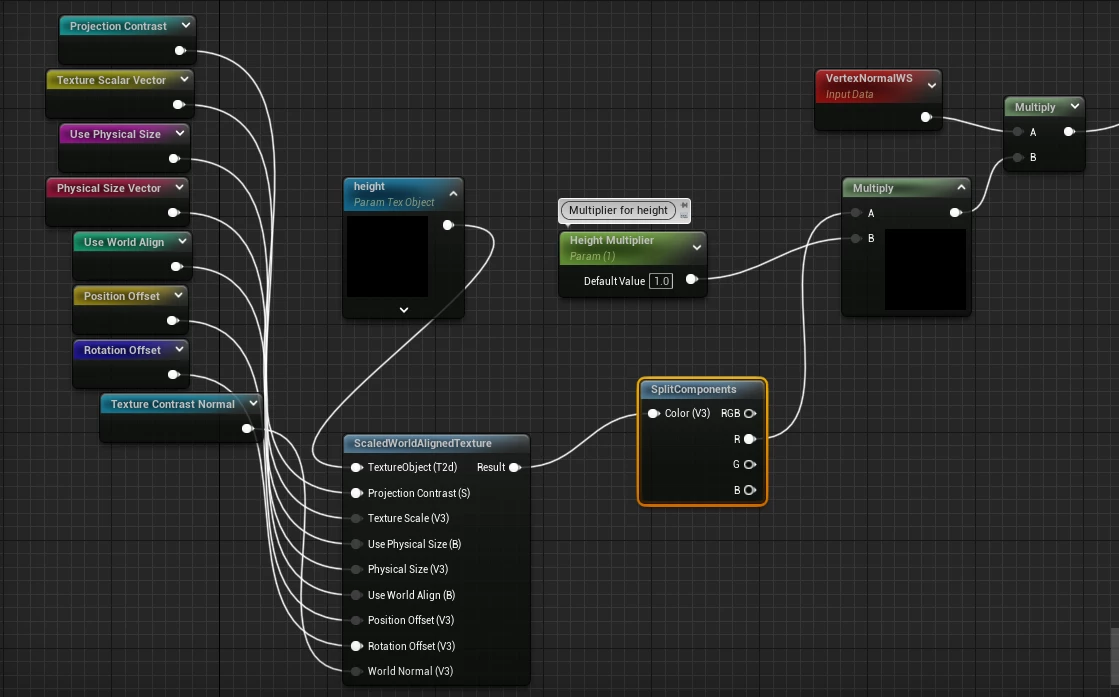
Hi @SwogDog, thanks for reaching out! In this case the issue is happening because all of the channels are being used for height when we only need the Red chanel. You can add a SplitComponents node after the ScaledWorldAlignedTexture node and send only the Red output to Multiply. After saving changed you should see displacement applied correctly in every axis.


2 replies

Aldo_3DCorrect answer
Adobe Employee
March 16, 2023

Hi @SwogDog, thanks for reaching out! In this case the issue is happening because all of the channels are being used for height when we only need the Red chanel. You can add a SplitComponents node after the ScaledWorldAlignedTexture node and send only the Red output to Multiply. After saving changed you should see displacement applied correctly in every axis.


SwogDogAuthor
Participating Frequently
March 28, 2023

Perfect!  That worked.  Thank you!

Cyril Dellenbach
Community Manager
Community Manager
March 10, 2023

Hello @SwogDog,


Unfortunately, I am really not an Unreal Engine expert, therefore let me move this conversation to the plugin section so our team can give you a proper answer.


Have a nice day.


Cyril Dellenbach (Micro) | QA Support Artist | Adobe
SwogDogAuthor
Participating Frequently
March 11, 2023

@Cyril Dellenbach Ah, thank you!