


New Participant
December 14, 2022
Answered

Substance to blender plugin error when loading material
  • December 14, 2022
  • 3 replies
  • 6234 views


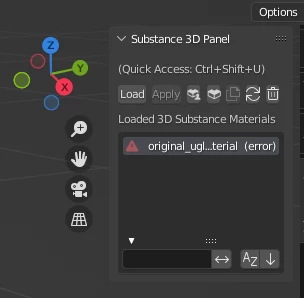
I just installed the plugin from substance 3D to blender. I loaded a material, but then it says "(error)", I can't apply it to any object.


The object is UV-unwrapped, but the way it looks is like it doesn't matter what the object looks like, it's an error from loading the material.


Does anyone know what could be the problem?

This topic has been closed for replies.
Correct answer k30n1

and 2nd one in line 473-476


Here's the updated manager.py from this morning, that includes the second fix for the Duplicate button (lines 473 area), it is the same as the one posted in this thread. Apologies for the confusing interplay between threads.


If you do not use the Duplicate button in the plugin then there is no need to use this version, as I understand it. 


Glad to hear the patch is working for people!


3 replies

Community Manager
January 12, 2023

Hi,

What version of Blender are you using? Also, is there any information on the Blender console/terminal that you could share with us? 

To view the console, go to the Windows menu -> Click on Toggle system console
For Mac: https://blender.stackexchange.com/questions/2078/how-to-use-blender-command-lines-in-osx 

Community Expert
January 15, 2023

Hi Shwetha,

I can confirm this bug on both machines Win10 and macOS 12.6.2 an error appears when trying to load any material into the Substance Panel.

Blender add-on is working well with Blender 3.3 but thows back an error in 3.4 (win & mac).

Actual workaround is reinstalling Blender 3.3 or using the code change mentioned above.


New Participant
December 18, 2022

Thank you so much. Saved me from near madness with this!

Community Manager
January 12, 2023

Hi,

We will be pushing an official update soon on the Substance website for this issue.

Participating Frequently
December 17, 2022

Blender changed an internal Python API - here's what I edited to get the plugin v1.0.1 working with Blender 3.4.


In the addon file 3.4/scripts/addons/Substance3DInBlender/material.py use a plain text editor to comment out these lines (prefix with '#') a couple lines after "Initialize shader sockets" to disable the crashing code, as shown:


                    # if _socket["source"] == "input" and _socket["name"] not in _items[_socket["id"]].inputs:
                    #     _items[_socket["id"]].inputs.new(_socket["type"], _socket["name"])
                    # elif _socket["source"] == "output" and _socket["name"] not in _items[_socket["id"]].outputs:
                    #     _items[_socket["id"]].outputs.new(_socket["type"], _socket["name"])


After those lines, put this alternate code that uses the preferred method from the developer site:


                    grptree = _sbs_group.node_tree
                    if _socket["source"] == "input" and _socket["name"] not in grptree.inputs:
                        grptree.inputs.new(_socket["type"], _socket["name"])
                    elif _socket["source"] == "output" and _socket["name"] not in grptree.outputs:
                        grptree.outputs.new(_socket["type"], _socket["name"])


Note that python is very sensitive to indentation! The new code should be very similar in indentation to the original version of the old code.


Your mileage may vary and this may not be a fully correct solution, but this seems to have fixed the plugin crash for me that started with Blender 3.4. Hope it helps!


Participating Frequently
December 17, 2022

Correction! this is in the file


3.4/scripts/addons/Substance3DInBlender/material/manager.py


Community Expert
January 15, 2023

thank you very much however by unzipping Substance3d 1.0.1 to replace and Re zipp it in which folder you replace your manager.py, in the material folder? as there is few material.py on different folder once you search for it.?

unless you do it in a different way in that case any steps or guidance to properly replace it.

I have issue on 3.4.1 blender version as my sbsar apply as Black on the cube or the sphere once applied the 1.01. and toolkit 1.4.5

thank you 


you are not supposed to unzip!

Install both and then change the installed files on your harddrive!