


Participant
November 5, 2019
Answered

Motion Graphics .mogrt files not syncing in Team Projects -

  • November 5, 2019
  • 2 replies
  • 4983 views

I'm attempting to utilize team projects as a way to streamline workflow between multiple computers/team members -- I have a lower third motion graphic I've created and each computer has this motion graphics file installed. However, when team members try accessing the project where the lower third has been utilized it shows up as missing. When I try to route to map this media it will now allow me to route to the .mogrt file location or I cannot select to map the .mogrt.


How do I go about mapping these files?

For reference, when saving these .mogrt files I have gone through the user/adobe/common/motion graphics path to save these files locally to each computer.


Thanks in advance!
This topic has been closed for replies.
Correct answer Nate Boerman

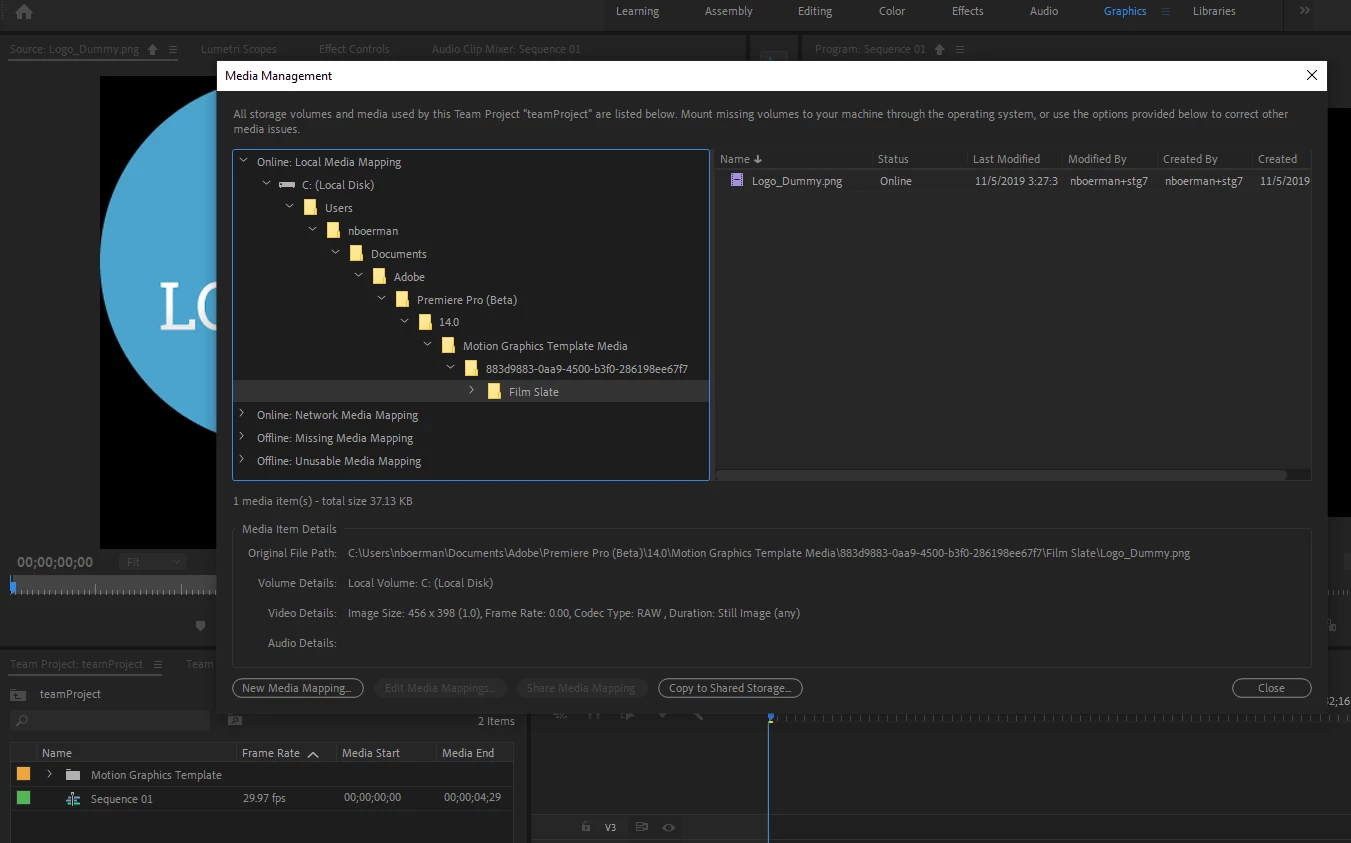
Yes, and for that situation you need to go into the media managmenet dialog and copy the media to shared storage.  For example, this is a team project which is utilizing a motion graphic with a PNG logo, because the motion graphics scratch disk was not set, the png is unpacked into the local c drive, which the other users of the team project do not have access too.  If you go into the media mangement dialog, you will see something like this.


If you select the png and copy it to shared storage, the other users should be able to see the file, if they also have access to that same shared storage.

Edit :  The issue isnt that you installed the .mogart to all the systems.  When anyone uses an item from the essential graphics panel (which has .mogarts in it) in an edit, it gets unpacked into it's individual assets within a project or team project.  Having the .mogart installed on the other systems does not matter.  What matters is that they all have access to the unpacked elements.

I hope this help...

-Nate


2 replies

Participant
December 1, 2022

Whenevever I add Premiere Pro provided media such as Adobe Stock clips, Graphics or Titles to my timeline in a team project, then save and share changes, my team members will open the team project on their computer and PP will ask for the location of the files for the PP provided media (e.g. Adobe Stock clips, Graphics or Titles). Well, those media files came from within PP, I didn't bring them in, so I don't have them, nor does my team member have them to link -- before the timeline loads. Consequently, I am the only one who can see the PP provided media because my team member's timeline will show PP provided media offline.

What is the work around for this?
*********************************

To report a bug, please provide:
  1. Version of the app   -- Version 23.0.0
  2. Platform and OS version  -- Windows 11 Home
  3. Basic steps to reproduce the problem  -- Create a team project. Add titles and Adobe Stock footage. Close project. Have a different team member open the team project. A PP window will ask for the location of the titles and Adobe Stock footage. 
  4. Expected result and actual result

* Optional: Test file, screenshot, video or gif file capturing the issue


Kevin-Monahan
Community Manager
Community Manager
December 6, 2022

Hi rpeete,

Sorry for the frustration. I will move your bug report to a Team Projects thread that directly addresses this issue. Please let us know if the info contained in this thread helps solve your issue or if you still want to file the issue as a bug report.


Thanks,
Kevin

Kevin Monahan - Sr. Community & Engagement Strategist – Pro Video and Audio
Nate Boerman
Community Manager
Community Manager
November 5, 2019

In the team projects context, the short answer to this question is to install the .mogart onto all the systems using the essential graphics panel. Since you are in an situation where you are all local to each other, and I assume that you have shared storage, set all your users team projects preferences ( file // team project settings // scratch disks // motion graphics template media ) to a location on shared storage. That way when anyone uses a motion graphics library item, associated media will show up on shared storage (or creative cloud shared folders, dropbox)


From what I remember, you don't "share" a .mogart file in the team project collaboration sense.  You install it on all the machines so that they can use it in differenet projects.  But, once the .mogart file from the essential graphics panel is utilized in a timeline, it gets unpacked into its different elements(shapes, texts, PNG, or video.) In the case of PNG and video, these get unpacked to the location specified in the motion graphics template media scratch disk location whereas the shapes and text just are part of the timeline.


What I would suggest for an existing production is to go to the system which is adding the motion graphics to the timeline and use the media management dialog to copy the associated media from your user directory to shared storage.


Chloe_GAuthor
Participant
November 5, 2019

Hi Nate,


Thanks for the reply although, that's the problem I'm having -- for example, the .mogrt files in question are all installed to the motion graphics panel on all computers. When I take a motion graphics and lay it into the timeline and then I go to click "share" to share my updates it does, in fact, pop up for my collaborators but the file then appears as "unusable" missing media. All the users on my team project have this exact same .mogrt file installed into the essential graphics panel. 


-Chloe 

Nate Boerman
Community Manager
Nate BoermanCommunity ManagerCorrect answer
Community Manager
November 5, 2019

Yes, and for that situation you need to go into the media managmenet dialog and copy the media to shared storage.  For example, this is a team project which is utilizing a motion graphic with a PNG logo, because the motion graphics scratch disk was not set, the png is unpacked into the local c drive, which the other users of the team project do not have access too.  If you go into the media mangement dialog, you will see something like this.


If you select the png and copy it to shared storage, the other users should be able to see the file, if they also have access to that same shared storage.

Edit :  The issue isnt that you installed the .mogart to all the systems.  When anyone uses an item from the essential graphics panel (which has .mogarts in it) in an edit, it gets unpacked into it's individual assets within a project or team project.  Having the .mogart installed on the other systems does not matter.  What matters is that they all have access to the unpacked elements.

I hope this help...

-Nate