New Participant
January 3, 2019
Question

Team Projects: Issues with Auto Save and Sharing Changes

  • January 3, 2019
  • 4 replies
  • 3514 views

Hi,

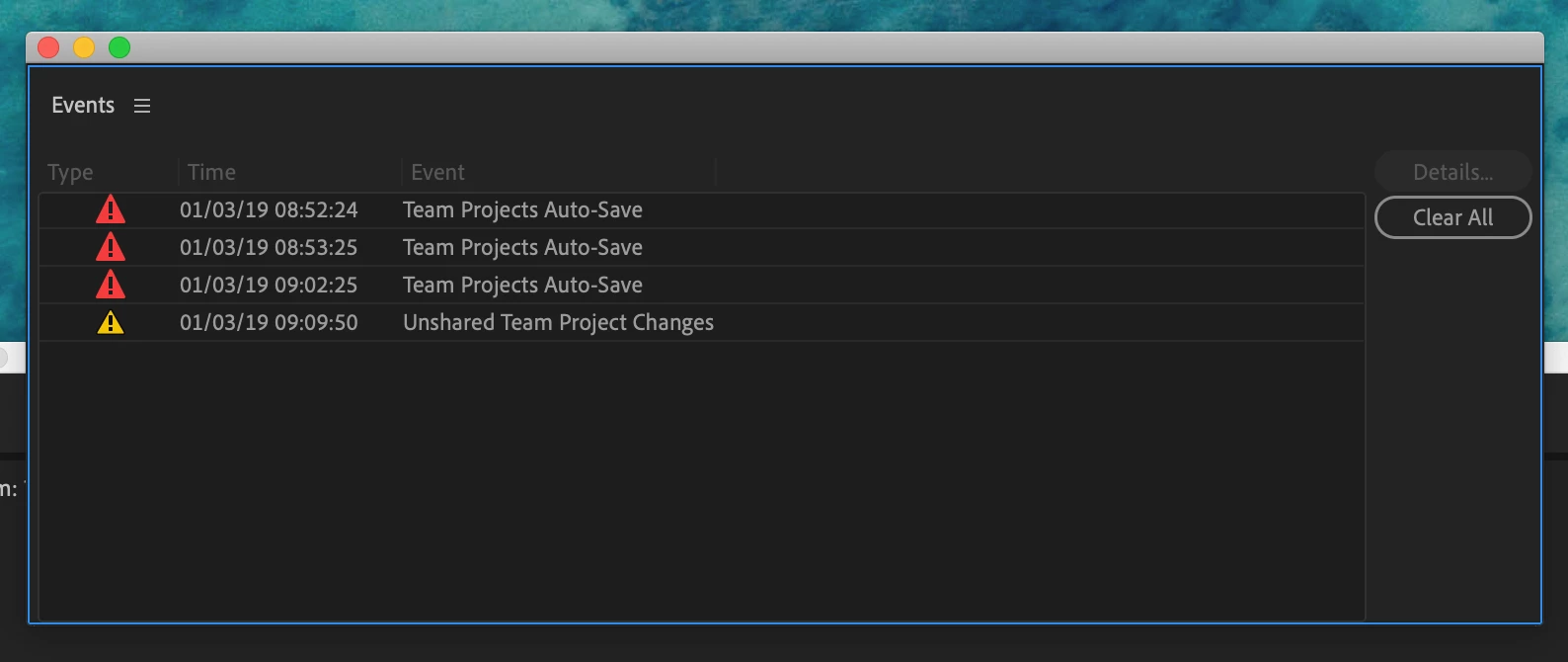
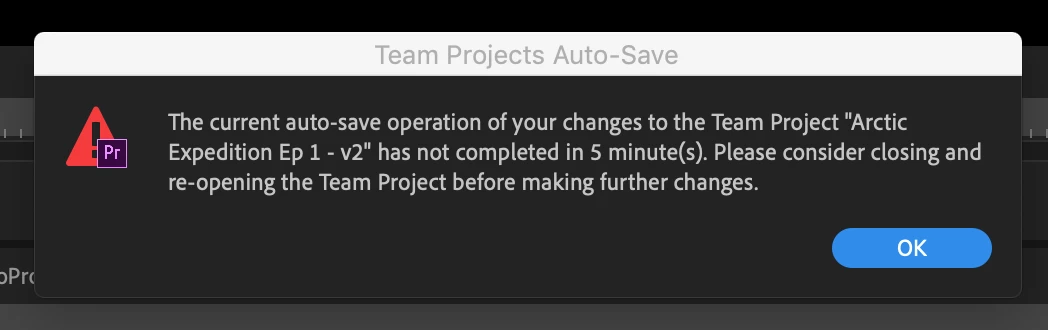
I keep running into the same issues with Team Projects. Every 10 or so minutes I get a "Team Projects Auto Save Error" and 9 times out of 10 I am unable to share my changes with my team (see screenshots below). The annoying thing is Premiere sometimes crashes during the process causing me to lose my work because neither the auto-save feature nor the share changes has worked.

My internet connection is very stable and fast.

I'm running Premiere Pro CC 2019 on the latest MacBook Pro.

What can I do? Is there a reason why Premiere is not able to push my changes or auto save at the very least? Are there any network settings I am unaware of?

Please help!
This topic has been closed for replies.

4 replies

teofiloc34001321
New Participant
December 26, 2023

Hi, in my case, what I noticed is that some material said "editing". So, I selected that video or element and click on publish. It solve the problem. So, make sure whatever you bring to the project is published. It might be hidden in one of the bins. Good luck.

New Participant
December 22, 2022

Hello,


Did a solution was brought up ?

I'm using premiere pro v23.0 and I still have this problem

I am working on a very big project (around 8000 assets) but we didn't import anything, I am working on a timeline and my coworker is working on its own with totally different rushes so we don't have conflict problems.

The thing is my cowerker (the owner of the team project) doesn't have this problem, ever.


Please help !

Thanks

DavidMathieu
New Participant
January 3, 2019

I have the same problem since a few days. For me, it seems to happen mostly after I import clips in the project (not thousand as Peter suggested, but only a dozen or two) I didn't find a solution to the actual problem, but I found a way to not lose my work when that happens. I create a normal Premiere Pro project in which I copy and paste the sequence I was working on. This works as a backup at least.

PeterELee
Adobe Employee
Adobe Employee
January 3, 2019

That's very interesting. So far, I've only seen this issue when importing at least a few hundred pieces of media. It could also happen if were editing without taking a break for several minutes after doing a smaller import. In that case, closing the Team Project should allow the auto-save to complete, uninterrupted.

Please PM me if you're willing to enable some additional logging in Premiere to see if we can figure out what might be happening on your system.

New Participant
February 13, 2020

Hello!

Have a same issues. The project is huge over 20 thousands files. But I'm now importing not more than 20 music/mp4 files a day, and autosaves start to fail.

It is realy bad problem, because I need  20minutes to open project, because of loading and indexing media on every opening...

PeterELee
Adobe Employee
Adobe Employee
January 3, 2019

Can you tell me more about your Team Project? Roughly how many media files are there? If you import or modify several thousand media files, the first auto-save after that can take a very long time to complete. This is especially true if you make any edits before the auto-save completes, or if any slow network drives are mounted, even if they don't contain media.

We're working to improve performance in those situations, but for now we suggest using linked Team Projects to split up large productions into smaller chunks. Importing files in smaller batches (e.g. a few hundred at a time), then waiting for auto-save to complete before importing the next batch can also help. If you attempt to close the Team Project after a large import, that will also cause the auto-save to run faster in most cases, though it may still take several minutes if a large number of files were imported or modified.

New Participant
January 11, 2019

Yeah the project is pretty big, 5000  + odd files. I have tried to split up the project in multiple ones with less assets but I am still often getting these auto-save errors. I don't understand why sometimes it works and other times it just refuses all-together.

Is there anything else I can try?

PeterELee
Adobe Employee
Adobe Employee
January 11, 2019

To be clear - the auto-save warning is just a warning. The auto-save operation will continue running in the background, even while the warning dialog is displayed, and the auto-save will normally complete eventually. The best thing to do when the warning dialog does appear, though, is to choose "File/Close Team Project..." and wait for the resulting progress dialog to go away. Auto-saves that runs when closing a Team Project are generally faster than the ones that run in the background while you edit, because the former are allowed to use more computer resources, and can't be interrupted by further edits.

I'll PM you to see if we can narrow down what be causing auto-saves to be so slow in your Team Project, in case it's something other than importing or changing many media files at once.