


Participant
May 13, 2024
Answered

Teams Collab feature (Audio problem)

  • May 13, 2024
  • 1 reply
  • 379 views

When utilizing the team project feature  I noticed that the audio edits from essential sound (ducking, noise reduction) did not carry over to my partner's project. Has anyone experienced this? Yes, I published the project and had my colleague update as well.

I'm using Version 24.3.0 on a Mac. I've attached a screenshot of what my partner sees and what I see when working.
 

This topic has been closed for replies.
Correct answer Udo_Pawlik

Hi @Dorrian25810955x6iz 

Do the keyframes appear in the 'Effects Controls' panel? In this case can your partner make sure the correct keyframes are selected.

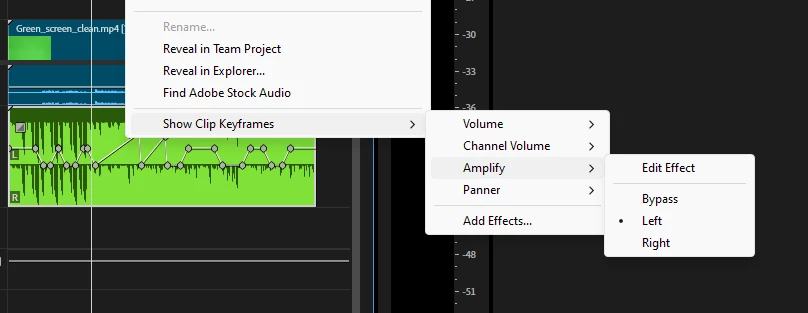
Right-click the Audio track > Show Clip keyframes > Amplify > [Left]

Best,

Udo

1 reply

Udo_PawlikCorrect answer
Adobe Employee
May 13, 2024

Hi @Dorrian25810955x6iz 

Do the keyframes appear in the 'Effects Controls' panel? In this case can your partner make sure the correct keyframes are selected.

Right-click the Audio track > Show Clip keyframes > Amplify > [Left]

Best,

Udo

Participant
May 14, 2024

Thank you so much. This was the perfect solution.