


Inspiring
January 12, 2020
Question

FrameMaker2019のレジストレーションマークの"Western"について

  • January 12, 2020
  • 4 replies
  • 700 views

FrameMaker2019でPrint出力する際に、レジストレーションマークを"Western"に設定し、出力した場合に、レジストレーションマークが以前のFrameMakerと異なる出力がされてしまいます。


OS:Windows10 64bit EN

App:FrameMaker2019 64bit EN


FrameMaker10の場合
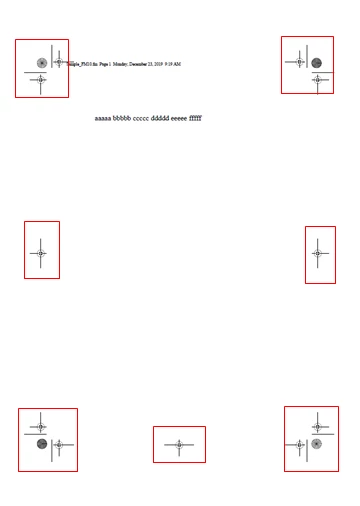
 FrameMaker2019の場合
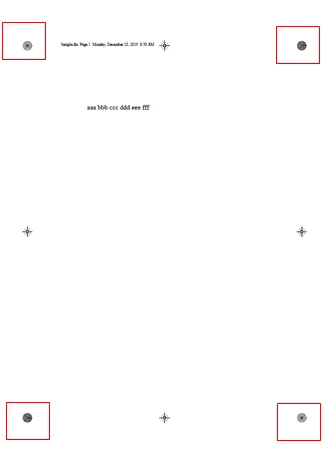
 

以前のFrameMaker10のように表示するにはどのようにすればよろしいでしょうか?

This topic has been closed for replies.

4 replies

Jeff_Coatsworth
Community Expert
Community Expert
January 14, 2020

So if it's printed to the Adobe PDF printer instance, then there should (IIRC) be a joboptions file that governs registration marks. Maybe it's an issue with the version of Acrobat?

Jeff_Coatsworth
Community Expert
Community Expert
January 13, 2020

Are you all patched up? How did you create the PDF? Print to Adobe PDF, Save As PDF, or publish to PDF?

s-onishiAuthor
Inspiring
January 14, 2020

ありがとうございます。


PDFの出力方法は[File]-[print]から行っています。

Adobe Employee
January 14, 2020

We have looked into this issue as it was reported by couple of users. Would be great if you could drop us an email at amisingh@adobe.com so we can share a private patch which you can try. Plan is to release it with update 5 coming up beginning of Feb.


Thanks

Amitoj Singh


TomSchenck
Inspiring
January 13, 2020

This has changed from the FrameMaker 2017 (and all previous) release.

Missing is the page crop marks. This isn't important unless you have printing that goes to the edge of the paper and manually create a "bleed"

I recently upgraded to 2019 and had my printer call me about not being able to cut my cover pages properly. Since I deliver to them in PDF, I was able to copy/paste the old marks from a previous release.

Not sure why this has changed. The page crop marks are important.

s-onishiAuthor
Inspiring
January 14, 2020

ありがとうございます。


Adobeに問い合わせても意味なさそうですね。

問題ないPDFからのコピー/ペーストはかなり手間そうですね。

Bob_Niland
Community Expert
Community Expert
January 13, 2020

答えはわかりませんが、but for the benefit of any English speaker who does, the question machine-translates from Japanese as:
"When printing with FrameMaker2019, if the registration mark is set to "Western" and output, the registration mark will be output differently from the previous FrameMaker.

How do I get it to look like the previous FrameMaker10?"