


Participant
1月 19, 2025 3:37 午前 UTC
解決済み

画面下部の「選択するオブジェクトをクリック」を非表示にする方法

いつからかIllustratorのウインドウ下部に「選択するオブジェクトをクリック〜」というヒントの領域が表示されるようになりました。この部分を非表示にする方法をご存じの方、いらしたらご教示ください。

Omachi
Omachi解決!
Legend
1月 19, 2025 4:29 午前 UTC

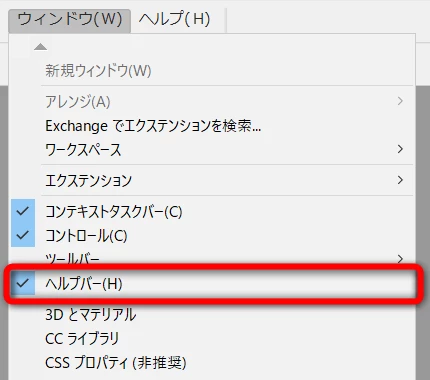
Illustrator 29.2.1の新機能「ヘルプバー」ですね。

https://helpx.adobe.com/jp/illustrator/using/workspace-basics.html

[ウィンドウ]→[ヘルプバー]をクリックしてチェックを外します。
 

返信数 2

Omachi
Omachi解決!
Legend
1月 19, 2025 4:29 午前 UTC

Illustrator 29.2.1の新機能「ヘルプバー」ですね。

https://helpx.adobe.com/jp/illustrator/using/workspace-basics.html

[ウィンドウ]→[ヘルプバー]をクリックしてチェックを外します。

 

翻訳
Participant
2月 1, 2025 7:01 午前 UTC

大変助かりました。

誠にありがとうございました。

翻訳