

解決済み
プリセットパネルが表示されない(初めてプリセットを使うとき)
初めてプリセットを使おうとしてます。プリセットをダウンロードし、【編集】→【環境設定】→【プリセット】→【Lightroomの現像プリセットを表示】→【Settings】の中にxmp形式のファイルを入れましたが、
カタログ、フォルダ等のパネルがあるところに、プリセットパネルがそもそもありません。【ファイル】の中の【現像プロファイルとプリセットを読み込み】も選択できません。
どうしたらプリセットパネルが表示されますか??

初めてプリセットを使おうとしてます。プリセットをダウンロードし、【編集】→【環境設定】→【プリセット】→【Lightroomの現像プリセットを表示】→【Settings】の中にxmp形式のファイルを入れましたが、
カタログ、フォルダ等のパネルがあるところに、プリセットパネルがそもそもありません。【ファイル】の中の【現像プロファイルとプリセットを読み込み】も選択できません。
どうしたらプリセットパネルが表示されますか??
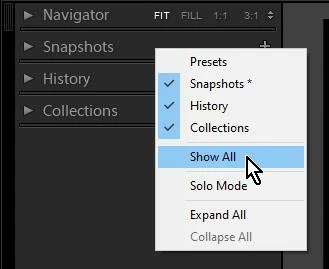
Preset Panel will be visible only in the Develop Module.
If it is not visible in the Develop Module it may be hidden.
[Right-Click] on another panel header and choose [Show All]
Enter your E-mail address. We'll send you an e-mail with instructions to reset your password.


 AdChoices