

解決済み

このトピックへの返信は締め切られました。
こんにちは
次のような方法で矢印を中央に合わせてみたらいかがでしょうか。
定規を表示し、水平方向中央と垂直方向中央にガイドを引けば、矢印は「モーション」の「位置」で容易に中央に合わせられると思います。
※定規とガイドは「プログラムモニター」を選択し、メニューの「表示」→「定規を表示」、「ガイドを表示」を選択すると表示されます。
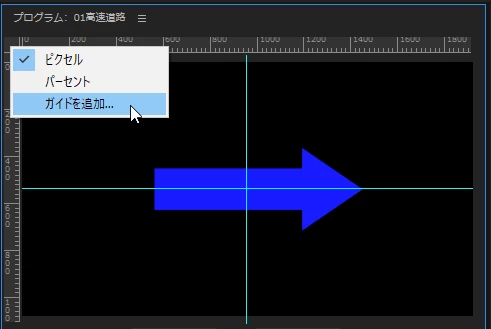
下図のように定規の左上隅部で右クリックして表示されたメニューから「ガイドを追加」を選択すると、ガイドを数値で正確に指定できます。
※ガイドはドラッグで移動できます。
※下記リンクも参考にご覧ください。
https://wanhachi.com/premiere-pro-guide/


Enter your E-mail address. We'll send you an e-mail with instructions to reset your password.
 AdChoices