Participant
March 5, 2020
解決済み

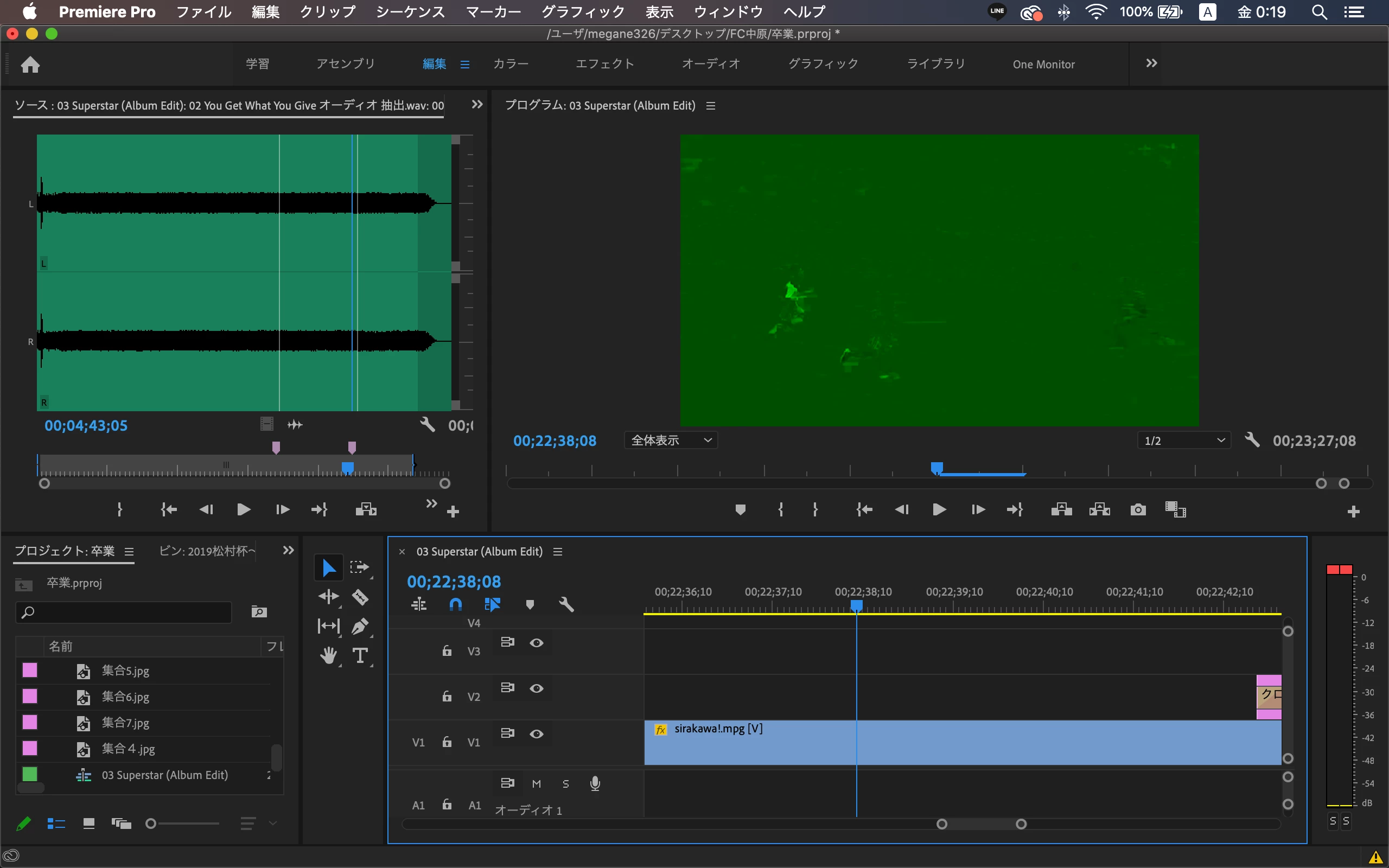
Premiere Proで編集している動画が緑になる

  • March 5, 2020
  • 返信数 4.
  • 18825 ビュー

Premiere Proで動画(mp4)をマウントして編集るすると、なぜか緑色になったり、ノイズが乗ったりします。マシンパワーが低いからなのか、解決方法が知りたいです。

解決に役立った回答 Sumeet Kumar Choubey

Hi megane326,


We would need more info to troubleshoot the issue properly. Please let us know the system specifications (OS, CPU, GPU and RAM) and the codec of the media file that is being used. Also, let us know if switching the Renderer to Mercury Playback Engine Software Only helps. 


Thanks,

Sumeet

返信数 4

Community Manager
March 6, 2020

Hi megane326,


We would need more info to troubleshoot the issue properly. Please let us know the system specifications (OS, CPU, GPU and RAM) and the codec of the media file that is being used. Also, let us know if switching the Renderer to Mercury Playback Engine Software Only helps. 


Thanks,

Sumeet

megane326作成者
Participant
March 6, 2020
Thank you for the advice. The symptom was improved by changing the decoding settings.


Peru Bob
Community Expert
Community Expert
March 6, 2020

Try resetting the preferences:
https://community.adobe.com/t5/Premiere-Pro/FAQ-How-to-reset-trash-preferences-in-Premiere-Pro/td-p/8236158

If that doesn't work, try resetting the Workspaces:
Reset a workspace
Reset the current workspace to return to its original, saved layout of panels.
1. Do one of the following:
• Click the Workspace menu icon and select Reset to Saved Layout.
• Choose Window > Workspace > Reset to Saved Layout.
from here:
https://helpx.adobe.com/premiere-pro/using/workspaces.html

If that doesn’t work, try updating or rolling back your graphics driver directly from the video card manufacturer’s site.

megane326作成者
Participant
March 6, 2020
Thank you for the advice. The symptom was improved by changing the decoding settings.
Ckun
Community Expert
Community Expert
March 6, 2020

添付していただいた画像からは、コーデックのデコードエラーかGPU関連の問題のように見えるのですが、症状が出ているMP4ファイルはどのような機器(あるいはアプリ)で作成されたものでしょうか?


環境設定の「高速処理の H.264 デコードを有効にする(再起動が必要)」のチェックを外したり、プロジェクト設定でレンダラーの設定を変えてみると、変化はありませんでしょうか。


(参考URL)

https://helpx.adobe.com/jp/premiere-pro/using/preferences.html#media_preferences

https://helpx.adobe.com/jp/premiere-pro/using/creating-changing-projects.html


megane326作成者
Participant
March 6, 2020

ありがとうございます。動画ファイルはYouTubeにアップした動画を再ダウンロードしたmp4ファイルになります。

ご指摘いただきました「高速処理の H.264 デコードを有効にする(再起動が必要)」のチェックを外したところ、

症状が治りました!とりあえず、これで状況をみてみようかと思います。ありがとうございます!

John T Smith
Community Expert
Community Expert
March 5, 2020

MP4 is a wrapper, what is inside YOUR wrapper - Exactly what is INSIDE the video you are editing?
Report back with the codec details of your file, use the program below
Free program to get file information for PC/Mac http://mediaarea.net/en/MediaInfo/Download
- when you analyze your file in MediaInfo and post a screen shot in the forum, do so in TREE view