

Illustrator Newsletter - November 2022

It's Thanksgiving month, and on behalf of my team and community, I would like to express my sincere thanks and gratitude to everyone here. We have had wonderful conversations this year, all geared towards improving our experience with a product that we have so heavily invested in. My team will continue to ensure that we keep working towards ensuring that this space gets even better in the year ahead.
Adobe MAX is behind us, and I am sure, like us, you were blown away by the many sessions and announcements. In case you missed it, you can still watch Adobe MAX 2022 sneaks to see how the future keeps getting all the more promising.
In this edition of the newsletter, you will find important links related to MAX 2022 and tutorials by Laura Coyle, Monika Gause, Tony Harmer, Anna Lander and Paul Trani.
See the Adobe Illustrator Newsletter Home page for previous versions of the newsletter.
Adobe MAX Sneaks
Get a sneak peek into what’s brewing at Adobe Research. MAX Sneaks is where Adobe engineers give a first look at potential future technologies.

Community Experts Highlight
I would like to share my deepest gratitude to all our community experts for their valuable contributions during MAX, and would like to give a big shout-out to Laura Coyle, Monika Gause, Tony Harmer, and Anna Lander for these extremely helpful and quick tutorials for the Adobe Care Youtube Channel.
See the Tutorials section at the end of this newsletter for all the wonderful tutorials that our experts have magnanimously created and shared with us.




Trending Issues
- Issue:- While exporting PDFs, Intertwined objects are exported as raster images.
Action:- The team is aware of it and is working towards resolving the issue in a future update. Till the time it is fixed, please upvote this request on this UserVoice page and stay tuned for updates.
- Issue:- Packaging a file adds source folder name and appends PSD to the packaged linked files.
Action:- Bug logged with the Product team.
Solution:- This is fixed in the 27.0.1 Prerelease build available in the Creative Cloud Desktop Prerelease section.
Note: If the issue isn't resolved in the 27.0.1 release, please create a new post on the community, and we will help you.
- Issue:- Illustrator turning all PNGs into negatives (with or without yellow background) after saving and reopening document
Action:- Bug logged with the Product team.
Solution:- This is fixed in the 27.0.1 Prerelease build available in the Creative Cloud Desktop Prerelease section.
Note: If the issue isn't resolved in the 27.0.1 release, please create a new post on the community, and we will help you.
- Issue:- Color looks dull in InDesign and Illustrator on macOS Ventura on GPU PreviewAction:- Bug logged with the Product team.
Workaround:- Use CPU preview or run the app using rosetta or open Illustrator as Intel from the Creative Cloud Desktop app.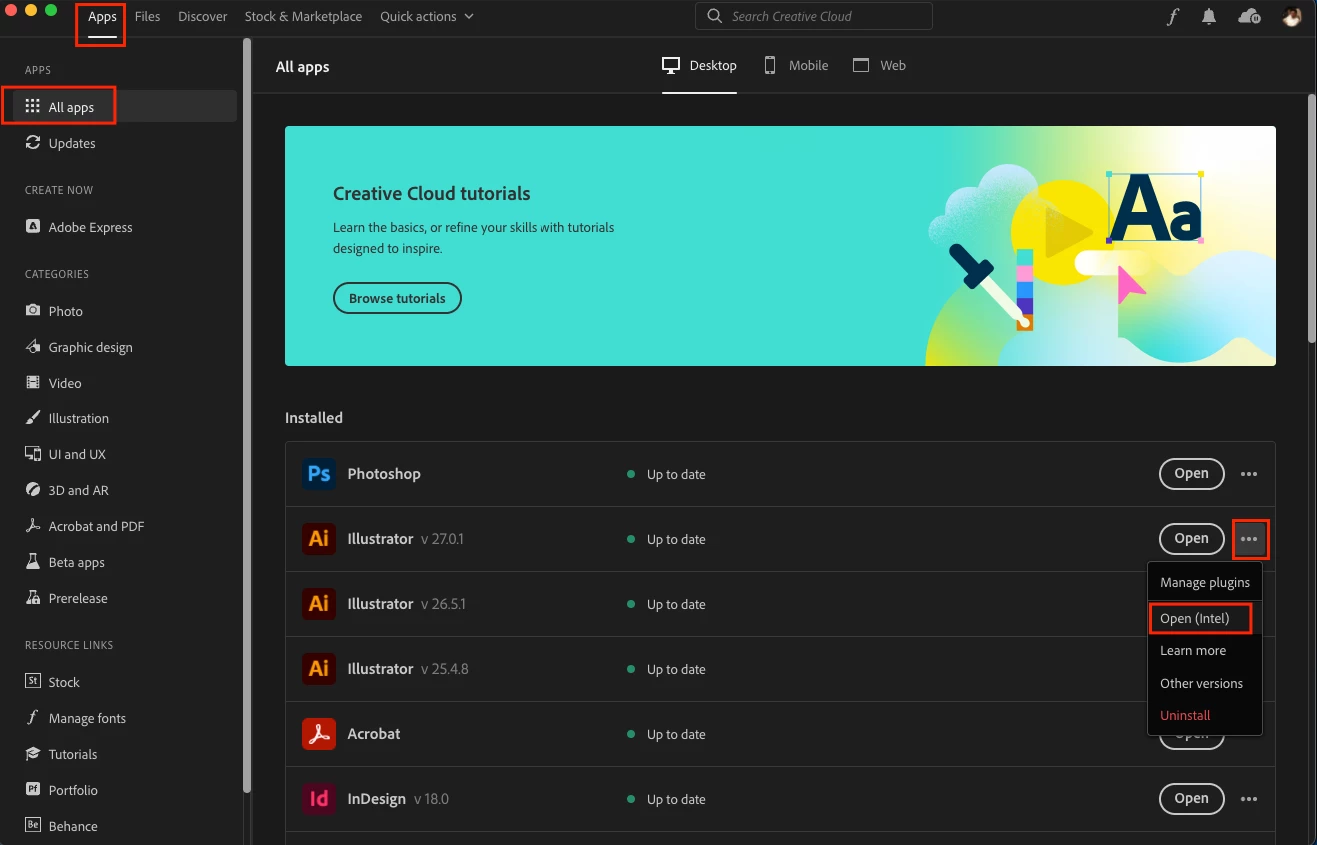
Tutorials
Helpful links
User guide | FAQ | Common troubleshooting steps | System requirements | Tutorials | Known issues
To receive notifications for our newsletters for other Apps, please follow these pages:-
Photoshop | Lightroom | Lightroom Classic | InDesign
 AdChoices