



Wormsmeat
Participating Frequently
February 25, 2023

P: Bridge Label Colours - Keyboard Shortcut Options

  • February 25, 2023
  • 3 replies
  • 4188 views

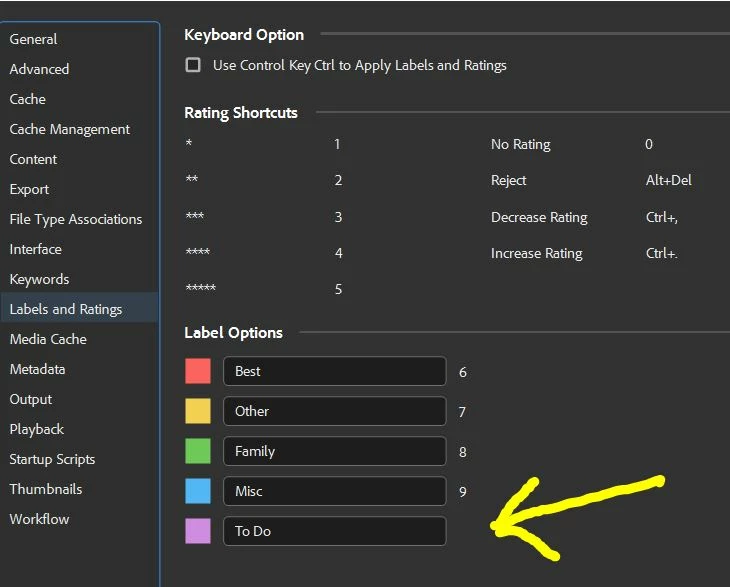
Bridge Preferences only allow 6, 7, 8, 9 keyboard shortcuts.

Purple has no shortcut, I have to right click on the image > Labels > select purple.
This is time consuming, CAN I ALLOCATE A SHORTCUT TO PURPLE?
3 replies

CMass
Community Manager
Community Manager
July 7, 2025

I'm moving the original post to the Bugs section so we can properly track it. The team has been made aware and is currently investigating the issue.

I'll share any updates here as soon as I have more to report. Thanks for your patience!

Rahul Saraogi
Community Manager
Community Manager
September 15, 2023
Hi all,

We are happy to announce the release of Adobe Bridge 2024 (Version 14.0.0.102).
This release has support for ‘Customizing keyboard shortcuts’ along with a few other features.

The detailed guide of using the keyboard shortcut customization feature is at : https://helpx.adobe.com/in/bridge/using/keyboard-shortcuts-panel.html

For a complete list of features available in Bridge 2024, please refer to the community post :

Regards,
Bridge Team
Bando
Known Participant
December 16, 2024

That is great, but the problem is that the Purple Label option is only available at the Application level and it does not exist for the panel or review level. So it can only be set at the application level and it works for the main panel. But does not work at the review window and there is no way to set a shorcut for it. 

Bando
Known Participant
December 16, 2024

Notice, there is no option for Purple Label

Rahul Saraogi
Community Manager
Community Manager
August 5, 2023

Hi,


The latest Beta build 14.0.0.57 has support for ‘Customizing keyboard shortcuts’ along with a few other features.


The detailed guide to using the keyboard shortcut customization feature is at : https://community.adobe.com/t5/bridge-discussions/keyboard-shortcut-customization-workflows-in-adobe-bridge-beta-14-0-0-57/td-p/13986171


For a complete list of features available in the Beta build, please refer to the community post: https://community.adobe.com/t5/bridge-discussions/adobe-bridge-beta-is-now-available-14-0-0-57/td-p/13986216


We would love for you to try it out and share feedback.


Regards,

Bridge Team