Inspiring
April 5, 2021

P: loses connection with files after folder is renamed

  • April 5, 2021
  • 137 replies
  • 7689 views

I've been using Lightroom for many years, and I've never experienced this problem until the last two updates to the application.

When I upload photos to Lightroom, the app creates a folder that is by default named with the date, in this format: 20210403.

I usually rename the folder, in Lightroom, with something more descriptive, just after the upload is complete. For example, 20210403_family-gathering.

Starting with the previous version of Lightroom, after I perform this action, Lightroom loses the connection with the files in the newly renamed folder. A question mark appears on the folder in the Navigation panel, and in Loupe view, every photo now displays a small exclamation mark in its upper right corner.

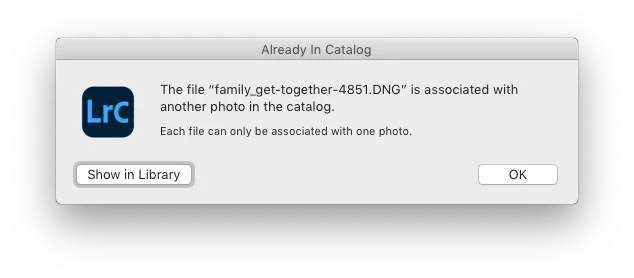
When I click on an exclamation mark, a dialog box appears, like the first one of three that I've uploaded.

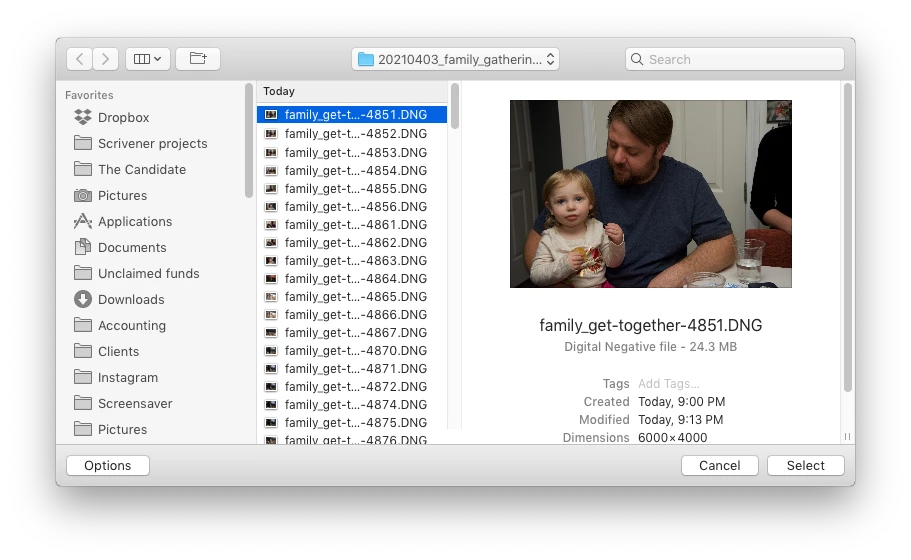
When I click on "Locate," another dialog box appears. For example:
The first file, which is highlighted, is the one that is missing (although at this point, Lightroom has lost track of all of the files in the renamed folder). When I click the "Select" button, this dialog box appears:
Lightroom is obviously confused, and the only way around this, in the current version of Lightroom, is to quit the application and re-launch Lightroom. After I relaunch Lightroom, it re-finds the files and the exclamation marks are gone. When I quit Lightroom after renaming the folder from the most recent upload, I back up the catalog. I don't know if this is necessary, but I back up the catalog whenever I quit Lightroom.
 
This is a bug, which never existed for me, until the last two updates of the app.
This topic has been closed for replies.

137 replies

Inspiring
April 28, 2021

I just updated to Big Sur 11.3 in the hopes that this problem would go away.  It didn't.  Well, it worked for about a day.   

It seems completely random:  Sometimes renaming a folder works fine, sometimes it loses just a few files and they eventually come back if I click away from the folder, and sometimes every folder and file is lost and won't come back until I restart Lightroom, and anything in between is also possible.    Any scenarios can play out in different ways on the exact same folder of images every time I try to rename it.  I've seen no pattern to it.   Again, find missing folder/image does nothing when selecting it in the finder.   Only thing that works is restarting Lightroom.    BTW, I've noticed that Lightoom can successfully point to a missing image if I select "show in finder"  (or cmd+r) , so it seems to know how to locate it, but still shows it as missing.  

This issue is happening no matter where any catalog file is located, and no matter where any of the images are located, it also happens across operating systems.    I have 2 external single USB drives, 1 external 4 bay Raid 0 usb drive, and 3 external 4 bay softraid 0 drives, two are thunderbolt with SSDs.   Lightroom resides on my internal SSD.   I have also tried running Lightroom Classic from Big Sur OS residing an external SSD, same issue.    A few more things to try:  clean re-install of lightroom (via creative cloud) on external SSD.   Try a catalog file located on internal SSD.    New catalog files seems to work for a short while so I may not know if problem returns for a day or two...

Inspiring
April 26, 2021

@Alexander   I just imported three small batches of images into three separate folders, in one session. By default, the folders were named with the dates the images were captured (20210424, etc.). Before quitting Lightroom, I renamed each folder, and none of the folders displayed question marks. None of the images contained in the folders were lost; none of the image file thumbnails displayed exclamation marks. This is the first time, since the renaming bug has appeared, that I've imported images into more than one folder and renamed the folders, and Lightroom didn't lose the folders and files.

Known Participant
April 24, 2021

Before proceeding with reporting this as a bug, my recommendation is that you upgrade MacOS to at least 11.2. Adobe is not going to test on every version of the OS, only on the latest. While not many, there have been apparent Lightroom and Photoshop bugs that were due to bugs in MacOS.


Inspiring
April 24, 2021

Hi Bill,

I am on a Mac but using OS 10.14.6.

Known Participant
April 24, 2021

Looks like you are on a Mac? If so and the OS is at 11.2 or later, I'd suggest reporting this as a bug to Adobe. 11.0 and 11.1 are buggy but 11.2 seems to be very clean.


Inspiring
April 24, 2021

@bill_3305731

Creating a new catalog and importing the images did not fix the problem.  Issue appears in any new catalog.  I had a single older catalog that did not exhibit the bug, so I copied it and added/removed images, created presets etc to replicate the catalog I am having issue with. Renaming folders worked perfectly fine for 2 days but today the bug is now in this catalog as well.  


Inspiring
April 24, 2021

Now I'm noticing that the missing images in a folder keep changing as I simply click from one image to another in the folder, also folder will sometimes flip from missing/not missing just by clicking on random images in the folder.  When folder is missing, everything inside it is missing.  But if I click on any image in that folder, the folder will suddenly come back and some of the images will too.  It's changing with every click.   

-

BTW this is with a catalog that was working fine for the last two days, but this morning has suddenly gotten this bug.  So depressing.  I thought I had finally figured out a way to avoid this.  So issue is NOT catalog related, or catalogs develop bug after some usage.  

Here is a link to the screen capture video

Inspiring
April 24, 2021

@Alexander

Tried what you suggested.   Folders do not show up as missing when I rename, but some/all of images inside will be missing.  When I rename a folder with missing images, the missing image count frequently changes.   So sometimes every image will be missing after rename, and then after renaming again sometimes a few of them will suddenly not be missing anymore.   Sometimes I can rename a folder and it works fine with no missing images.  It seems completely random.

Known Participant
April 23, 2021

@Alexander I can't recreate this problem on Windows 10 Pro fully updated. Is this strictly a Mac problem or is something else involved? 

alexskunz
Inspiring
April 23, 2021

I ran two imports this morning. Since I knew that I'd have to restart LrC anyway to fix the "missing" folder after renaming the first folder, I renamed the second folder as well.

The second rename operation fixed BOTH! 😳 (but the photos IN the folder remain marked as missing)

After that, I renamed a couple more folders, for testing purposes. Some went fine, then suddenly one's marked as missing again. The next rename operation fixed that one, again. How odd.

If anyone reading this still has the time and patience to test more — try a couple of consecutive rename operations without restarting LrC in-between. I'm curious what you observe.