


1mpala
Participant
March 23, 2026

P: Recommended Presets Not Working

  • March 23, 2026
  • 211 replies
  • 5650 views

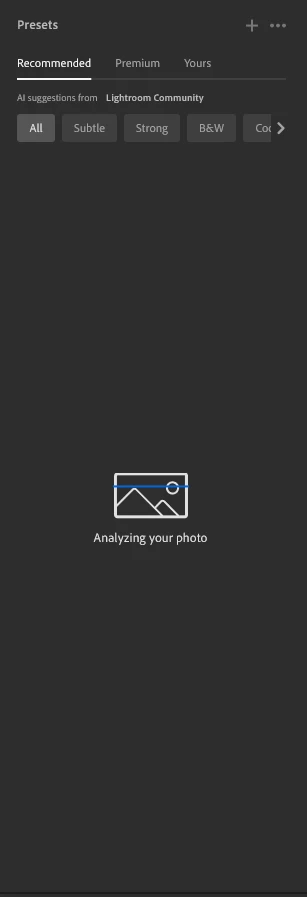
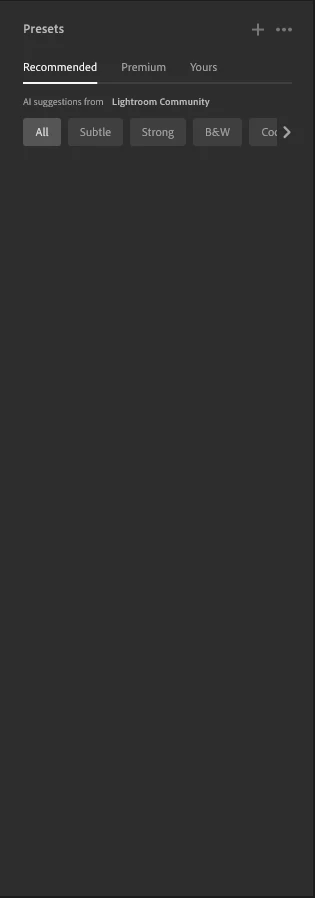
The recommended presets aren't loading anymore; it says they're being analyzed, but nothing happens. It used to work before—how can I fix this?
 

211 replies

untrolleyperdue
Participant
March 31, 2026

I've been having the same problem for a while now. Has anyone found a solution yet?

v2p_productions
Participant
March 31, 2026

Hi all,  Nice to see that some others are having this issue recently also.  One day it was working fine and then it was just gone.  Has anyone found a fix for this yet?

Thanks

Participant
March 31, 2026

I am having the same issue and I have reset my Lightroom Preferences already to no avail 

rodneyleewilliams
Participant
March 31, 2026

When I upload to the cloud I sometimes like to use AI suggested presets. However it is not working. I can use other presets but not suggested. Is there a fix?

erikamarie344
Participant
March 31, 2026

My presets are not loading at all. Its making it very hard to batch edit. 

James_Frazier8512
Participant
March 31, 2026

Lightroom Cloud isn’t loading the recommended presets, and I’m wondering if others are experiencing the same issue.

erik_0709
Participant
March 30, 2026

Is this going to be fixed???


Claire H.
Community Manager
Community Manager
March 30, 2026

Hi ​@bretweaver, let’s try to figure this out! If you haven’t already, please try resetting your Lightroom Preferences: https://adobe.ly/4o7JADQ

If that doesn’t work, we can continue to troubleshoot. I hope this helps! ^CH

bretweaver
Participant
March 31, 2026

I reset my preferences.  Shows some “progress” but still not fixed.  Now it spends more time “analyzing photo”, then shows two brief splashes about searching community presets, then doesn’t display anything.  

Update: the brief splashes in the panel only displayed on the first couple of photos I clicked on.  After that I just does a quick “analyzing” and then goes blank

This is an app breaking issue on an app you charge monthly for.  It’s literally removed your core feature and lots of users are reporting this.  This should be a global 0 for you guys

Arbek
Participant
April 1, 2026
Ron Reiss
Participant
March 30, 2026

SHIFT+P does not do anything anymore.

Claire H.
Community Manager
Community Manager
March 30, 2026

Hi ​@Ron Reiss, If you haven’t already, can you try resetting your Lightroom preferences? ^CH

Ron Reiss
Participant
April 1, 2026

Hey ​@Claire H., thanks for the reply. Still not working.

Daisy3D
Participant
March 30, 2026

I have been having the same issue for the last few days.

jeffk84115838
Participant
March 31, 2026

At first I thought it might be linked to the AI credits, but I still have plenty so this can’t be the issue.  I’ve been using this feature for quite some time and all of a sudden a few days ago it stopped working.  Frustrating.
