



RosaPerry
Inspiring
October 19, 2018

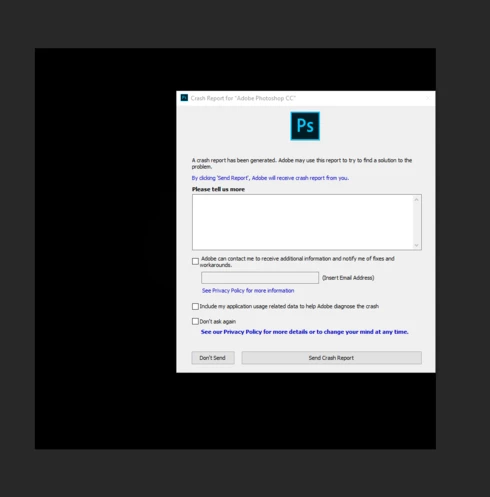
P: Crashes when using the filter Lighting Effects

  • October 19, 2018
  • 67 replies
  • 2002 views

I'm just not happy with this version of PS - it's buggy and frustrating. 

  • When using Filter, Render, Lighting Effects PS crashes every single time. 
  • I've also reported on this forum the problems with the Adjustment Layers and using Blend  modes. They are not working as they should. 
  • The Constrain Link doesn't work. It's a bug. . . and yes I know that you don't hold Shift to maintain aspect ratio now but when you un-check the Maintain Aspect Ratio constrain link on the toolbar and then use transform it still maintains aspect ratio. . .  un-checking the link should disable aspect ratio shouldn't it? The shift key + transform disables aspect ratio but doesn't correspond with the constrain link on the tool bar.


https://feedback.photoshop.com/photoshop_family/topics/cc-2019-blend-modes-not-working

https://feedback.photoshop.com/photoshop_family/topics/cc-2019-layer-blend-mode-color-isnt-working-c...

https://feedback.photoshop.com/photoshop_family/topics/free-transform-maintain-aspect-ratio-broken-a...


 Adobe Photoshop Version: 20.0.0 20180920.r.24 2018/09/20: 1193433  x64
Number of Launches: 1225
Operating System: Windows 10 64-bit
Version: 10 or greater 10.0.17134.1
System architecture: Intel CPU Family:6, Model:14, Stepping:3 with MMX, SSE Integer, SSE FP, SSE2, SSE3, SSE4.1, SSE4.2, AVX, AVX2, HyperThreading
Physical processor count: 4
Logical processor count: 8
Processor speed: 3 MHz
Built-in memory: 32627 MB
Free memory: 19421 MB
Memory available to Photoshop: 29878 MB
Memory used by Photoshop: 65 %
Alias Layers: Disabled.
Modifier Palette: Enabled.
Highbeam: Enabled.
Image tile size: 1024K
Image cache levels: 4
Font Preview: Huge
TextComposer: Latin
Display: 1
Display Bounds: top=0, left=0, bottom=1200, right=1920
OpenGL Drawing: Enabled.
OpenGL Allow Old GPUs: Not Detected.
OpenGL Drawing Mode: Advanced
OpenGL Allow Normal Mode: True.

This topic has been closed for replies.

67 replies

RosaPerry
RosaPerryAuthor
Inspiring
November 3, 2018
You're welcome Wim. I think v20.0 is sluggish too. 
Rosa
Participating Frequently
November 3, 2018
Thanks to the heads-up from Mark and Rosa I tried the old version (19.1.6) and lo and behold the crash is not there.
Here's what I do in current and previous version of Photoshop:

- Create a new document 1000x1000px 300ppi sRGB 8bit
- Use Filter - Render - Lighting Effects

After clicking OK v20.0 crashes but v19.1.6 does not. Also I have to mention that v20 boots slower and feels a lot more sluggish all around, both apps use the same GFX settings (advanced)

Inspiring
November 3, 2018
Yes, but it is urgent to produce a solution and not only 2 traces ... Please hurry up, wet your shirts and stop counting the $!

Yves Crausaz, Suisse, retraité actif dans le monde de la photo et des arts graphiques.
Inspiring
November 3, 2018
Yes, but this is NOT THE solution, I need new features brought by the latest version, so Adobe, please, quickly a fix of this version, both on Windows that makes PS look like on macOS who does not know how to complete the dynamic object!
Yves Crausaz, Suisse, retraité actif dans le monde de la photo et des arts graphiques.
Participating Frequently
November 3, 2018
Well I haven't apparently but it's easy to install older versions. For those who don't know and are creative cloud members:

- launch the Creative Cloud app
- click the arrow next to Open, then select Manage and then Other Versions
- install v19.1.6 from that list
Participating Frequently
November 3, 2018
Exact same issue here Ruth.
And here I thought it was my GFX card!
As for constrains, this reverse hinders workflow but I guess we have to adapt to it.
They could add a setting in prefs though which would solve the problem quickly.
Inspiring
October 25, 2018
I agree 100%. And I would rather get less-frequent releases of new versions in favor of more stable releases as well. I have been using Photoshop from its beginning. I used to upgrade to new versions with anticipation, now, especially since Adobe went to the subscription model, I upgrade with trepidation. 
Legend
October 25, 2018
Thanks. We have a separate issue tracking that.
Inspiring
October 25, 2018
For me, the Lighting Effects filter caused a Photoshop crash that not only failed to recover the file but when I went back and reopened it, several layers had disappeared - even though I had saved the file with those layers right before the crash - and the layers that had lighting effects applied were all black. I lost a couple hours of work.

Subsequent tries with Lighting Effects caused strange behaviors, such as layers with the Lighting Effects applied turning black at different zooms. Any attempt to save-as a flattened or exported file resulted in an all-black canvas when opening that file. Sometimes simply moving an image on a layer after applying Lighting caused parts of the image on that layer to turn black.

I worked around the issue by taking a screenshot at the largest zoom that didn't turn black to get a usable image to bring into my InDesign layout. Also, I noticed when applying Lighting Effects, a perspective grid would briefly appear, then a breakdown of the actions would appear in the layers palette until the effect finished.

I am also frustrated by the constrain proportions being reversed. When I don't want to do a constrained scale in the current aspect ratio, I have to hold the shift key to unconstrain the scale. 
RosaPerry
RosaPerryAuthor
Inspiring
October 25, 2018
On a side note Jeffrey PS CC 2019 displays incorrect processor speed. My Processor Speed should be 3408 MHz not 3MHz 


Here is the comparison of the two versions of Photoshop


Adobe Photoshop Version: 20.0.0 20180920.r.24 2018/09/20: 1193433  x64
Number of Launches: 1225
Operating System: Windows 10 64-bit
Version: 10 or greater 10.0.17134.1
System architecture: Intel CPU Family:6, Model:14, Stepping:3 with MMX, SSE Integer, SSE FP, SSE2, SSE3, SSE4.1, SSE4.2, AVX, AVX2, HyperThreading
Physical processor count: 4
Logical processor count: 8
Processor speed: 3 MHz
Built-in memory: 32627 MB
Free memory: 19421 MB
Memory available to Photoshop: 29878 MB
Memory used by Photoshop: 65 %
Alias Layers: Disabled.
Modifier Palette: Enabled.
Highbeam: Enabled.
Image tile size: 1024K
Image cache levels: 4
Font Preview: Huge
TextComposer: Latin
Display: 1
Display Bounds: top=0, left=0, bottom=1200, right=1920
OpenGL Drawing: Enabled.
OpenGL Allow Old GPUs: Not Detected.
OpenGL Drawing Mode: Advanced
OpenGL Allow Normal Mode: True.


Adobe Photoshop Version: 19.1.6 20180808.r.398 2018/08/08: 1185588  x64
Number of Launches: 1219
Operating System: Windows 10 64-bit
Version: 10 or greater 10.0.17134.1
System architecture: Intel CPU Family:6, Model:14, Stepping:3 with MMX, SSE Integer, SSE FP, SSE2, SSE3, SSE4.1, SSE4.2, AVX, AVX2, HyperThreading
Physical processor count: 4
Logical processor count: 8
Processor speed: 3408 MHz
Built-in memory: 32627 MB
Free memory: 20915 MB
Memory available to Photoshop: 29878 MB
Memory used by Photoshop: 70 %
Alias Layers: Disabled.
Modifier Palette: Enabled.
Highbeam: Enabled.
Image tile size: 1024K
Image cache levels: 4
Font Preview: Huge
TextComposer: Latin
Display: 1
Display Bounds: top=0, left=0, bottom=1200, right=1920
OpenGL Drawing: Enabled.
OpenGL Allow Old GPUs: Not Detected.
OpenGL Drawing Mode: Advanced
OpenGL Allow Normal Mode: True.
OpenGL Allow Advanced Mode: True.


I will open a new problem for this if you want to delete this comment.

https://feedback.photoshop.com/photoshop_family/topics/ps-cc-2019-displays-incorrect-processor-speed
Rosa