


Inspiring
January 24, 2018

P: Histogram behaviors are different from prior versions

  • January 24, 2018
  • 104 replies
  • 3328 views

I am experiencing problems with the histogram in 19.1.0. I am a mid-career fine art photographer by profession, and have been a PS user since Version 2. I am also a member of the Authors Guild, and write on photography for various publications. I have been purposely hanging back at PS 2015.5.1, as it has served me well. Yesterday, I decided enough, is enough, and installed 19.1.0.

This first histogram is at Cache Level 1 for the file values of a 36Kx24K pixel 16-bit grayscale file.
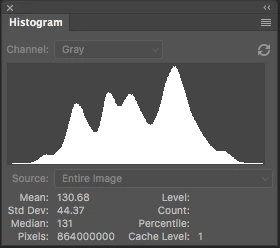
 

Please notice how there are "tails" (lines) out each side of the main body of data, indicating that there are small levels of data almost to the limits of range. For me, it is important to know about these tails exist so that I do not end up creating a clipped condition when applying a curve function. We use S-curve limiters to compact the tails without clipping.

Here is the exact same file at Cache Level 1 for the same 36Kx24K pixel 16-bit grayscale file, but this time in 19.1.0.
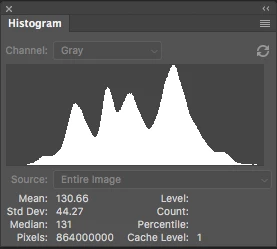
 

Please notice how there is no tail indicating data extending to the left, and rather a botched one going to the right. This is not helpful! You will also notice that the Mean and Standard Deviation values differ.

Further, it use to be nice to be able to take the cursor and scan across the histogram with a display of level and count showing up for whatever was under he cursor. This seems to have gone away in 2015.5, and is even worse in 19.1.0.

Thanks for your help.

Pete

This topic has been closed for replies.

104 replies

Inspiring
May 10, 2020
I was incorrect about there being no zero count bins.  

But something more disconcerting is that I mad the Jeff's file RGB (each is same as the gray value).  I then ran the Histogram on the 16 bit RGB image.  See attached:

On the left is a Histogram from my plugin and it shows live data from the low level to about 8 bins from the high level edge.  This is what the gray histogram should look like.  On the right are the output of the latest PS version run on the RGB image.  There are the parts missing as before in the discussion but look at the blue one.  It is much like Pete's example.

There seems to be a bug in the RGB version which also might show up for the grayscale one. 
 

Please try doing this yourselves.  I didn't measure the height of each histogram but the bottom one might a pix smaller.

My version is what I'm going to purpose when I've viewed enough data to feel secure in it.
RONC
Inspiring
May 9, 2020
In playing with Jeff's image, I find that there are no "Zero" count bins so every bin position should show something.  I will show this and more when I post in thread.  I think that there a problems with the present Histogram but this does not explain what Pete is showing us.

RONC
Todd Shaner
Legend
May 9, 2020
Histogram, Curves, Levels are the only places I can think of that would benefit from improvements for better accuracy.
Inspiring
May 9, 2020
I'll put together a separate post to talk about enhancements to the histogram displays.  Is there any other option other than Histogram, Curves, Levels. and ACR where the Histogram is displayed?  This should be carried across all Adobe programs with histogram displays.

I can't duplicate Pete's missing tails so expect it is a parameter not a bug but like the disappearing histogram before I remembered the collapse to icon option, I can't think of what.

RONC
Legend
May 8, 2020
You'd be surprised. A lot of executives are hardcore users of our products.
Legend
May 8, 2020
Yep. Todd is a kind helper/moderator and he meets with Rikk and I on a regular basis to discuss issues and the products.
Legend
May 8, 2020
2. Yep. I was able to reproduce the issue with the intersection line not showing, so that's in engineering's hands.

We're down to trying having a file/setup to reproduce the tails issue #1.
Todd Shaner
Legend
May 8, 2020
Pete, in order to investigate the remaining open issue concerning missing histogram tails can you please provide information for the two system models you are using including OS version, GPU model, and display model, including actual resolution settings if different than the display's native resolution, and OS scaling setting if other than 100%. Since the missing histogram tails are only 1 pixel in size I suspect display path interpolation may be the cause for their disappearance.
Todd Shaner
Legend
May 8, 2020
The best way to do that is by creating a separate post here in the Photoshop Family forum. Please keep it specific and focused on improving the PS histogram(s). Once completed please copy the URL link to that post back here in a reply. That way people landing here can add their comments and 'Me To' vote on your post, which helps to get Adobe's attention. Adobe Company Admin *Jeffrey Tranberry has replied here and is following this post.

If you come up with any ideas on how to fix the histogram "missing tails" on *Pete Myers systems please let us know in a reply back here. It's clearly a separate issue unrelated to the histogram accuracy question.
Todd Shaner
Legend
May 8, 2020
The Champion title just means Adobe has recognized the individual's contributions and product knowledge and offered ability to communicate directly with Adobe Product Management. We also have the ability to moderate posts and report issues.

I am also an Adobe Community Professional (ACP), which is a separate program that provides the ability to work more closely with Adobe Forum and Engineering staff including prerelease testing.

https://community.adobe.com/t5/user/viewprofilepage/user-id/9983072