


_nicdean
Community Expert
Community Expert
January 30, 2024

P: MOGRT: ALL CAPS bug random lower-case letters

  • January 30, 2024
  • 17 replies
  • 3351 views

There is a long-standing bug with the faux-style ALL-CAPS (TT) option in Font Properties for text layers. This bug affects both Premiere Pro graphic Text Layers and text inside MOGRTs.


When user applies ALL-CAPS, the text randomly displays upper/lowercase characters instead of all-caps characters. 
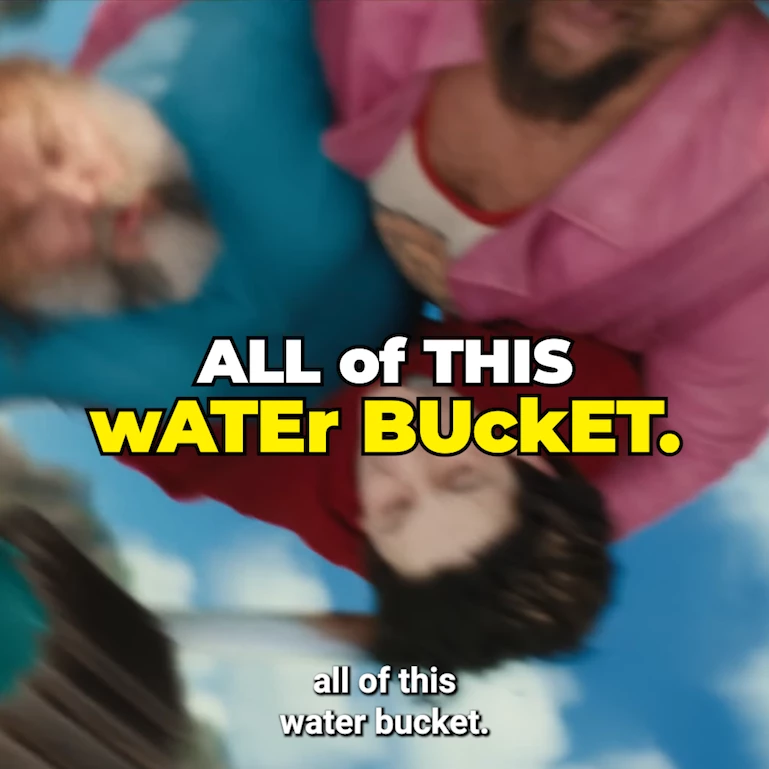
 

The fix is to manually type the capital characters (a -> A) instead of using the all-caps button.


Sometimes, these also work as a temp fix for the bug:

  1. Uninstall/reinstall font
  2. Manually clear all Media Cache files
  3. Restart Premiere Pro


This bug disproportionately affects plugins that use MOGRTs for text templates (such as Mr Horse Animation Composer, Captioneer, etc)


Here are many user reports of this issue:

  1. https://www.reddit.com/r/premiere/comments/134pyqe/random_letters_are_lowercase_when_all_caps_is/
  2. https://community.adobe.com/t5/premiere-pro-discussions/mogrt-titles-render-uppercase-lowercase-randomly/m-p/15399924
  3. https://community.adobe.com/t5/premiere-pro-bugs/all-caps-and-faux-italic-bug/idi-p/14970178
  4. https://community.adobe.com/t5/premiere-pro-discussions/random-upper-and-lowercase-letters-in-previously-exported-video-will-not-stay-all-caps/m-p/12609694
  5. https://community.adobe.com/t5/premiere-pro-discussions/text-bugs/m-p/14391297

17 replies

Theresa Rostek
Community Manager
Community Manager
April 24, 2026

Hi everyone,

Can you tell me if you’ve seen this issue on projects that have been built with 25.4+ or is it only happening to projects that were built prior?

Thanks,
Theresa

Motion Graphics, Premiere Pro
Participant
March 23, 2026

I confirm, the error still occurs. When opening the project it may appear, but the next time it might not be there. Restarting CC helped me several times. There is an opinion that there is some issue with font synchronization.

saarangp
Participating Frequently
March 23, 2026

This bug still exists in Adobe Premiere Pro v26.0.2
Is this so hard to fix? Any ETA for this bug’s solution?

MyerPj
Community Expert
Community Expert
February 3, 2026

OK, so, this new forum software (by default) is putting the most recent on top, so, ‘Above this’ in a post means ‘Below’. I see some links in the right-side “Related Posts” which seems Illustrator was having some problems like this also.


Related posts

_nicdean
Community Expert
_nicdeanCommunity ExpertAuthor
Community Expert
October 30, 2025

@MyerPj Indeed, this bug is unresolved

MyerPj
Community Expert
Community Expert
October 30, 2025

Indeed. The two posts above yours both say the issue is not fixed, so hang in there. The OP of this thread @_nicdean is a developer himself and seems to be still tracking this.

yash-lucid
Inspiring
October 30, 2025

I think my bug got lumped into this megathread, am I correct? Oct 2025 with latest PPro, still an issue that randomly pops up. See the b, where capitalization from AE is not pulling through. @MyerPj 


Participant
August 25, 2025

This is still an issue in 25.4

Participating Frequently
August 15, 2025

Good News, the bug is fixed in CC25.4!

_nicdean
Community Expert
_nicdeanCommunity ExpertAuthor
Community Expert
August 14, 2025

This is a dumb workaround but it works in MOGRTs and AE until this bug is fixed.


Put this expression on the Source Text of your text layer:

// Replace text with uppercase text if all-caps button is true
let myText = thisLayer.text.sourceText;
let targetStyle= myText.style;

if (targetStyle.isAllCaps) {
	myText = myText.toLocaleUpperCase();
};

myText