

















Design the future of fashion, win Firefly Pro 👗✨
Photoshop (Beta)
Recently active
When testing the generative rotate tool, I get the following error:
I was able to use the neural filter and then it shut down. I have work to do. I unloaded and then reloaded the program and there is still no functionality.
I just downloaded the newest beta version of PS. The reference image is not behaving anything like it used to. I used to make a selection, put in a prompt to influence the fill, and then pick my reference image and it just worked. But now, it kicks out my prompt and when my reference photo is loaded, it's showing background cut out in the reference photo and it no longer just blends it into my scene. It's strange and not working normally at all.
I am an active user of Adobe Photoshop Beta. I urgently need to regain access to Photoshop Beta version 26.6.Reason for my request:I actively used the Reference Image feature in version 26.6, which was perfectly suited to my professional needs.After the update, the logic of this feature has changed, and now I am unable to perform my workflows as before.My ability to use the previous implementation of the Reference Image feature directly affects my work and professional obligations.I kindly ask:Please consider restoring my access to Adobe Photoshop Beta 26.6 or provide an alternative solution that allows me to use the previous logic of the Reference Image feature.Let me know if it is possible to temporarily roll back to the required version or obtain a separate installation file.
Using Ai Tools like Nano Banana makes everything blurry. Asking for a 2400 x 3000 pixel image to be restored. Comes out MUCH less sharp than original, often unusable.Originalnano
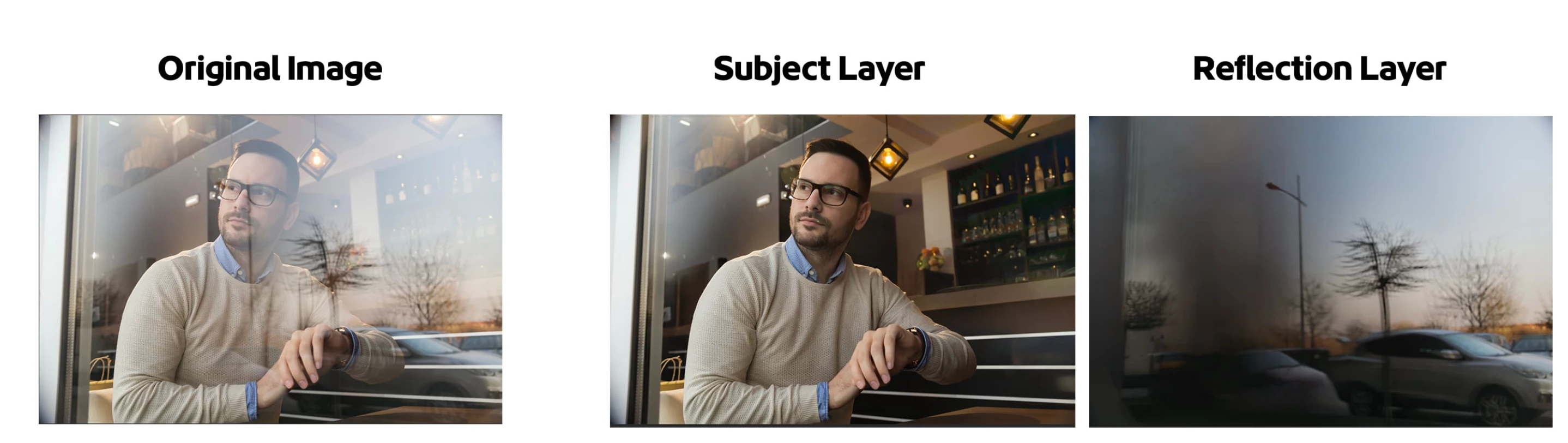
The AI-powered Reflection Removal feature lets you easily extract and remove reflections that impact the majority of your scene. The Reflections Removal command eliminates large and prominent window reflections in just a few steps, allowing your image's subject to stand out clearly. While AI-powered, it is not generative AI and does not use credits.How to:Open a file with reflections that dominate the image. Edit > Reflections Removal…The Reflection Removal Dialog appears Choose the quality of the results from the pop up. Turning on "Create separate reflection layer" will give you both the subject "Reflection Removal" layer and a layer with the extracted reflection. Click [OK] The "Reflection Removal" layer and, if checked ON, the Reflection layer appear in the Layers panel. Adjust the Layer Opacity of the subject "Reflection Removal" layer to bring back subtle reflections if desired. Adjust the Opacity slider in the layers panel to bring back subtle reflections for a natural
Photoshop (Beta) 27.5Windows 11When I am cleaning up scratches and dirt, the program will suddenly stop as if I had selected cancel and didn’t have any changes, but Bridge stops in the meantime. I am working on a .tif file. I can’t make a screenshot because it doesn’t do it consistently, and it doesn’t do every time. Besides, when it does go away, there isn’t any photo left. It does this in Beta and the regular Photoshop 27.4. I have been having to keep selecting ‘Done’ after I clean up three or four scratches because if I do more, it suddenly disappears. And then I have to start over with Bridge that also stopped. Although it has happened before, not like it does now. I can’t even get one photo done because it is doing that consistently. I should be able to clean up the whole image before I have press ‘Done’ and have the whole image cleaned up. I have been doing this for a number of years, but it has had this problem for about a month now. The problem might be in Bridge beca
Wenn ich ein Bildfläche für “Generieren und Füllen” markiere und anschließend “firefly fill & expand” wähle, wird für längere Zeit das normale Arbeitsfenster von Firefly sichtbar. Dann jedoch erscheint die Nachricht “Der Dienst reagiert nicht.Überprüfe Deine Internetverbindung.” (siehe Attachment).Diese Überprüfung meiner Internet-Verbindung ergibt jedoch jedesmal ein OK.Wenn ich anschließend (als Notlösung) eine frühere Version von Firfly auswähle, funktioniert es dann ohne weiteres Problem.Die Fehler bei “firefly fill & expand” jedoch treten nun unverändert bereits gut ein Monat lang auf.Vielen Dank für die Mühe, hier eine Lösung zu finden.= Thomas Wittmann =
My photoshop Beta app froze while running the generative expand. I closed out the program with the task manager, but now when i reopen it, it launches a recovered image trying to use the generative expand and freezes again. I tried uninstalling, powering off the computer, looked for temporary files and can't get nothing to work. What can I do?
I am having an adobe premium subscription plan. But Beta tab is not available in my CC Desktop app. Tried reinstalling the app still it’s not there.
Is the new photoshop beta rotate 2D image asset after rotating a 3d Gaussian splat? Also what upscaler are you using after?
No matter what portrait I use I can not get select subject to pick out the model from the image.It uses to have no problem before but I have noticed all I ever get now is an error message. I know this image maybe a bit difficult but I have previously successfully a lot harder.,
Is there a limit to how many layers AI can rename at once in Photoshop Web Beta? I’ve been testing the new AI layer‑naming feature and it works great, but I’m wondering whether there’s any upper limit when renaming a large number of layers in one go.
I’ve downloaded the 27.5 beta version of Photoshop, and I’ve tried using Ctrl+T to get a bar at the bottom—that doesn’t work. I do see the rotation option in the Properties panel, and that works fine. However, the Harmonize button, which I’ve seen in some videos, is not available. Do I need to enable something else? It seems to be missing, or there may be a reason for it.
rotate object doesn’t shoe in latest beta 27.5, in fast transform ttolbar or the Edit menu
I open image and duplicate layer. select all, type prompt “Change style to black and white graphic novel” it replaces my image entirely in graphic novel style.
I could not find photoshop beta in my creative cloud desktop app on my PC.I happened to find a simple solution:go to adobe.com/apps. It look just like the creative cloud desktop app if you're logged in, and I found the beta photoshop there. But here's a question: I see 9 beta apps there. On my desktop creative cloud app, I see only one - Illustrator Beta. Any idea why or how to fix it?
Hi everyone,I’m currently using the latest Photoshop Beta (version 27.0.0).The Generative Fill with Firefly works perfectly — no issues at all.However, when I switch the model to Nano Banana (Gemini 2.5 Flash Image), the generation doesn’t produce anything.No error message appears — it just completes instantly without changing the selected area.I’ve tried multiple prompts, different selections, and new documents, but the result is always the same: nothing happens when using Nano Banana, while Firefly generates as expected.Is this a known issue with the current beta build, or is there something I should reset or re-enable to make it work?Thanks for your help!
if any changes done to the action eg. change in canvas size 9 inch to 12 inch it will not reflect in the action its remains same as 9 inch
Weak Session Token Randomness vulnerability found during pentesting in ColdFusion 2023 Administrator During a recent pentesting exercise, we identified a vulnerability related to Weak Session Token Randomness in ColdFusion 2023, specifically affecting the Administrator interface. Our analysis shows that only about 6 out of 80 characters in the session cookie have an acceptable level of randomness, which raises concerns about session security and potential risks.Could you please advise if there are any configuration options or recommended best practices in ColdFusion 2023 to improve the randomness and security of session tokens for the Administrator? Is it possible to change the session ID generator or enable a more secure session management mechanism?Any guidance or recommendations on how to mitigate this vulnerability would be greatly appreciated.Thank you in advance for your support!
Concerne les versions 27.4 et 27.5 de photoshop :préférences/curseurs cocher “taille rféelle du curseur” et 1 - retour immédiat en édition de la photo en cours : le curseur est toujours une croix2 - rédémarrage de photoshop : même résultat
Photoshop’s text style system is badly undermined by the lack of visual feedback around what styles and overrides are actually active.When I select text, Photoshop should clearly tell me: the current paragraph style the current character style what attributes come from each what has been manually overridden whether the selection contains mixed states Instead, the current experience often feels opaque and inconsistent. A style gets applied, some things change, some do not, and Photoshop gives very little explanation why. That makes the feature feel buggy even when it may technically be following an internal hierarchy.Please add: clearer active-style indicators visible override indicators a way to inspect effective formatting a reliable, obvious way to strip overrides and return text to the actual defined style This would make Photoshop text styling dramatically easier to trust and use.
Remix with Firefly Community Gallery
Thousands of free creations to fall in love with and remix in Firefly.
Already have an account? Login
Enter your E-mail address. We'll send you an e-mail with instructions to reset your password.