















Design the future of fashion, win Firefly Pro 👗✨
Questions
Recently active
This was created for our Career Coaches to do push in lessons in grades 6-12. It is an introductory lesson to career exploration and Adobe Express. The slides feature a "messy" objective and slides for key vocabulary to increase comprehension among different learning groups. We used Pathful for career exploration but any platform can be used. Students use the Book Cover Guided Activity to complete the lesson. Designed to be a mini lesson and a short acitivity for student engagement (estimated classtime: 45 minutes).
It’s not a question but I wanted to share how our Turriff and Huntly ACE meet-up/coffee and create sessions went. Week 1 I was with a group of 10 educators in Turriff. A couple had used Adobe Express before but the rest were newbies. Then yesterday I repeated the session in Huntly with a group of 18 educators. There were more in this group who had done a bit of Adobe dabbling before! We focussed on the Teach section looking at the wealth of resources and templates which can give us a starting point so we don’t have that “blank page” moment where you struggle to come up with ideas. Then we all had a go at the Community Quilt so we could see how easy the scaffolded Guided Activities makes a task. I was tempted to go with the Yearbook persona (loving this month’s challenges!) as a fab way to reflect on the year but I love how we can use the Community Quilt as a getting to know you activity - perfect for those transition visits with your new learners - so I stuck with that. It was also a g
As an educator and long-time Adobe user, being a part of the product feedback process has been an invaluable experience! It has been amazing to have a hand in receiving the resources I need to support students with emerging educational technology as I incorporate Adobe Express and other professional products into the classroom on a daily basis. Through this collaborative partnership, my students have even had the opportunity to sit down with the Adobe team and speak freely about their experience with Adobe Express, showing them that their opinions also matter – how powerful is that?! With thoughtful features like Generate Activity, I have been able to quickly assign creative exercises that support our students’ learning and still provide freedom for artistic interpretation. Now that this new feature is live, educators across the globe are finally able to generate a quick and relevant activity for their class that challenges students through creativity! By completing these activities, s
Being part of the feedback process for the new Generate Activity feature has been one of those rare moments in education where you can actually see your voice make an impact. As a middle school librarian, I’m constantly looking for tools that showcase student creativity while still being realistic for teachers’ time and workflow. Contributing feedback and then watching those ideas show up in the final product was beyond meaningful — it reminded me that our classroom realities matter.Generate Activity has definitely changed the way I collaborate with teachers. Instead of spending hours designing activities from scratch, I can generate a starting point in seconds and customize it for the lesson. This sparks collaborative conversations with my teachers and removes any barriers between inspiration and implementation!When our RLA department began their Holocaust novel studies, an RLA teacher and I partnered to build a project using Generate Activity.We used the feature to build a Timeline o
!--scriptorstartfragment-->Hello everyone, I am currently using a Dell Precision 5520 workstation equipped with an NVIDIA Quadro M1200 GPU. After extensive testing, I have confirmed that Photoshop and Illustrator 2024/2025 are unstable on my system. Due to DirectX 12 feature level limitations of the Quadro M1200, the applications frequently freeze and become unusable for production work. Photoshop 2023 (v24.x) and Illustrator 2023 (v27.x) are the last versions that run stably and reliably on this hardware configuration. To be clear, I am NOT requesting anyone to share installers, files, or download links. I would like to ask if there is any official or supported way to:- Access or enable Photoshop 2023 and Illustrator 2023 (legacy versions) on an active Creative Cloud subscription, or- Request account-level legacy access from Adobe Support due to confirmed hardware incompatibility with newer versions Any guidance from Adobe staff or knowledgeable community members would be greatly a
Hey everyone! 👋I'd love to start a thread where we can post ideas, templates, or even pictures to help share with each other what we use as our very first project with students when introducing Express!I teach a wide range of grades (Kinder-5th) so I have a different approach depending on the group of students I have in class but am always looking for other suggestions.In your response, please include -- • the grade/s you use the idea/template with 👩‍🏫 • a link, picture or description of the idea 🔗🖼️️ • anything else you think might be helpful 💭I can't wait to brainstorm with all of y'all! 🥰
Need a template for March to honor the women in your community? Here is a template to honor the women in your community:https://new.express.adobe.com/design/userTemplate/urn:aaid:sc:US:d4e48af1-64c3-5f9d-b4af-df783900b9bd
We had great fun exploring the different features available in Adobe Express. Our NI innovators demonstrated the use of the drawing tool, guided activities and more.
This March it is Science week in the UK. The theme is ‘Curiosity; What’s your question’ I created a promotional school video with my pupils (pupil voice) to showcase what our science department is putting on.https://new.express.adobe.com/publishedV2/urn:aaid:sc:EU:c9cb143d-f26e-438c-ac2b-fb7561478b41?promoid=Y69SGM5H&mv=otherPoster and video competitions can be coordinated through an Adobe classroom and join code and it is quick and easy to create QR codes too all within Adobe Express.It was fun putting the video together with pupils and it got me thinking what other school events/competitions/clubs could be coordinated in this manner?
In Wales, we’re all asked to publish a Curriculum Rationale — something that explains what our school is about, what matters to us, and the kinds of learning experiences we offer.I wanted a way to share ours that looked professional, was easy to update, and felt a bit more engaging than a PDF on a website — and Adobe Express Webpage has been perfect for that!With Adobe Express, I was able to:Bring our rationale to life with images, videos, and linksTell our school’s story visually in a clean, modern formatUpdate content quickly whenever things evolveShare the link easily with staff, families, governors, and the wider communityIt’s honestly such a great tool — not just for classroom projects, but for educators and leaders to share information and ideas digitally in a professional way.If you’re thinking about how to present your school’s curriculum rationale (or any school-wide initiative) in a way that really shines, give Adobe Express Webpage a go. It’s simple, flexible, and looks fant
I was excited to lead sessions for students, at Stranmillis University, showcasing Adobe Express. Participants had the opportunity to explore lots of features and create their own portfolio. It is always a pleasure to meet future creative educators. Here are some of our favourite creations:
Hello!Here are the resources from the Dynamic Designs: Explore Animation, Drawings & Layers in Adobe Express!We'll be LIVE on Friday, January 23 at 11am PT (2pm ET | 7pm UTC). You can catch a replay on YouTube too! https://www.youtube.com/live/JMlrHX9UsRY?si=A4xDDspQHpq8a1Q3UK ACE Innovator Suzanne Pritchard's Festive Drawings with Adobe Express Playlist: adobe.ly/festivedrawsDrawing with Kyle Webster Adobe Express Drawing PlaylistKeep learning with the Adobe Creative Educator Community and become an ACE Leader today! Sign up at adobe.ly/acesignupWant to take it to the next level? Apply to become an ACE Innvator! Applications are open until January 31, 2026. More info can be found here: https://adobe.ly/aceinnovator2026 Please keep us posted on what you create with Adobe Express. Tag us on Social using #AdobeEduCreative ❤️ Ann
I am using the Adobe XMP Toolkit to add or modify XMP metadata in supported file formats. Currently, when XMP data is written and CloseFile() is called, the toolkit creates a temporary file and then replaces the original file with this temp file. From my understanding, this replacement is handled internally (possibly via the DeriveTemp API). Functionally, this works as expected. However, this approach is not ideal for my use case because when the original file is replaced the file attributes and permission are not same as previous. What I am looking for is a method or recommended approach to update or replace XMP metadata directly in the same file And also i found a method in TXMPFiles.incl_cpp. the method is: #if XMP_StaticBuild // ! Client XMP_IO objects can only be used in static builds. XMP_MethodIntro(TXMPFiles,bool):: OpenFile ( XMP_IO * clientIO, XMP_FileFormat format /*
Hi everyone,I’m working on creating simple academic visuals and reports for students, and I often need to calculate weighted grades accurately before designing charts or summaries.Manually computing weighted averages for multiple subjects with different credit units can be confusing and time-consuming, especially when accuracy matters for final results.I wanted to ask:What’s the best method you use to calculate weighted grades?Do you rely on spreadsheets, formulas, or online tools before moving to design or presentation work?Thanks in advance!
Hello ACE Community!! ❤️ January is here, which means one thing around our corner of the internet… a fresh start for creative thinking is officially live! This month is all about reflection, imagination, and low-lift creative wins giving ourselves (and our students!) space to explore goals, identity, and growth without pressure. This thread is your creative corner to gather, try something new, share what you’ve been creating, and cheer each other on as we kick off 2026 with creativity and intention. How to Join In Share your January wins: Drop a link to any social post, video, or project you’ve tried this month. Add a quick reflection: What brought you joy? What surprised you? Use the Reply button so everything stays in one thread (easier for us all to scroll and celebrate together!). Not sure what to share? New-You Starter Pack ❤️ Try it here: https://adobe.ly/start2026 Using Adobe Express, students design a “starter pack” that represents personal goals, or demonstrates deep un
I used this month’s Adobe Express Starter Pack Guided Activity to help students analyze a character in a whole-class novel by focusing on the objects that define them. Think identity, growth, symbolism… without another worksheet in sight. 📚The best part? You can remix the instructions inside the guided activity and personalize it for your classroom: any book, any subject, any grade, any character. Model it once, then let students take the lead.This worked beautifully for character analysis, SEL conversations, and student voice (hello, Auggie from Wonder 🧡).🔁 Remix it🎨 Customize it📖 Make it yours Thanks Adobe for EDU for making Guided Activities customizable for our students!🔗 https://adobe.ly/3YFEuV9.
From symmetrical word snowflakes and stained glass colouring pages to northern light silhouettes and geometric polar bears - these festive drawings progress in skill from Lesson 1 to 10 and have been created by the wonderfully talented Suzanne Pritchard, ACE Innovator at Inspire Learning in the Scottish Borders. 🏴 Take a look and try them out with your class: adobe.ly/festivedraws Share your creations here or via #AdobeEduCreative
🎁 Welcome to Day 6 of the 12 Days of Creativity!Today’s activity invites students to express their creativity and demonstrate their learning using the Vintage Postcard guided activity. This activity is fast, flexible, and perfect for incorporating into any subject area. How to Complete the Vintage Postcard Guided Activity in Adobe ExpressOpen the “Send a Vintage Postcard” Guided Activity in Adobe Express. (CLICK HERE FOR LINK)Customize the “orange” text to your chosen destination. (Ex: Change “Hawaii” to “Cincinnati” 😉)Then, update the “yellow” layer directly underneath it with the exact same word to create the shadow effect!Use the Replace feature to swap out the middle layer with a photo, graphic, or AI-generated image that represents your location.Make it your own by customizing the color theme, adding fun elements, and writing a catchy tagline or short message. Classroom Applications & Remix Ideas (https://bit.ly/3JRsWud)🗺️️ Social Studies: Research your Hometown's history,
Future You Activity:Use this template as a way for students to create goals about what they want to accomplish for their future. How I remixed:Imagine it’s the year 2045. Snow days look nothing like they do today and students’ imaginations get to go wild! In this activity, students will create a news report from the future using Adobe Express. Students will explore futuristic solutions to snow days or other school cancellations, like holographic teachers, AI snowplows, or teleportation pods, and share their ideas through a short video. Other Classroom Applications & Remix Ideas:Tie into a narrative writing unit: Students draft their news script before designing.STEM twist: Students invent a futuristic snow-day technology and explain how it works.Speaking & Listening: Students record a voiceover for their news report.Remix prompts:“Future Holiday Traditions”“Winter Weather Forecast from the Year 3000”“Snow Day Innovations of the Future” How to Do It:Open the “Record a News Sto
We used this template with 4th graders, they were provided with a blank turkey and then they use insert object to disguise thier turkey. Before the lesson we read "Twas the night before Thanksgiving". Spoiler alert at the end of the story the students in the book sneek out the turkeys so the book goes along well with the activity. save for next year. There are examples in the template as well to give students ideas. Tip to get hair to be its best I type wig instead of hair. Disguise a turkey remix
I had the most fun with this creativity project! It was so cute and the kids had so much fun designing. For Day 9 of the 12 Days of Creativity, we sugar coated our favorite animal. Our kids had such a blast creating candy animals that I had to take advantage of the excitement. We added all of our animals to a classroom story and created a movie in Adobe Express. Check out my post and my kids' projects! Other fun classroom ideas: -Create a collaborative movie by importing each animal into another project. -Write a story about the animal-Create a marketing plan or store front to sell your animals. -Explore possible biomes for your animal or create new biomes and explain their adaptations. How to do it:1. Visit the 12 Days of Creativity bar in your Adobe Express dashboard and choose "Sugar Coat Your Favorite Animal". [CLICK HERE for a direct link]2. Click on the animal in the middle to reveal the editing menu. Click on "Generate Image" to see the AI prompt that was already loaded. 3.
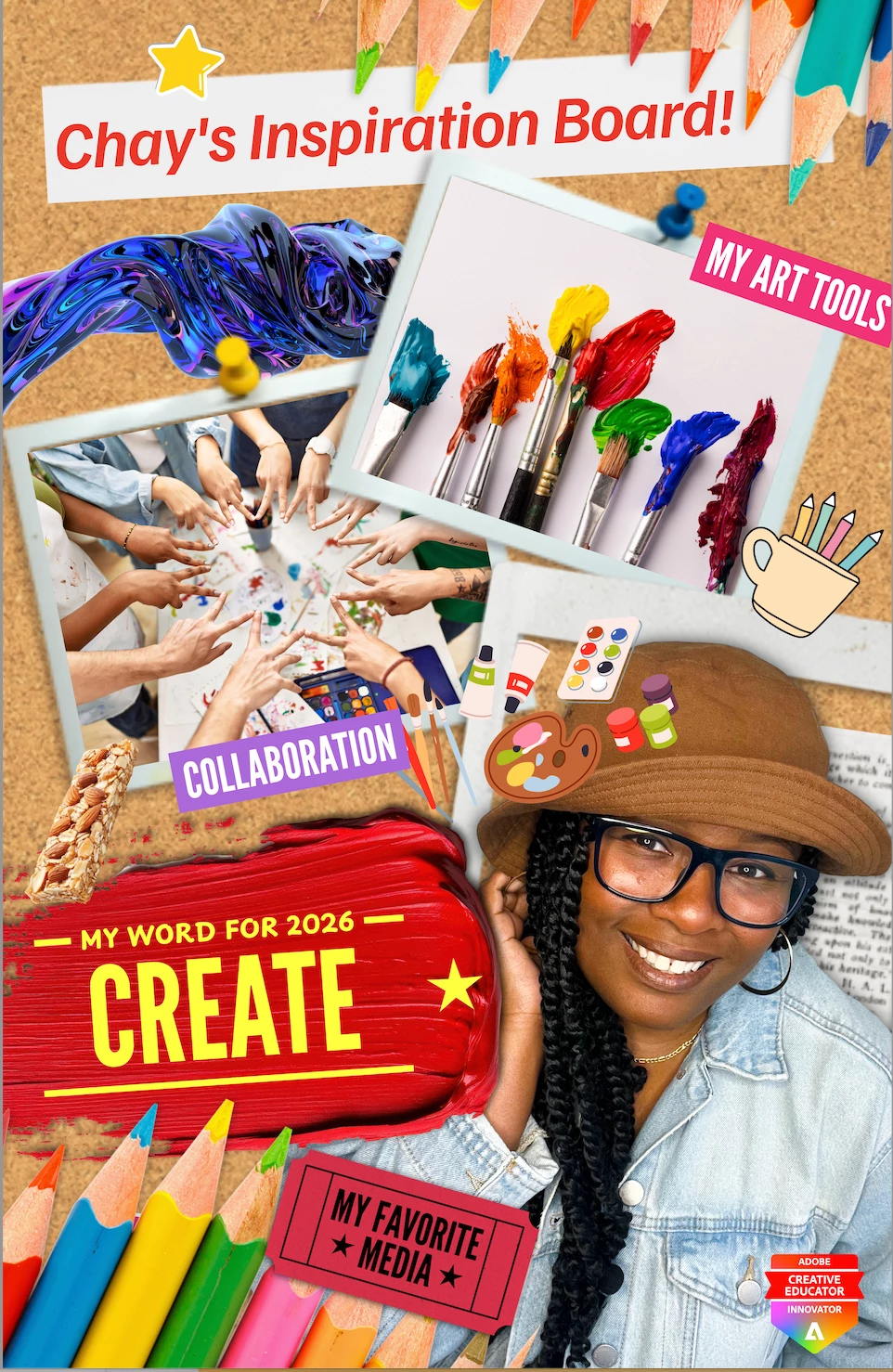
For Day 12 of the 12 Days of Creativity, my students and I curated an Inspiration Board using @AdobeExpress. They had such a blast designing their boards that I couldn’t help but lean into the excitement. We even printed one using a large-format printer, and seeing their work come to life was pure fire!! I had the most fun with this creativity project—it was absolutely amazing, and my students were all in from start to finish. Check out my Instagram post to learn some of the inspirations behind their boards. Click here to see student examples. How to do it:Visit https://adobe.ly/12DOCday12, for the template and customize it with images, text, colors, and icons.Encourage students to curate visuals around a theme, mood, or idea. Share digitally or print student work for display. Thanks everyone!Feel free to visit my on IG @chayarts_edu Chay 🙂
I created a "business card" my students will be remixing. It will have a QR code to their digital portfolio (webpage) so all their work can be displayed in one spot. However, when you scan the QR, it says please view on a desktop. This view is not yet supported on mobile. Will this be added anytime soon? This is for the art show and to hang in our school for visitors to view.
Hello ACE Community!! ❤️ December is here, which means one thing around our corner of the internet… 12 Days of Creativity is officially live! This month is all about joy, low-lift creative wins, and giving ourselves (and our students!) moments of delight during the busiest stretch of the year. This thread is your cozy corner to gather, share what you’ve been creating, and cheer each other on as we wrap up 2025 with a burst of creativity. How to Join In Share your December wins: Drop a link to any social post, video, or project you’ve tried this month. Add a quick reflection: What brought you joy? What surprised you? Use the Reply button so everything stays in one thread (easier for us all to scroll and celebrate together!). Not sure what to share? Try out one of the 12 Days of Creativity activities! Pick a challenge and try it out today → https://adobe.ly/12DOC25 Each activity is designed to take 10–15 minutes, work with any grade level, and help students create something f
If you’ve been looking for a space where creativity, pedagogy, and community genuinely intersect, this might be your moment! The ACE Innovator community is a selective, application-based cohort of U.S. educators, instructional leaders, librarians, coaches, and creative changemakers who are using Adobe tools to elevate student voice, reimagine learning, and share their practice with others. ACE Innovators aren’t defined by perfection or platofrm size. They are people who: Thoughtfully integrate creativity into teaching and learning Reflect on practice and are open to learning alongside others Care deeply about student agency, voice, and meaningful outcomes Contribute generously to a collaborative, educator-led community As an ACE Innovator, you’ll connect with educators across roles and regions, participate in collaborative learning experiences, and help shape how creativity shows up in education, both locally and globally. Because this is a cohort-based experience, not
Remix with Firefly Community Gallery
Thousands of free creations to fall in love with and remix in Firefly.
Already have an account? Login
Enter your E-mail address. We'll send you an e-mail with instructions to reset your password.