


Inspiring
July 18, 2011
質問

Flash full screen with dual screen moniter

  • July 18, 2011
  • 返信数 1.
  • 4033 ビュー

Dear all,

I have an AIR application that will go full screen when the application starts:

stage.displayState = StageDisplayState.FULL_SCREEN_INTERACTIVE;

The stage size is 2560 x 1024. And I have 2 moniters  (1280 x 1024 , 1280 x 1024)

When I start the application, it shows my application on one of my moniter only.

What is the problem?

I need the left side of the stage to be shown in moniter 1 and right side of the stage to be shown in moniter 2.

Currently, both sides are shown in moniter 1, and in moniter 2, it shows nothing but my default desktop.
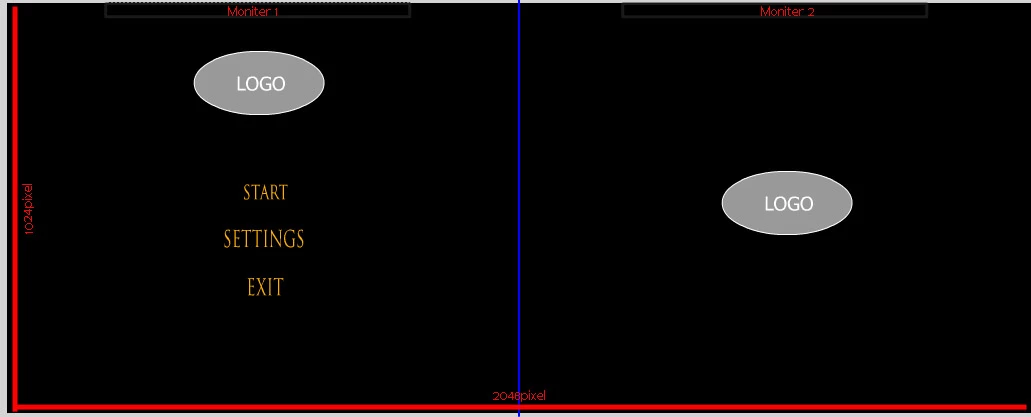
*The blue color line is a divider for better visual purpose.

How do I make the left side of the stage to appear in moniter 1 and right side of the stage to appear in moniter 2 when the application starts in full screen mode?

Thanks for reading,

-Zainuu

このトピックへの返信は締め切られました。

返信数 1

Community Expert
July 18, 2011

I don't think a movie in fullscren mode can cover multiple screens - it only goes fullscreen in the main monitor. I suppose you can make a (wide) movie to cover the entire screens. You can use flash.display.Screen class to obtain the screen dimensions etc. (You also need to take care of hiding OS elements such as menu bar/task bar etc.)

Zainuu作成者
Inspiring
July 19, 2011

Hi,

I have give the documentation a read, but I don't quite understand how it works. Is there any sample code out there for me to refer to? I need to see how it works.. Or are there any other work around for this?

-Zainuu

Community Expert
July 19, 2011

Since you know the monitor sizes (if not you need to use Screen class to determine the sizes) you can create 2560 x 1024 movie to cover the 2 screens.