
Participant
August 11, 2021
質問

Noob question: Dotted line while tweening

  • August 11, 2021
  • 返信数 1.
  • 1516 ビュー

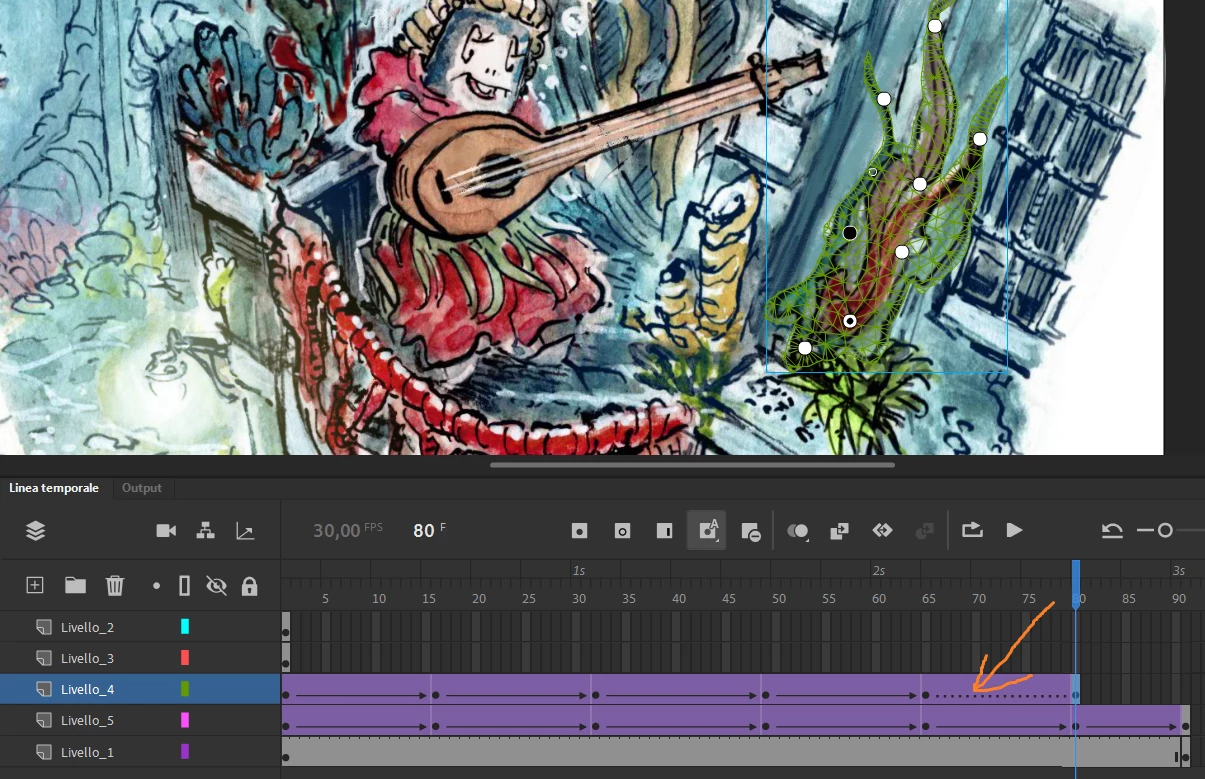
Hi, i've started using animate for a school project just a couple of days ago and i'm failng to grasp a thing (or find anything for it online) about tweening:
Why do i get a dotted line between two keyframes instead of the arrow , and so a non fluid animation?
i've added a screen of this

thanks
 

このトピックへの返信は締め切られました。

返信数 1

JoãoCésar17023019
Community Expert
Community Expert
August 11, 2021

Hi.


This happens when there is more than one instance in one of the keyframes or if one or more instances are not tweenable, like groups. Each keyframe must have only one tweenable instance for the tween feature to work properly.


I hope this helps.


Regards,

JC

ginovanta作成者
Participant
August 12, 2021

Not much really, how can i check instances?


JoãoCésar17023019
Community Expert
Community Expert
August 12, 2021

Hi again.


Go to the desired keyframes and check the stage using the Selection Tool (V) to see if there is more than one instance or if at least one of the instances is not tweenable, like a group.


Unfortunately Animate does not have a visual representation tree of the instances that make up the timelines.


So you're gonna have to use the selection features and the Properties panel (to check if the properties shown are related to a single instance or to multiple instances) to figure it out.


Regards,

JC