


Crussi
Known Participant
February 9, 2023
質問

Keyboard shortcut issues when Bridge in English and you use a keyboard in French, German, or Spanish

  • February 9, 2023
  • 返信数 3.
  • 978 ビュー

Hi, when have keyboard other than English and have Adobe Bridge in English, I have this warning message:

"Bridge has detected a keyboard language different than operating system which may cause some keyboard shortcuts to not work."
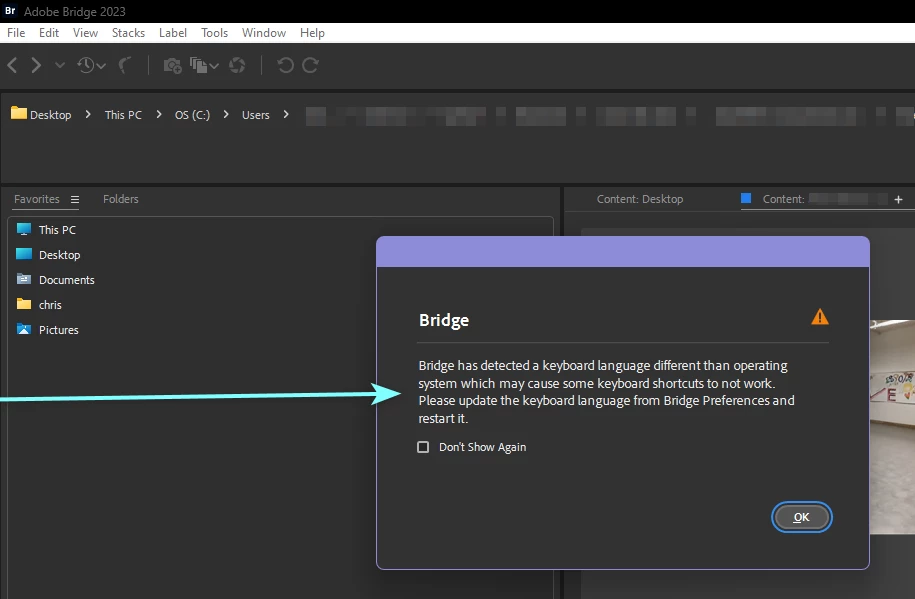
This is truely problematic. How to have Adobe Bridge using French keyboard shortcut, when Adobe Bridge interface is in English language ?

It is very common English interface while using a software in English. In most European countries you cannot sell a laptop with a US/UK layout, as it needs to be local. Regards

このトピックへの返信は締め切られました。

返信数 3

Rahul Saraogi
Participating Frequently
September 15, 2023
Hi all,

We are happy to announce the release of Adobe Bridge 2024 (Version 14.0.0.102).
This release has support for ‘Customizing keyboard shortcuts’ along with a few other features.

The detailed guide of using the keyboard shortcut customization feature is at : https://helpx.adobe.com/in/bridge/using/keyboard-shortcuts-panel.html

For a complete list of features available in Bridge 2024, please refer to the community post :

Regards,
Bridge Team
Community Manager
August 5, 2023

Hi,

The latest Beta build 14.0.0.57 has support for ‘Customizing keyboard shortcuts’ along with a few other features.

You can use this feature to create and modify shortcuts based on regional preferences/keyboard layouts. You can also create presets as well.

The detailed guide to using the keyboard shortcut customization feature is at : https://community.adobe.com/t5/bridge-discussions/keyboard-shortcut-customization-workflows-in-adobe-bridge-beta-14-0-0-57/td-p/13986171


For a complete list of features available in the Beta build, please refer to the community post: 
https://community.adobe.com/t5/bridge-discussions/adobe-bridge-beta-is-now-available-14-0-0-57/td-p/13986216

 
We would love for you to try it out and share feedback.


Regards,
Bridge Team

Crussi
Crussi作成者
Known Participant
February 10, 2023

I want to share my progress on this very annoying problem that touch any persons with a non English keyboard:

I have discovered that the keyboard layout of Adobe Bridge is located here: 

c:\Program Files\Adobe\Adobe Bridge 2023\ksvlayout\xml\


Where is the en.ksvlayout file ?

I want to replace it with the fr.ksvlayout file so that I can have the Adobe Bridge French keyboard layout for my Azerty keyboard while using Adobe Bridge and Windows 11 in English language.

Crussi
Crussi作成者
Known Participant
February 10, 2023

I have solved the issue by changing the Keyboard option in Preferences/Advanced. Hope it helps others, as the Adobe warning message does not help find how to fix it.

Participant
April 27, 2023

Thanks, Crussi.

I searched for the preference window for a while (as it's not the Camera RAW Prefs): Adobe Bridge > Settings - opens the Preferences window (go figure) > Advanced > International > keyboard Language ... 

Did the trick.