This topic has been closed for replies.
Correct answer VarunVarshney

Hi,

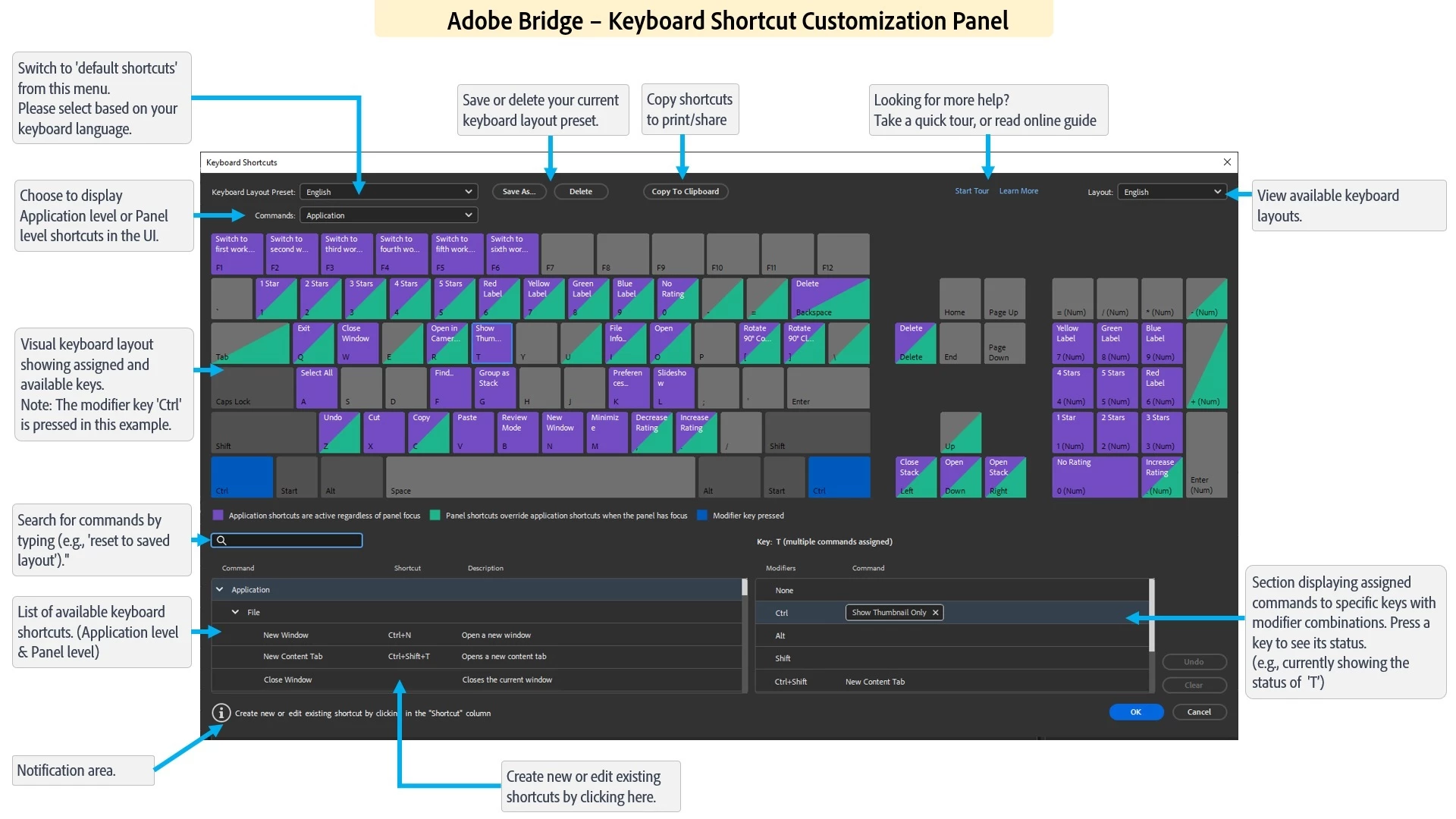
The latest Beta build 14.0.0.57 has support for ‘Customizing keyboard shortcuts’ along with a few other features.

The detailed guide of using the keyboard shortcut customization feature is at : https://community.adobe.com/t5/bridge-discussions/keyboard-shortcut-customization-workflows-in-adobe-bridge-beta-14-0-0-57/td-p/13986171


For a complete list of features available in the Beta build, please refer to the community post: 
https://community.adobe.com/t5/bridge-discussions/adobe-bridge-beta-is-now-available-14-0-0-57/td-p/13986216

 
We would love for you to try it out and share feedback..  


Regards,
Bridge Team

5 replies

VarunVarshneyCommunity ManagerCorrect answer
Community Manager
August 5, 2023

Hi,

The latest Beta build 14.0.0.57 has support for ‘Customizing keyboard shortcuts’ along with a few other features.

The detailed guide of using the keyboard shortcut customization feature is at : https://community.adobe.com/t5/bridge-discussions/keyboard-shortcut-customization-workflows-in-adobe-bridge-beta-14-0-0-57/td-p/13986171


For a complete list of features available in the Beta build, please refer to the community post: 
https://community.adobe.com/t5/bridge-discussions/adobe-bridge-beta-is-now-available-14-0-0-57/td-p/13986216

 
We would love for you to try it out and share feedback..  


Regards,
Bridge Team

Rahul Saraogi
Participating Frequently
September 15, 2023
Hi all,

We are happy to announce the release of Adobe Bridge 2024 (Version 14.0.0.102).
This release has support for ‘Customizing keyboard shortcuts’ along with a few other features.

The detailed guide of using the keyboard shortcut customization feature is at : https://helpx.adobe.com/in/bridge/using/keyboard-shortcuts-panel.html

For a complete list of features available in Bridge 2024, please refer to the community post :

Regards,
Bridge Team
Jeff Arola
Community Expert
Community Expert
May 5, 2020
Participant
December 7, 2020

Only Mac. 2008!!!

jbm007
Community Expert
Community Expert
December 8, 2020

It is not possible to create or change shortcuts in Bridge.

Jeff Arola
Community Expert
Community Expert
April 16, 2017

Maybe a program like AutoHotkey would work on a windows system/

Stephen Marsh
Community Expert
Community Expert
April 16, 2017

Agreed R-Kelly, however this is not strictly in Adobe Bridge – it is either at the OS or third party level, outside of Bridge.

So while this is possible to “hack”, it would just be nice if Adobe offered a native Edit/Keyboard Shortcuts command as found in Photoshop.

Participating Frequently
May 1, 2020

It's the way Adobe works: make everything as un-handy and complicated as possibel. Then offer folks «solutions» in the Adobe Community that are a. outdated or b. not existing anymore.


Thank you!

Jeff Arola
Community Expert
Community Expert
April 16, 2017

If your using a mac then you can, but not on a windows system as far as i know.

https://forums.adobe.com/message/5549925#5549925

Participating Frequently
May 1, 2020

That link is deader than a doorknob, Bob…

gary_sc
Community Expert
Community Expert
May 1, 2020

Unfortunately, when Adobe changed the company that runs this forum, some executive decisions were made for keeping some of the old links. Apparently this was one of the links that was not updated to the new forum.


I'm not justifying or decrying anything, just letting you know what happened.

Stephen Marsh
Community Expert
Community Expert
April 15, 2017

It’s easy – you can’t/don't!

Participating Frequently
May 1, 2020

That's HELPFUL answer, Steve: if you truly ARE a community pro then get behind it and kick some ass on behalf of all of us: IT SHOULD BE AVAILABLE!


Thanks.