


Participant
Mar 9, 2020 5:30 AM UTC
Answered

Rating photos/Keyboard shortcuts

Hello! So I just updated to the 2020 version of Adobe Bridge, and before the update I would always use my keyboard shortcut for sifting through my photos and rating them with the shortcut as I went. With this new version, my keyboard shortcut isn't working. I decided to then search for the area where I can customize my keyboard shortcuts but I go to every tab and I cannot find it. Please help ❤️
This topic is closed to new replies. Start a new post to keep the conversation going.
VarunVarshneyCorrect answer
Community Manager
Aug 5, 2023 2:32 PM UTC

Hi,

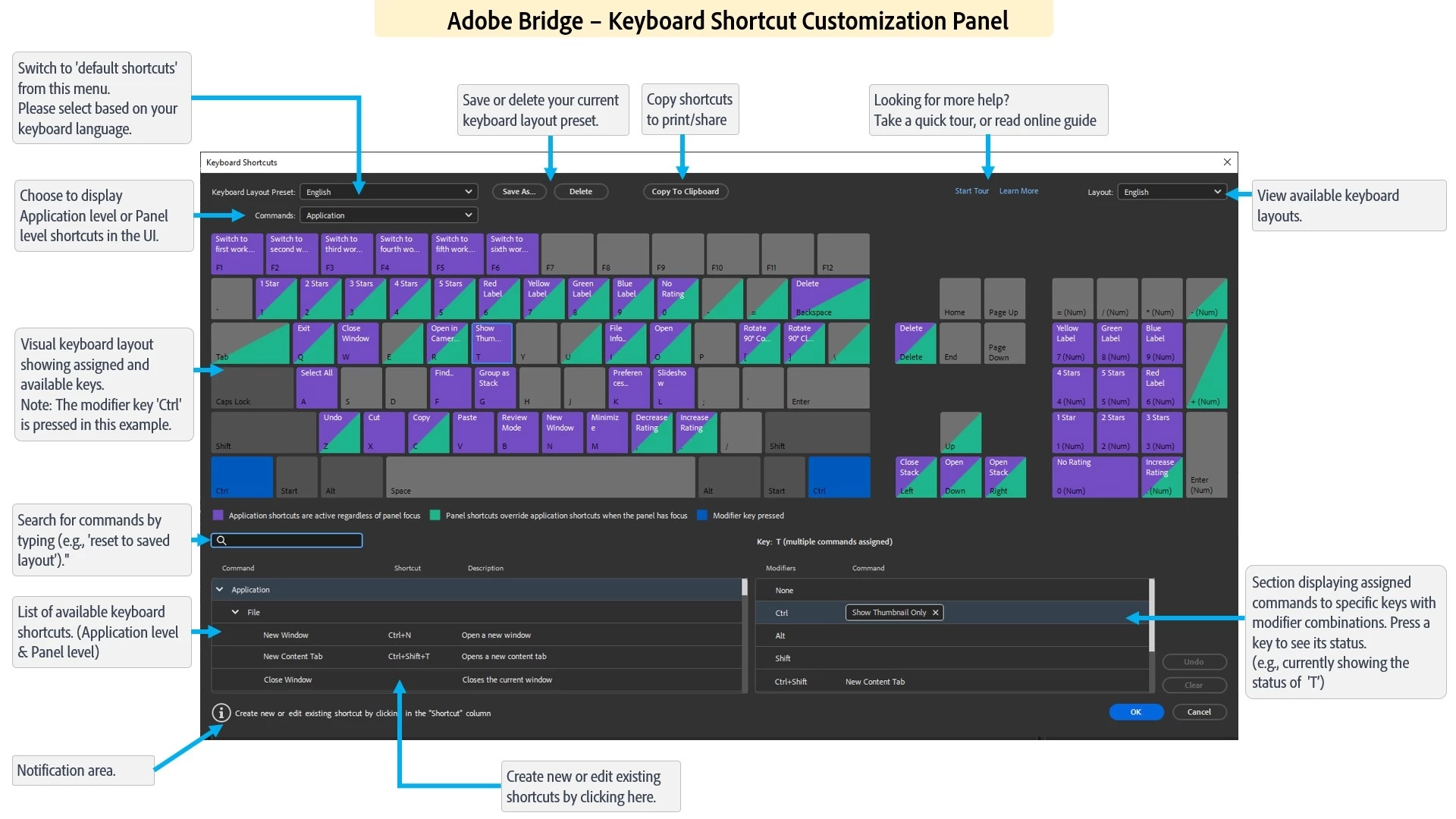
The latest Beta build 14.0.0.57 has support for ‘Customizing keyboard shortcuts’ along with a few other features.

The detailed guide of using the keyboard shortcut customization feature is at : https://community.adobe.com/t5/bridge-discussions/keyboard-shortcut-customization-workflows-in-adobe-bridge-beta-14-0-0-57/td-p/13986171


For a complete list of features available in the Beta build, please refer to the community post: 
https://community.adobe.com/t5/bridge-discussions/adobe-bridge-beta-is-now-available-14-0-0-57/td-p/13986216

 
We would love for you to try it out and share feedback.


Regards,
Bridge Team

4 replies

Rahul Saraogi
Participating Frequently
Sep 15, 2023 4:48 AM UTC
Hi all,

We are happy to announce the release of Adobe Bridge 2024 (Version 14.0.0.102).
This release has support for ‘Customizing keyboard shortcuts’ along with a few other features.

The detailed guide of using the keyboard shortcut customization feature is at : https://helpx.adobe.com/in/bridge/using/keyboard-shortcuts-panel.html

For a complete list of features available in Bridge 2024, please refer to the community post :

Regards,
Bridge Team
Translate
Participant
Jan 11, 2024 5:12 PM UTC

Rating is still not working on 14.01 in preview mode . I've tried it several hours, for me this is a very important to use. I dont see aanother option than going back to one of the preveous versions. When I see my pictures i click on one of the pictures , press space to open it in preview mode en then I start rating my pictures. It doesn't work. in normal mode it works when I have my office keyborad connetected to my macbook (with seperate numbers) on macbook itself it doasn't work, not even in normal mode . Nothing works in preview mode.


Translate
VarunVarshneyCommunity ManagerCorrect answer
Community Manager
Aug 5, 2023 2:32 PM UTC

Hi,

The latest Beta build 14.0.0.57 has support for ‘Customizing keyboard shortcuts’ along with a few other features.

The detailed guide of using the keyboard shortcut customization feature is at : https://community.adobe.com/t5/bridge-discussions/keyboard-shortcut-customization-workflows-in-adobe-bridge-beta-14-0-0-57/td-p/13986171


For a complete list of features available in the Beta build, please refer to the community post: 
https://community.adobe.com/t5/bridge-discussions/adobe-bridge-beta-is-now-available-14-0-0-57/td-p/13986216

 
We would love for you to try it out and share feedback.


Regards,
Bridge Team

Translate
Known Participant
Mar 9, 2020 1:16 PM UTC

If you were using the built-in shortcuts (the numbers 1-0 on the keyboard) you will probably have to change the preferences: preferences/Labels and check or uncheck "Require the Control Key to Apply Labels and Ratings".

If you had your own shortcuts, I wouldn't know; start with telling us on which OS you are. Win? Mac?

Translate