


Participant
February 8, 2020
Answered

Re: when we talk about repairing 3d models we are starting to...

  • February 8, 2020
  • 2 replies
  • 975 views

Hey!
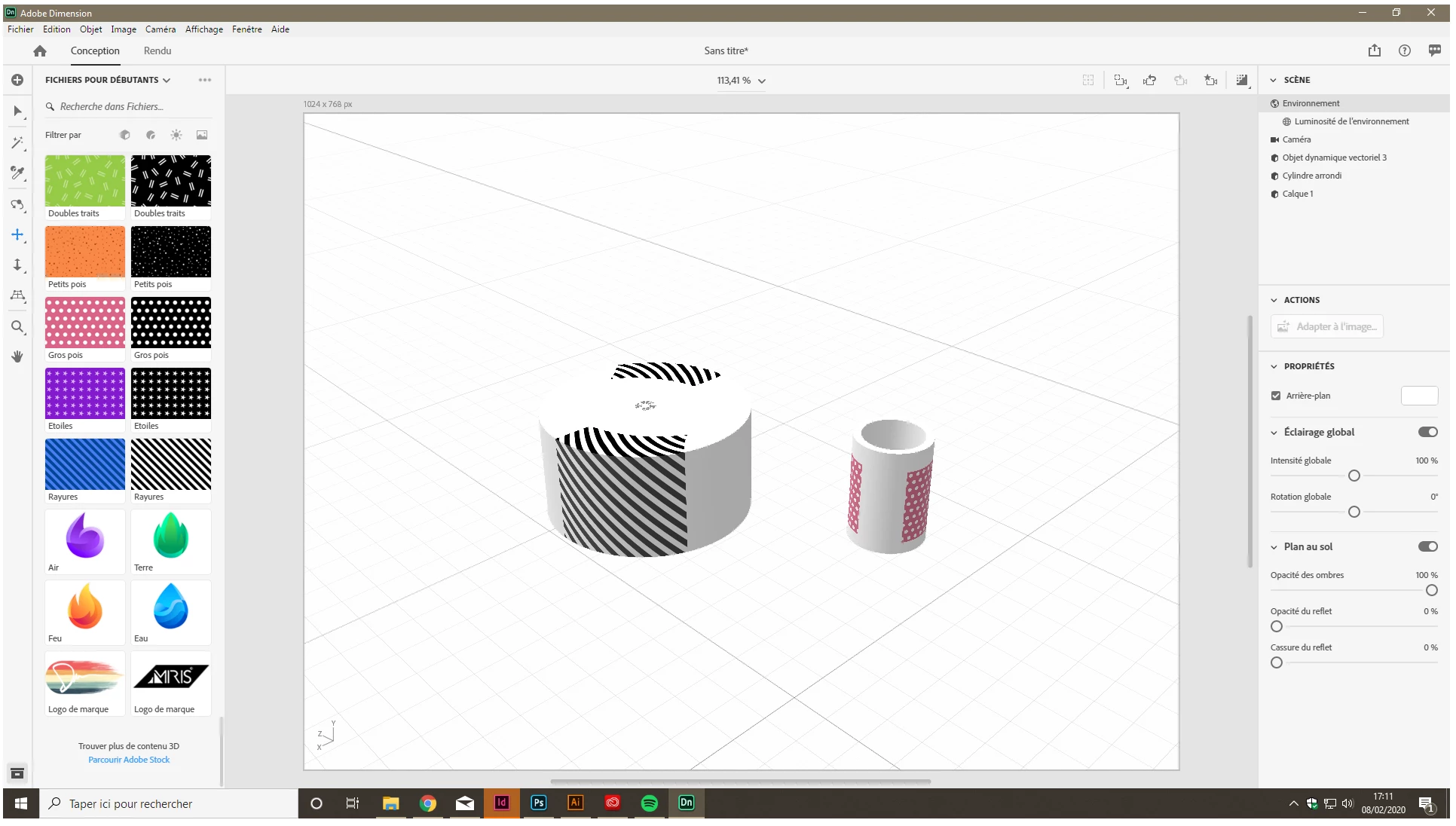
I have exactly the same problem as adma15586 but in don't understand your solution. the tuto video (https://www.youtube.com/watch?v=Ad2HCjgW-PY) looks pretty clear about how to make a bottle but it's doesn't work for me. I always have a double image when i import one. I tryed whit simple form, but it's the same.

Do i don't make something one photoshop ? please need help i passed two days one this. become crazy 😕😕
    This topic has been closed for replies.
    Correct answer TylerG 3D

    It sounds like the UV's are overlapping. Try selecting the model, open the "Object" drop down menu at the top, and select Generate UV's and see if that fixes things.


    Il semble que les UV se chevauchent. Essayez de sélectionner le modèle, ouvrez le menu déroulant "Objet" en haut, puis sélectionnez Générer des UV et voyez si cela corrige les choses.

    2 replies

    Ussnorway7605025
    Legend
    February 11, 2020

    your only mistake is following that tutorial... the bottle she makes is an extrustion and that is why the decal doesn't work well


    have a look at this thread https://community.adobe.com/t5/dimension/3d-model-not-solid-in-dimension/td-p/10877961?page=1

    I include example files for different ways to fix a bottle label

    Ussnorway7605025
    Legend
    February 8, 2020

    what?

    please use your native language ... I don't understand you


    • here are my notes for bottle making

    https://community.adobe.com/t5/dimension/how-to-make-a-good-bottle-in-photoshop-for-dimension-my-way/m-p/10759234?page=1

    [branched Ussnorway]

    Participant
    February 10, 2020

    Ok, 
    Bonjour, 
    Je fais exactement comme le tutoriel en ligne mais dans Dimension, lorsque j'importe une image sur la bouteille, elle se retrouve à l'avant et à l'arriere de ma bouteille. Je ne comprend pas ou est mon erreur.

    TylerG 3DCommunity ManagerCorrect answer
    Community Manager
    February 10, 2020

    It sounds like the UV's are overlapping. Try selecting the model, open the "Object" drop down menu at the top, and select Generate UV's and see if that fixes things.


    Il semble que les UV se chevauchent. Essayez de sélectionner le modèle, ouvrez le menu déroulant "Objet" en haut, puis sélectionnez Générer des UV et voyez si cela corrige les choses.