



Change weight/size of frame edges
I have just switched from CS5 to CC, and am having a problem with ID. The weight of the text frame edges is SO RIDICULOUSLY LIIGHT that I cannot even tell that the frames are there,unless I hover over them. It is unusable; see image below.
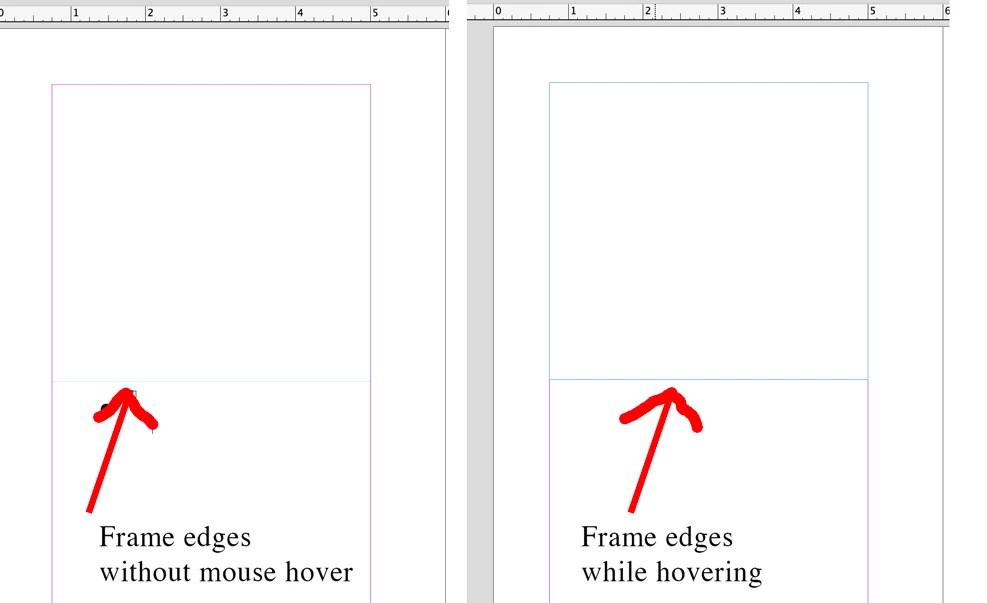
How do I make the default frame edges more prominent???
I have already tried: (1) trashing the cache folder (per this thread), (2) un-checking the "GPU Performance" box in preferences, (3) yes, I am in "Normal" view and not "Preview" view or any other view, (4) no, I do not have "overprint preview" turned on (I've tried on & off; no difference), (5) updated ID to the latest software, which made the problem EVEN WORSE than in the image above; now when I hover, it doesn't show the frame; only shows when you click on it.
I am using a 6-month-old Macbook Pro 16", running Big Sur, using ID 17.0.1.
Please help! I'm laying out a book with a very complex frame layout, and I really, really need to see the edgest of all the frames, all the time.
 AdChoices