

Adobe MAX 2022 and Lightroom Classic 12.0 release

Hey folks, welcome back to the Adobe Max creativity conference and a new Lightroom Classic release! Whether you are attending MAX in person, attending virtually, or just want to try new features in the apps, you will find this information useful.
Get inspired, learn new skills, and connect with other creatives at Adobe Max. We have over 300 in-person and virtual sessions for you. You can take a look at the sessions in the Photography Track that feature Photoshop, Lightroom, and Lightroom Classic, or, go visit the Session Catalog to see the complete list.
Read all about the latest Lightroom Classic features here, and then head over to our Lightroom desktop, Photoshop and Bridge updates to see what's new there.
Lightroom Ecosystem MAX release
What's new in Lightroom Classic
 Select People or Select Objects - Enhance your photos by making selective adjustments to people and objects using the Masking tool. Select People and Select Object lets you edit parts of the skin and multiple objects in a photo using precise masking selections. For more info, see Masking Tools.
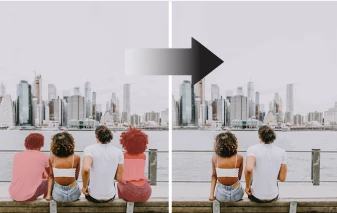 Content-Aware remove tool - Quickly remove tough spots and fill the selection with sampled content from other parts of the photo. Content-Aware Remove tool in the Healing panel provides an ultimate editing experience to achieve unimagined editing control. For more info, see Enhanced-Spot removal.
Support for new cameras and lenses
Find newly added cameras and lenses in the full list of supported profiles below:
Fixed issues
Find the information about the issues fixed in the latest update by visting this link.


 AdChoices