


Participant
April 27, 2025
Question

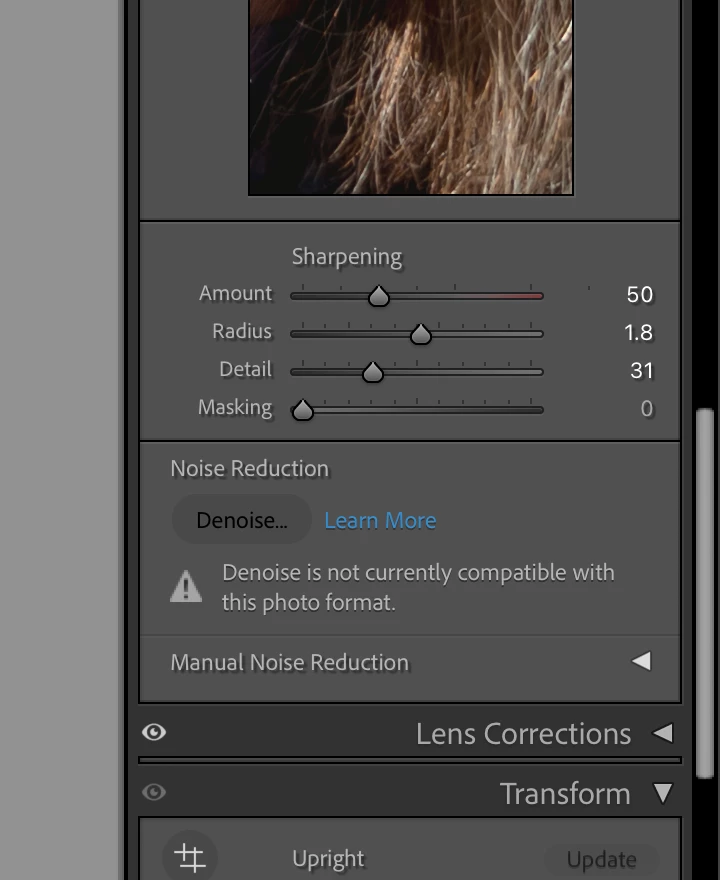
Lightroom classic denoise feature not working on RAW files

  • April 27, 2025
  • 4 replies
  • 286 views

As of the past week and a half, my Lightroom Classic denoise feature is claiming not to be compatable with RAW files. It's always worked for me prior to this. Is anyone else having this issue, or just me? I currently work on a Macbook Pro, if relevant. 
 

4 replies

CMass
Community Manager
Community Manager
May 22, 2025

Hey @georgiaa43347191

I wanted to check in and see if any of the shared suggestions have helped you resolve the issue. If not, could you share more details? @AxelMatt asked exactly what I was going to ask. 🙂 

Best, 
CM

johnrellis
Legend
April 27, 2025

In addition to the other suggestions, type "i" in Develop to see the file name and verify it is in fact a raw file rather than a non-raw (JPEG, TIFF, etc.).  There are many reports here of people convinced they're editing a raw when in fact they're not -- the default settings in LR hide that from you.

JohanElzenga
Community Expert
Community Expert
April 27, 2025

One look at the White Balance sliders and you'll know too. If it is not raw, then the sliders are both showing zero in the middle rather than having a Kelvin value for Temperature.


-- Johan W. Elzenga
JohanElzenga
Community Expert
Community Expert
April 27, 2025

See if the answer marked as correct in this thread solves it: https://community.adobe.com/t5/lightroom-classic-discussions/denoise-stopped-working/td-p/14092087


-- Johan W. Elzenga
AxelMatt
Community Expert
Community Expert
April 27, 2025

Please give us more informations.

Which RAW format from which camera type dp you use?

Which version of Lightroom Classic do you use?

What happened on ypou system before the error occured (software update, patch installation etc.)?

Please provide also a copy of your 'System Info'. This can be get from the LrC Help > System Info menu item. There's a copy button in the System Info dialog. Press this button and paste the info into your next forum post.


In the meantime you can try to reset the preferences of Lightroom Classic:  How to reset Lightroom Classic preferences (adobe.com)

It's recommended to backup your preferences before you reset the preferences to the default settings: 

https://helpx.adobe.com/lightroom-classic/kb/preference-file-and-other-file-locations.html


My System: Intel i7-8700K - 64GB RAM - NVidia Geforce RTX 3060 - Windows 11 Pro 25H2 -- LR-Classic 15 - Photoshop 27 - Nik Collection 8 - PureRAW 5 - Topaz Photo